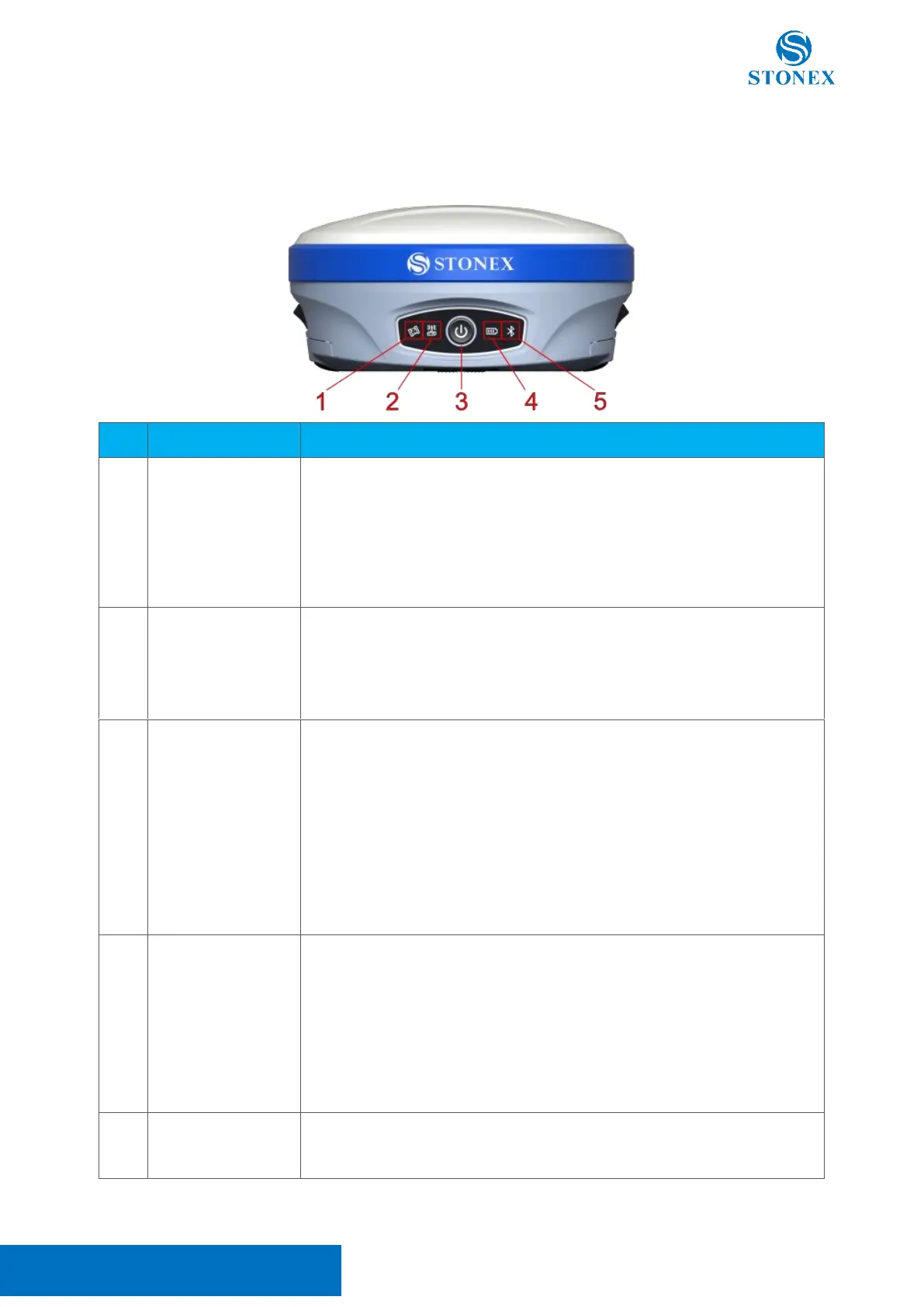
Stonex S900
+
GNSS Receiver – User Manual 4
2. Receiver appearance
2.1 Front view
Off: no satellite tracked
Flashing red: satellites tracked, a position not calculated
Flashing green: position calculated without a fixed solution
Green: fixed solution
Flashing green and red alternately: GNSS board abnormal
Green: datalink setting success
Flashing green: data in normal transmission
Flashing blue: raw data recording, flashing frequency according to the
sampling interval
Power on: keep pressed until you hear a beep. After three short beeps, the
device is ready to work
Current working mode: short press, if the speaker is enabled the device will
describe the current working mode.
Power off: keep pressed until all LED start to flash, release then short press
Self test: keep pressing until all LED start to flash, release then long press
until the LED stops flashing. The device will test the internal modules. If an
error is found the device will start to beep, to stop it short press the power
button. Please contact your local dealer if this happens.
Green: charge level between 30% and 100%
Flashing green: charge level between 10% and 30%
Flashing red: charge level lower than 10% with a warning beep
Device off while charging:
Green: charge completed
Red: in charge
Blue: connected
Off: no connection



 To Next Page