pg 20
External Control
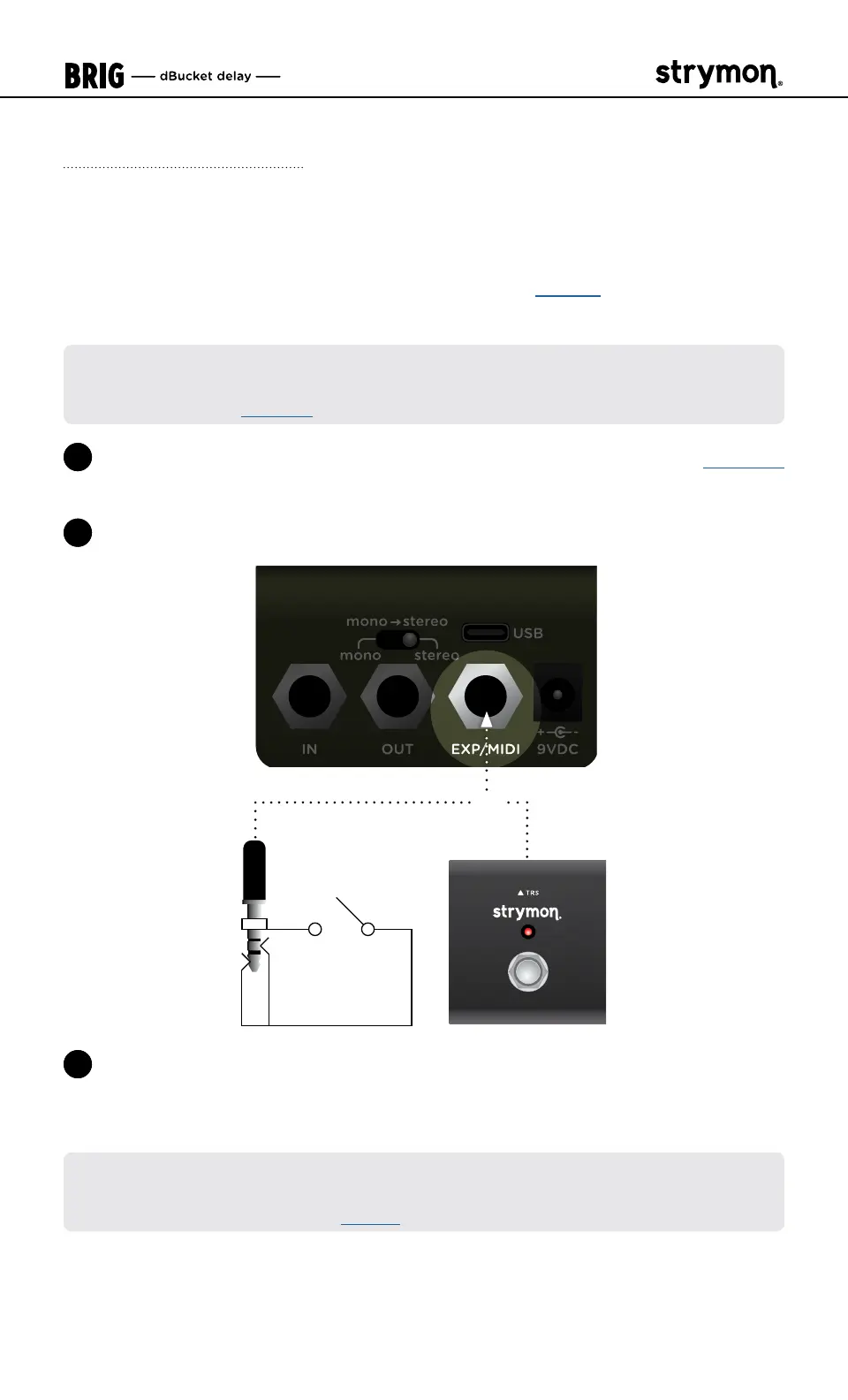
External Tap Mode Switch Setup
Connect a MiniSwitch or other external momentary footswitch with a
TRS cable to tap in a delay time� (As covered on page 5, you can also
use Brig’s FOOTSWITCH for Onboard Tap Mode�)
NOTE: Your Strymon MiniSwitch’s internal jumper switch must be changed
from the factory-default FAV/BOOST to the TAP setting for External Tap Mode
functionality—see page 19�
1 Configure the EXP/MIDI jack for External Tap Mode� (See page 13
or more info�)
2 Connect an external switch with a TRS cable to the EXP/MIDI jack�
OR
3 Tap in a tempo in quarter notes to set the delay time� The Brig pedal’s
LED will flash
RED
and BLUE
to indicate the tempo� Maximum tap
range is 2 seconds�
NOTE: External Tap Mode utilizes the current TAP DIVISION setting� To change
the TAP DIVISION setting, you must use the Brig pedal’s FOOTSWITCH to
enter Onboard Tap Mode� See page 5�



 To Next Page