pg 9
Power Up Modes
Bypass Mode for Mono I/O
With the rear I/O Mode Selector set to mono, the Brig pedal is set for
True Bypass as the default�* Setting Brig to Buffered Bypass Mode
preserves the high frequency response of your instrument’s signal
through your pedal chain and long cable runs�
*NOTE: Whenever the rear I/O Mode Selector set to mono stereo or
stereo, the bypass mode is automatically set to Buffered Bypass�
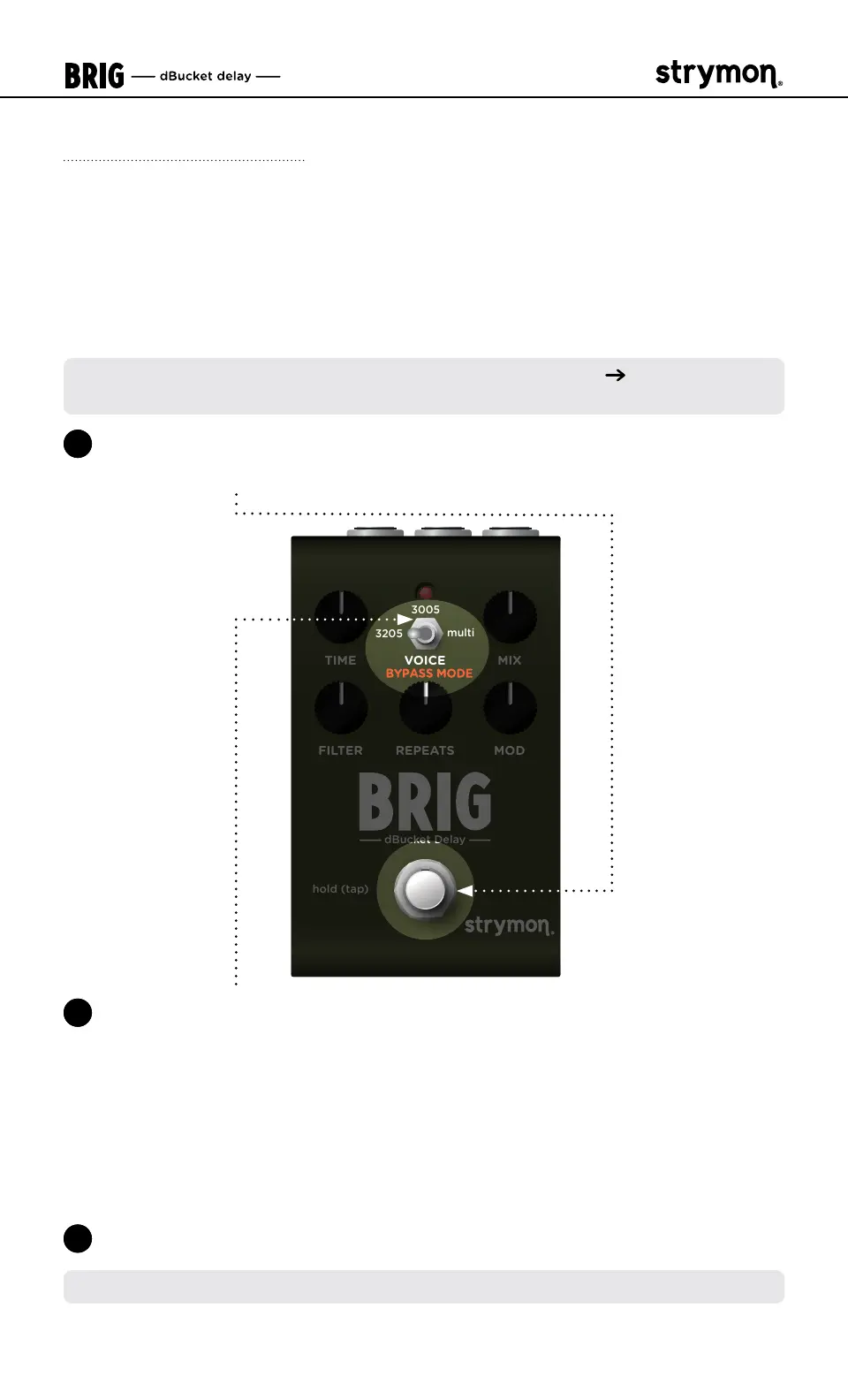
1 Press and hold the
FOOTSWITCH
for at least 2 seconds while powering
up Brig� Once the LED flashes RED, release the footswitch�
TIME VOICE MIX
FILTER MODREPEATS
hold (tap)
dBucket Delay
3205
multi
3005
2 Toggle the VOICE (BYPASS MODE) switch to choose between True or
Buffered Bypass Modes� The LED will change color to indicate the
current status as you toggle the switch�
• True Bypass: set the switch to the 3205 (left) or 3005 (middle)
position� The LED lights GREEN (default)�
• Buffered Bypass: set the switch to the multi (right) position� The
LED lights RED�
3 Press the FOOTSWITCH to store the Bypass Mode and begin using Brig�
NOTE: The Bypass Mode setting persists across power cycles�



 To Next Page