6-5
An administrator can lock Operation/Function settings on an item by item basis so
that an operator cannot change them.
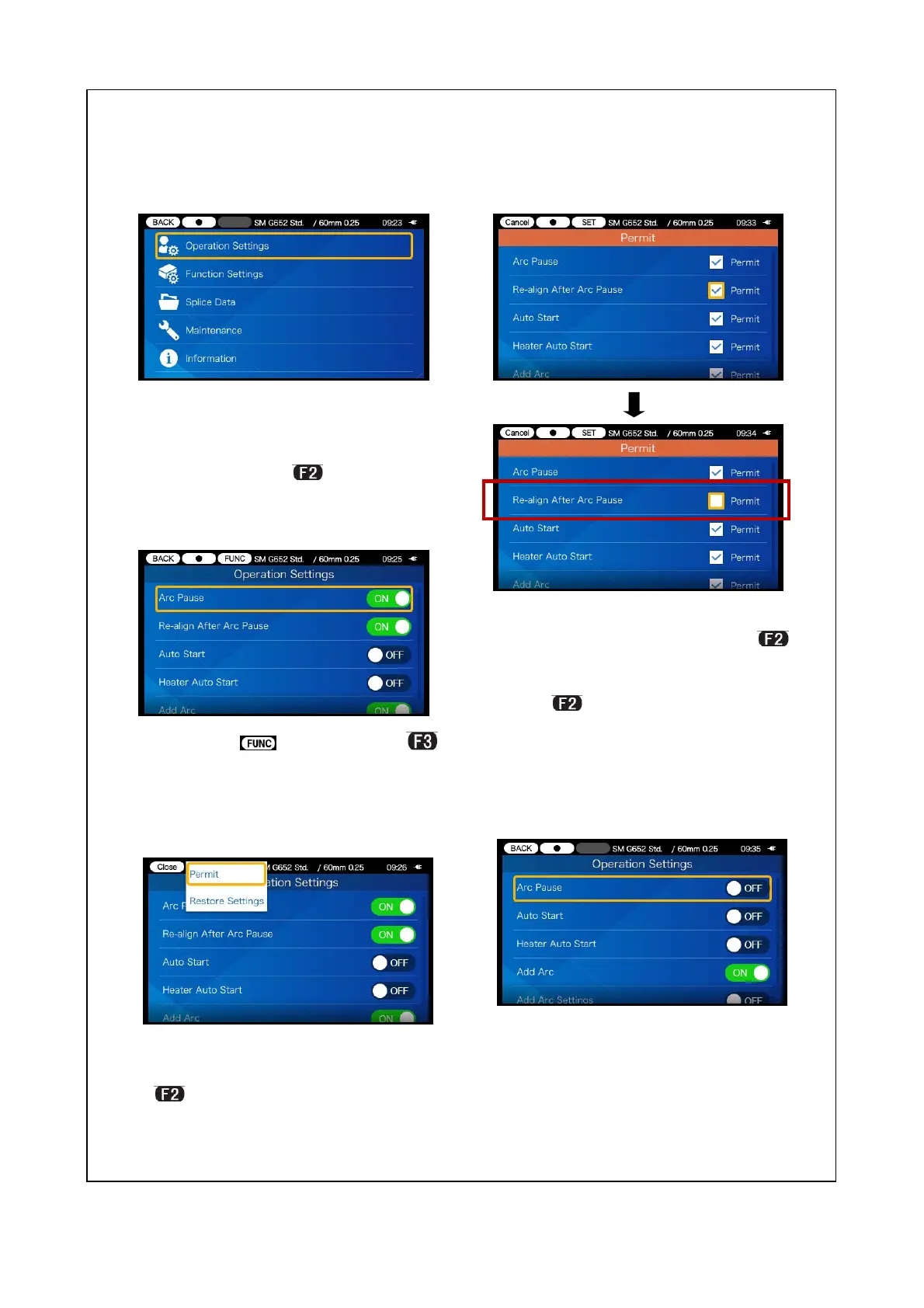
<Lock function 2>
1) While keeping logging in to
Administrator mode, move the
cursor to the item you would like
to lock and press
key.
2 ) Select icon. (Press
key.)
3) Move the cursor to “Permit”
in the pulldown menu and press
key.
4)Move the cursor to the item you
would like to lock and press
key. The checkmark is removed
from the Permit box.
Pres key to reflect the change.
In this example the checkmark for
“Re-align After Arc Pause” is re-
moved.
5)The lock setting is completed.
After you log out from Adminis-
trator mode, the item which has
been locked becomes hidden.
In this example “Re-align After
Arc Pause” is not shown on the
Settings screen.


 To Next Page
 Loading...