7
KeyAdvantage User Manual
KeyPad User Interface
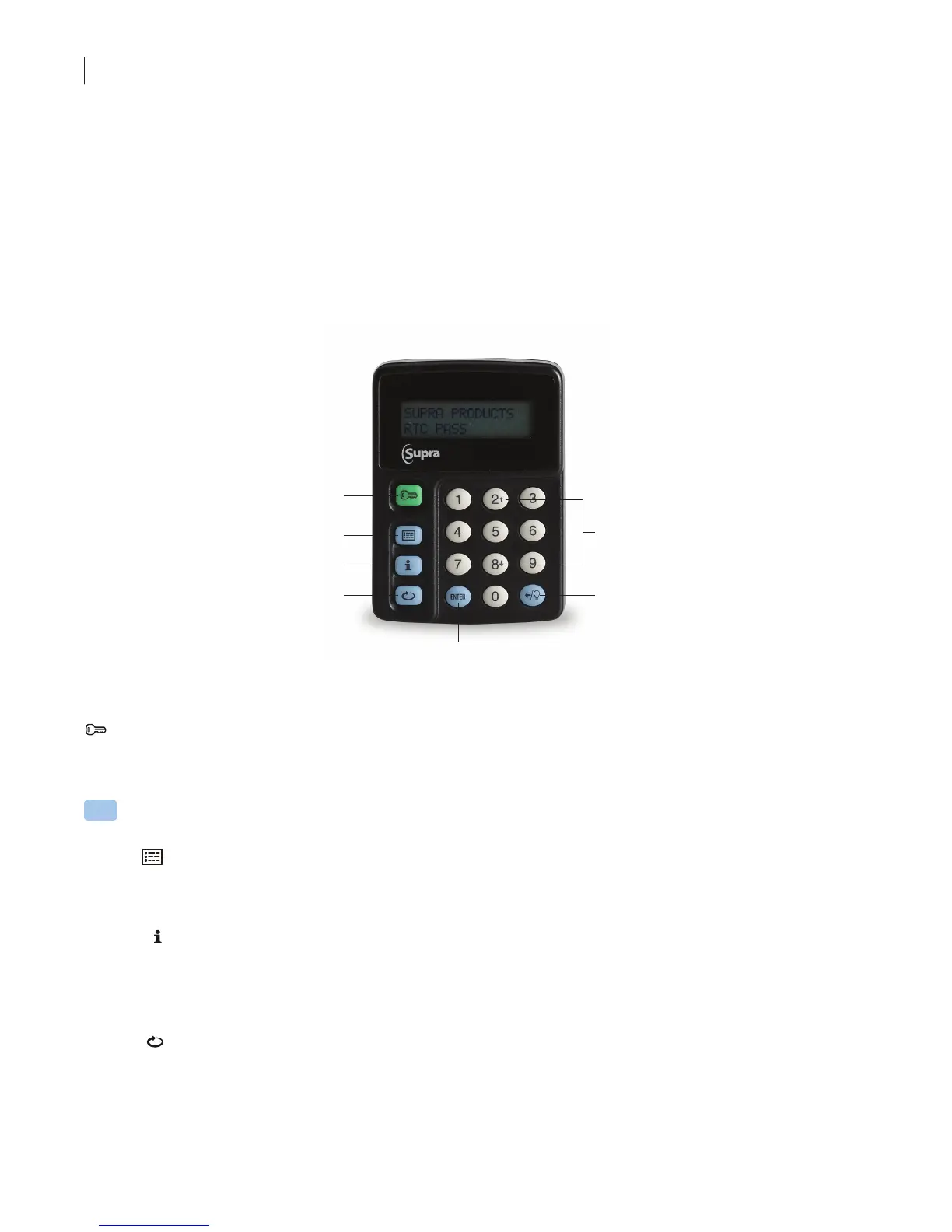
The KeyPad features 16 buttons:
• 10 buttons numbered 0–9 used to enter codes
• Green start button
• Three blue menu buttons
• Blue enter button
• Blue backspace/backlight button
• Up & Down scroll buttons, numbered buttons 2 and 8, are used in some menus
Start
Keybox
Information
KeyPad
Information
Update
Up/Down
Scroll
Arrows
Enter
Backspace/
Backlight
KeyPad Navigation
Green Start button
• Powers on the KeyPad
• Resets the KeyPad
Press a blue menu button when the KeyPad is powered on to launch the menu options. Press a blue menu
button repeatedly to cycle through the KeyPad menu options:
KeyBox Information
– Read KeyBox
– View last KeyBox read
KeyPad Information
– View user info
– Review error codes
– Display KeyPad battery status
Update
– Used to enter a manual update code when the KeyPad cannot be checked out using the
KeyAdvantage programming base



 To Next Page