20220323 Swegon reserves the right to alter specications.
59
WISE User Manual
Calendar
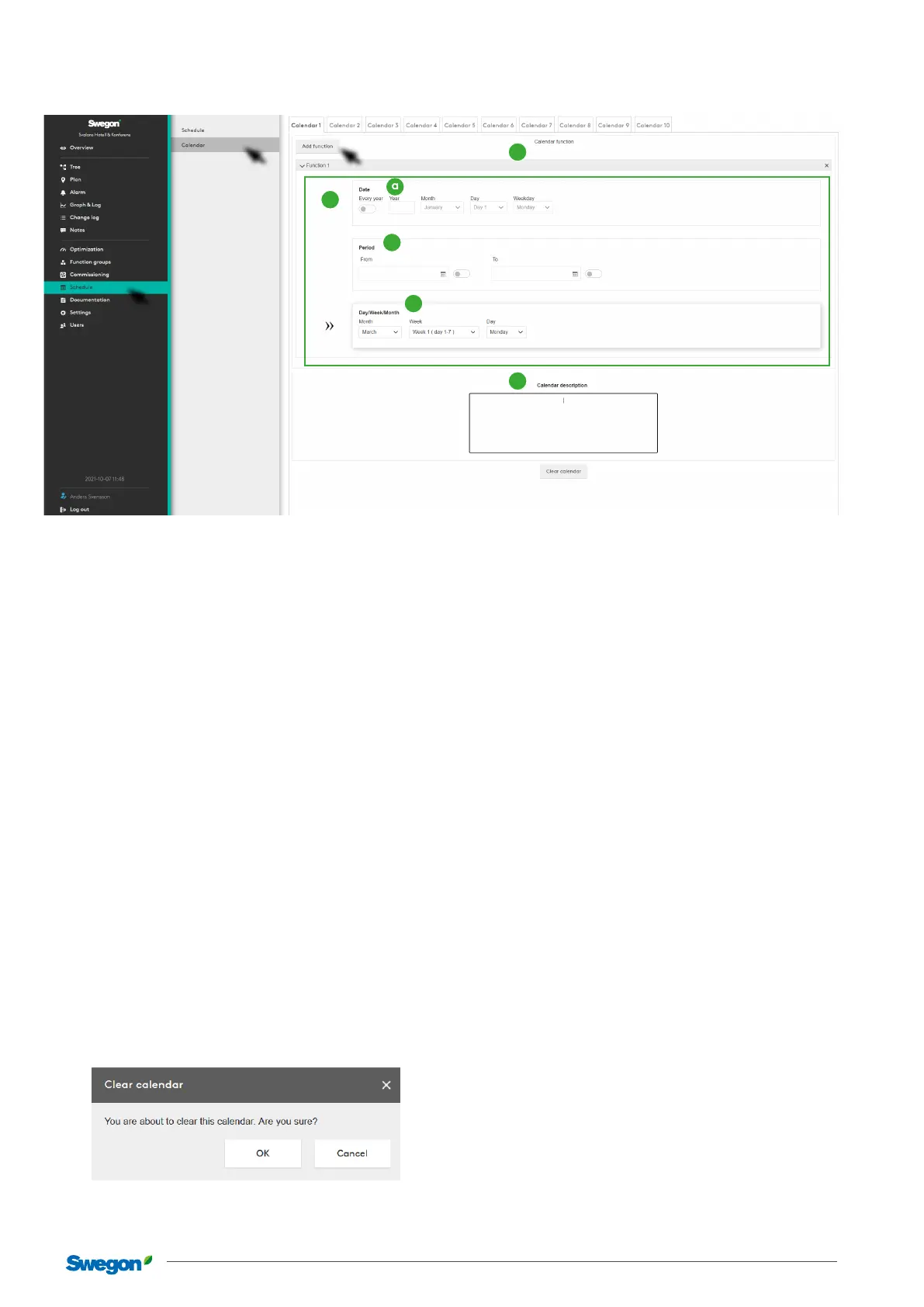
Clicking on one of the tabs displays a page for the calendar.
. Calendar function – Each calendar can have functions.
In order for a calendar to be “enabled” at least one of these
needs to be set. Function is described in more detail in
item .
. Calendar description – Is a free text area for the user to
describe the current calendar.
. Shows a calendar function – Each function can have a func-
tion type. A function type can be a date, a period or a day/
week/month.
. This can be compared with the exception type that is cre-
ated in a schedule.
This can be compared with the exception type that is created in
a schedule.
a. Date – Here you can describe only one year. Under this
year you can choose a variant of “Odd”, “Even” and
“Every” month or week as well as a weekday or “Every”.
b. Period – A period is similar to a schedule so you can
choose a specic date or a period between two dates.
c. Day/Week/Month – Here you can choose “Odd”, “Even”
or “Every” month. Week in month and day in week.
Clear calendar
This dialogue box appears when you click on the “Clear calen-
dar” button at the bottom of the calendar tab to ensure that
the user is sure the current calendar should be deleted.
1
2
3
a
b
c



 To Next Page