Before you start
Recording
Playing discs Editing
Before you start
Connections Getting started
Changing the Setting menu
VCR functions Others Español
Functional overview (cont’d)
13
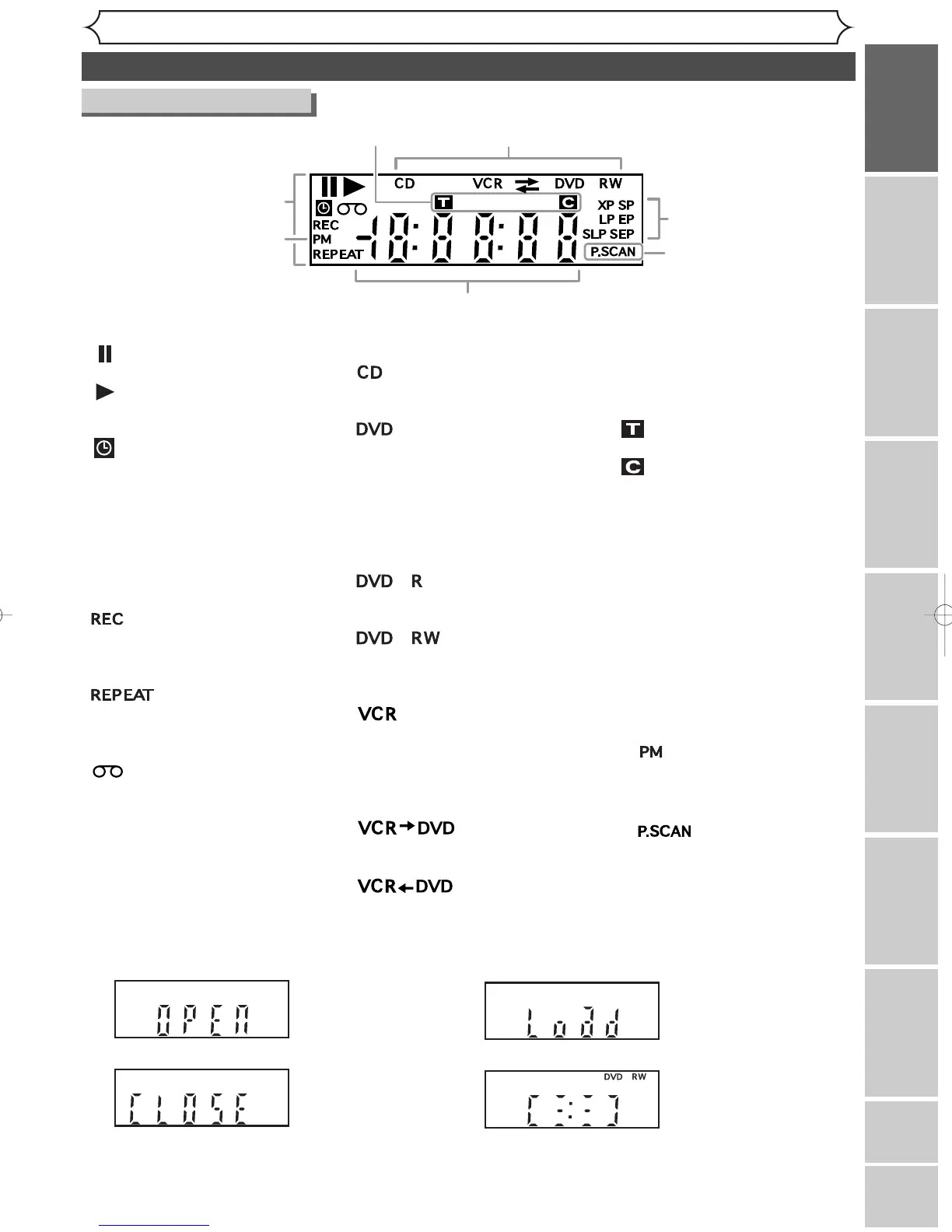
Front Panel Display Guide
1. Current status of the unit
: Appears when a disc or a
videotape play is paused.
: Appears when playing
back a disc or a video-
tape.
: Appears when the timer
programming or OTR has
been set and is proceed-
ing.
Flashes when all Timer
Recordings have been fin-
ished, or when a program
cannot be performed
with some reasons.
: Appears during recording
process.
Flashes when a recording
pauses.
:
Appears during repeat
playback (disc playback
only).
: Appears when a video-
tape is in the unit.
2. Disc type and Current
status of the unit
:
Appears when an audio CD
or a disc with MP3 files is
on the disc tray.
:
Appears when a DVD disc
is on the disc tray.
Appears when the Timer
Recording is proceeding in
DVD.
Appears when DVD is in
the Timer Recording
standby mode.
:
Appears when a DVD-R
disc is on the disc tray.
:
Appears when a DVD-
RW disc is on the disc
tray.
:
Appears when the Timer
Recording is proceeding in
VCR.
Appears when VCR is in
the Timer Recording
standby mode.
:
Appears during VCR to DVD
duplication process.
:
Appears during DVD to VCR
duplication process.
Display message
3. Recording speed
Indicates the recording speed of
the disc or a videotape.
4. Title/Track and Chapter
mark
: Appears when indicating
a title/track number.
: Appears when indicating
a chapter number.
5. Displays the following
• Played-back time / remaining
time
• Current title / chapter / track
number
• Recording time
• Clock
• Channel number
• VCR tape counter
• Remaining time for a one-
touch Timer Recording
6. : Appears in the after-
noon with the clock
display.
7. :
Appears when the pro-
gressive scan system is
activated.
Appears when the disc
tray is opening.
Appears when the disc
tray is closing.



 To Next Page