Connections
16
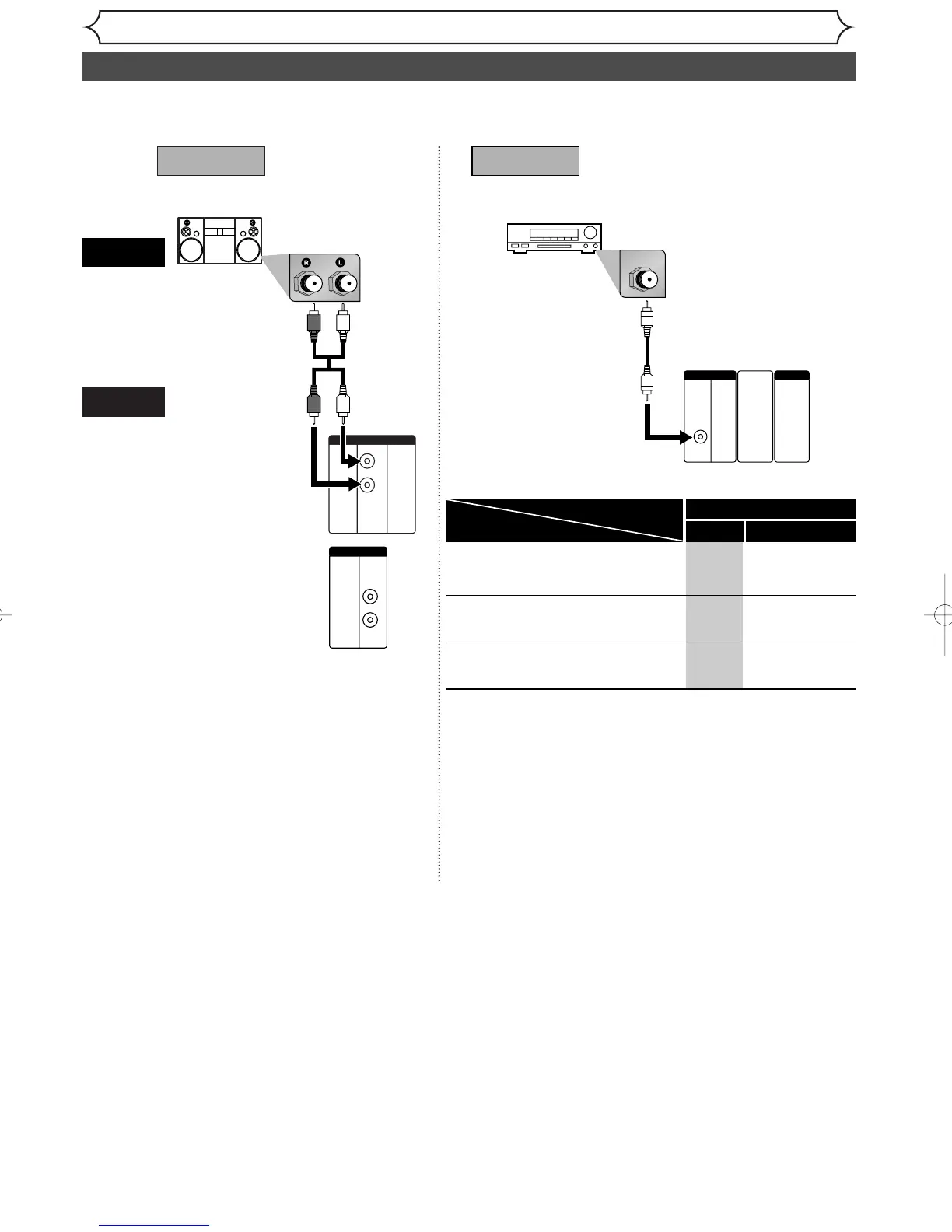
Connection to an Audio System
• When you change the connections, all devices should be turned off.
• Refer to the operation manual accompanying external devices for more information.
AUDIO
Method 1
Analog audio
input jacks
Digital audio
input jack
AUDIO OUT
DIGITAL
AUDIO OUT
Method 2
Audio cable
(supplied)
Audio Coaxial
Digital cable
(commercially
available)
Dolby Digital decoder,
MD deck or DAT deck
This unit
”
o
t-
n
g
AT
-
y
al
m
Note
• By connecting this unit to a Multi-channel Dolby Digital decoder,
you can enjoy high-quality Dolby Digital 5.1 channel surround
sound as heard in the movie theaters.
• The audio source on a disc in a Dolby Digital 5.1 channel sur-
round format cannot be recorded as digital sound by an MD or
DAT deck.
• Playing back a DVD using incorrect settings may generate noise
distortion and may also damage the speakers.
* To complete these settings, refer to pages 71-73.
If output is Dolby Digital encoded
audio, connect to a Dolby Digital
decoder.
Unless connected to a Dolby Digital
decoder.
Connecting to an MD deck or DAT
deck.
-
-
-
Stream
PCM
PCM
Setting >Playback >Digital Out >
PCM
Dolby Digital
Setting
Connection



 To Next Page