Getting Started 1-15
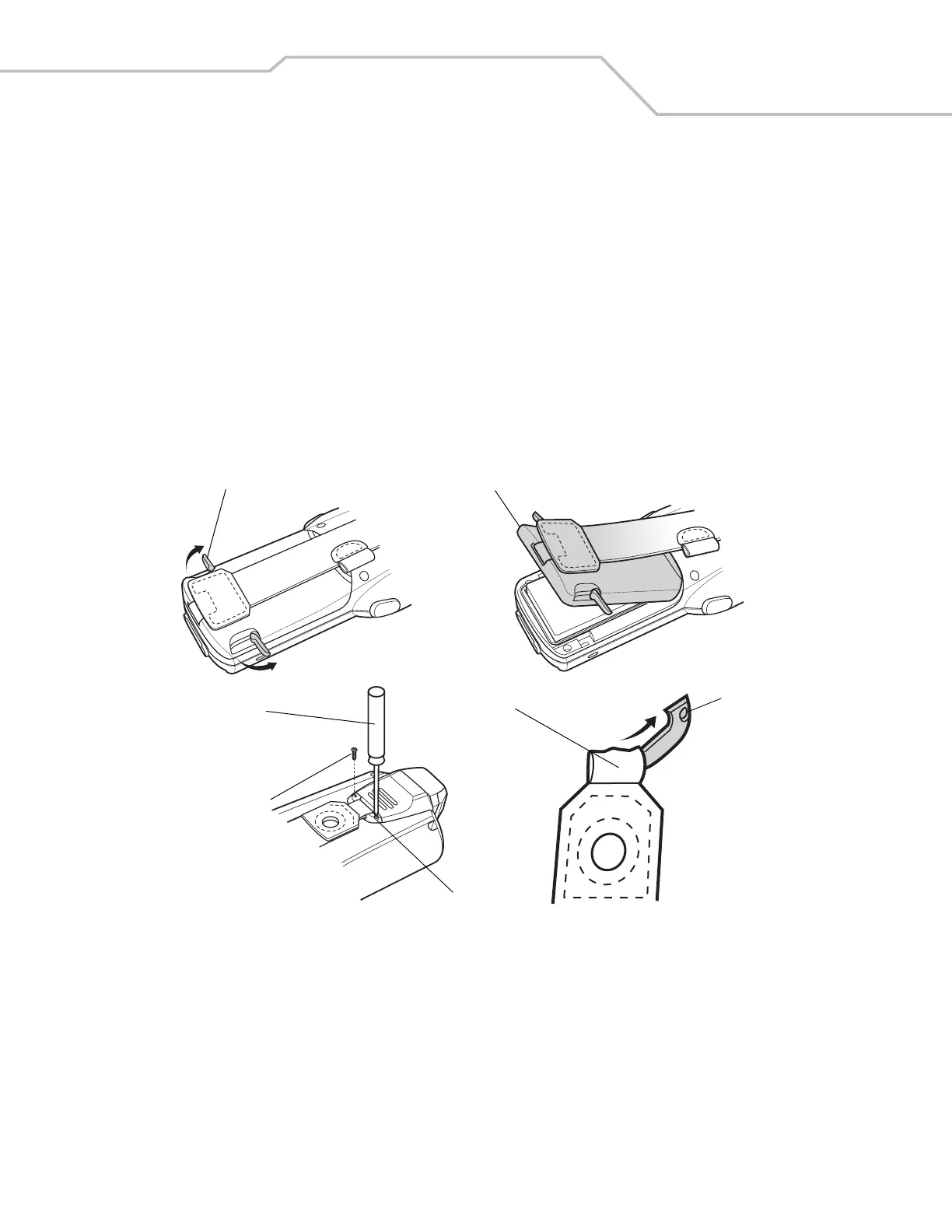
Strap/Door Assembly Removal and Replacement
The Strap/Door Assembly consists of a hand strap and the battery door. There are two versions of this assembly, one for the Standard
Battery and one for the Extended Life Battery. Before removing the Strap/Door Assembly, press the red Power button to turn off the
screen and set the mobile computer to suspend mode.
To remove the Strap/Door Assembly:
1. Rotate the latches to the open position.
2. Pull the strap to lift the Strap/Door Assembly off, bottom first.
3. Use a #00 Phillips screwdriver to remove the screws.
4. Lift the mounting clip.
5. Slide the mounting clip out of the strap loop.
Reverse the procedure to replace the Strap/Door Assembly.
Figure 1-9. Strap/Door Removal and Replacement
Strap/Door
Assembly
Latches
Screws
#00 Phillips
Screwdriver
Mounting
Clip
Strap Loop
Mounting
Clip



 To Next Page