Accessories 2-17
Secure Device Card
The Secure Device (SD) card provides secondary non-volatile storage (the flash memory is slower than RAM). The SD card holder is
located under the battery.
Follow proper Electro-Static Discharge (ESD) precautions to avoid damaging the SD card. Proper ESD
precautions include, but are not limited to, working on an ESD mat and ensuring that the operator is properly
grounded.
Do not use the SD card slot for any accessories other than a Symbol approved SD card.
The following Sandisk SD cards have been tested and qualified:
SDSDB-64-201-80 (64 meg)
SDSDB-128-201-80 (128 meg)
SDSDB-512-201-80 (512 meg)
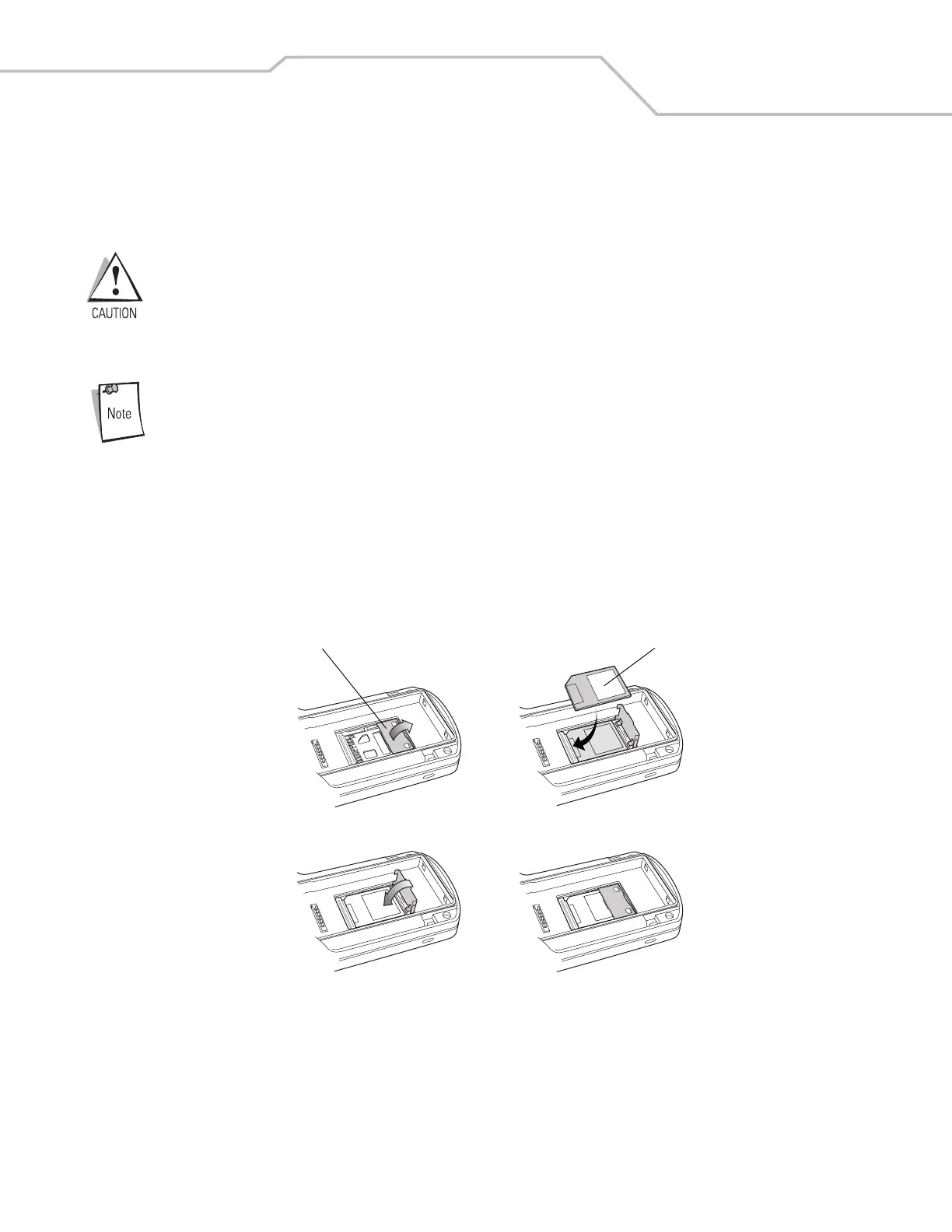
To insert the SD card:
1. Remove the battery (see Main Battery Removal on page 1-14).
2. Lift the SD card retaining door.
3. Position the SD card, with the contacts down, into the SD card slot. The SD card corner notch fits into the slot only one way.
4. Snap the retaining door closed.
Figure 2-16. Inserting the SD card
5. Replace the battery (see Install Main Battery on page 1-7).
SD Card Retaining Door
SD Card



 To Next Page