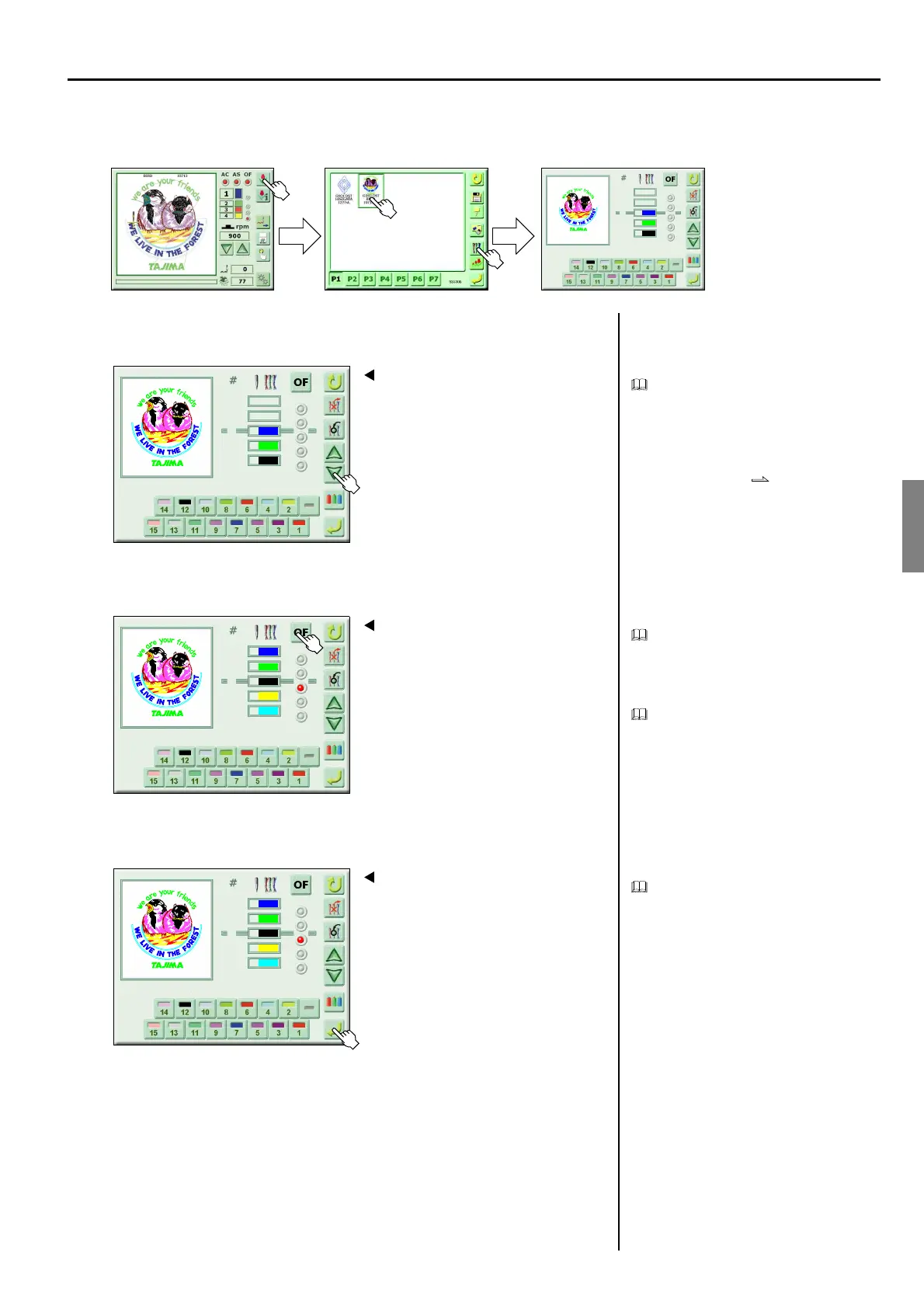
CHAPTER 5 EMBROIDERY SETTING
39
6. OFFSETTING AT AUTOMATIC COLOR CHANGE
<How to call the screen>
1. Select the needle bar step
Offsetting at automatic color change is a set-
ting that makes the frame move to the posi-
tion set by the automatic offset when the
machine performs color change.
When automatic offset is not registered, the
frame will not move.
Automatic offset p.47
2. Set offsetting at automatic color change
Setting offsetting at automatic color change
will cause the frame to move to the setting
position of automatic offset when the set
step ends.
It is also possible to set other needle steps as
the same way.
3. Register
To cancel offsetting at automatic color
change, select the step being selected, and
then press “OF”.
(GC02)
Select the design to be set
1
2
3
7
8
12
1
Screen 5000
1
2
3
12
7
8
2
Screen 5000
3
4
5
4
12
2
1
2
7
8
3
Screen 5000
3
4
5
4
12
2
1
2
7
8



 To Next Page