CHAPTER 6 DESIGN DATA MANAGEMENT
56
7. EXPLANATION ON THE SCREEN (SCREEN 8000)
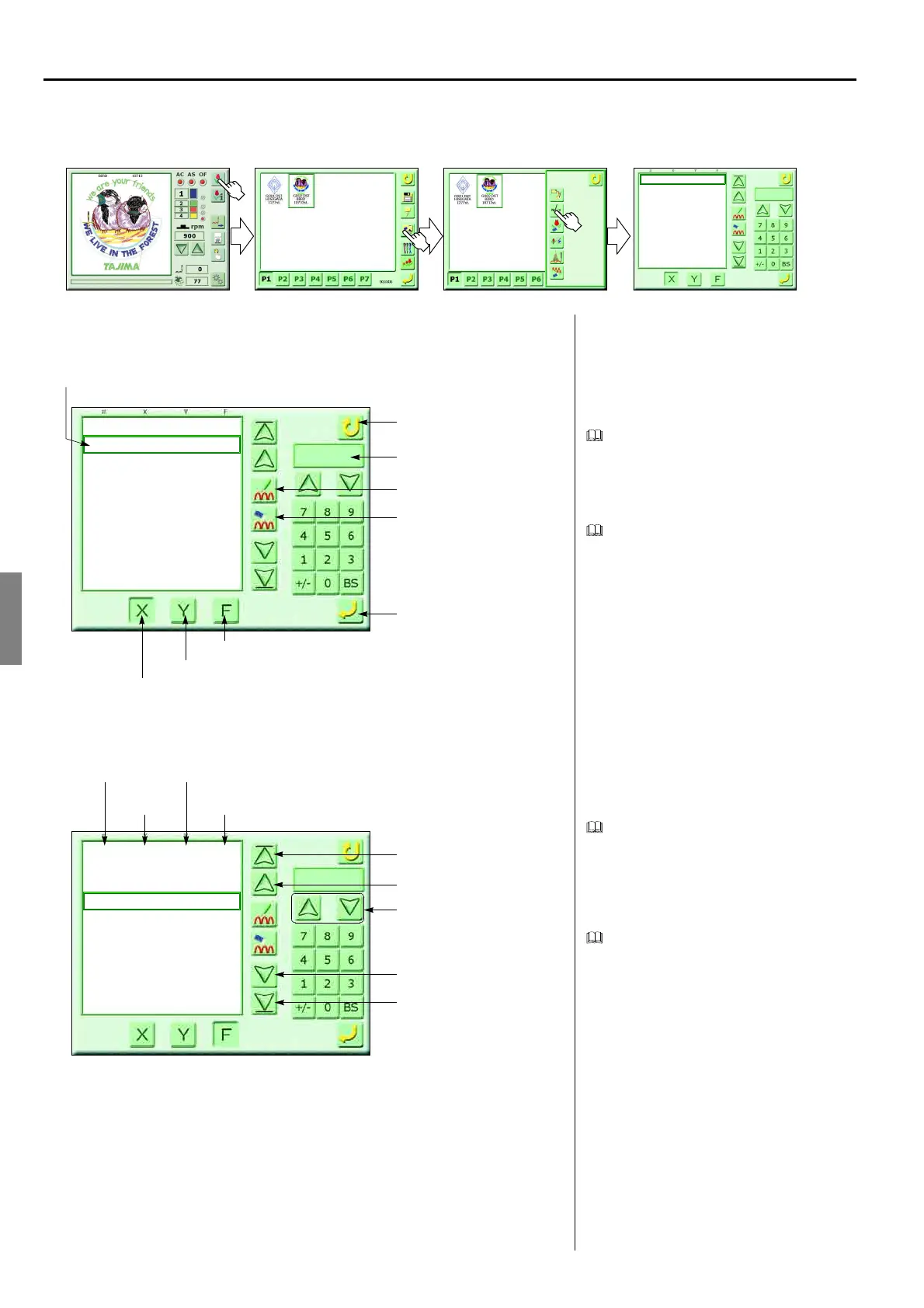
<How to call the screen>
Stitch editing screen
Stitch data
Unit of X, Y stitch data is 0.1 mm. Each
stitch data is displayed with relative coordi-
nates assuming the coordinates prior to one
stitch are (0, 0).
Data mode display
Selecting either X or Y function mode will
display data that exists at the mode of the
selecting position.
Function search
When performing searching after selecting
the function mode and the function code, the
machine will search data existing near for-
ward or backward of the function code to
display.
Scroll
Data by 10 stitches of forward/backward
will be displayed.
(GC02)
0
1
2
3
4
5
6
7
8
9
0
-12
1
11
11
11
11
-12
-12
9
0
6
-15
9
5
5
5
2
11
1
-
-
-
-
-
-
-
-
-
-
0
End, return
Register
X data mode
Y data mode
Function mode
Position of selection
Data mode display
Insertion of stitch
Deletion of stitch
0
1
2
3
4
5
6
7
8
9
0
-12
1
11
11
11
11
-12
-12
9
0
6
-15
9
5
5
5
2
11
1
-
-
-
-
-
-
-
-
-
-
Function search (ahead)
Scroll (up)
Function search (behind)
343
344
345
346
347
348
349
350
351
352
19
-19
9
21
21
22
21
-11
-11
-10
5
-8
3
-5
-4
-5
-4
-9
-8
-9
-
-
-
JUMP
JUMP
JUMP
-
-
-
-
Scroll (down)
Stitch number
X data
Y data
Function data
-12
JUMP
Selecting function code



 To Next Page