CHAPTER 5 EMBROIDERY SETTING
42
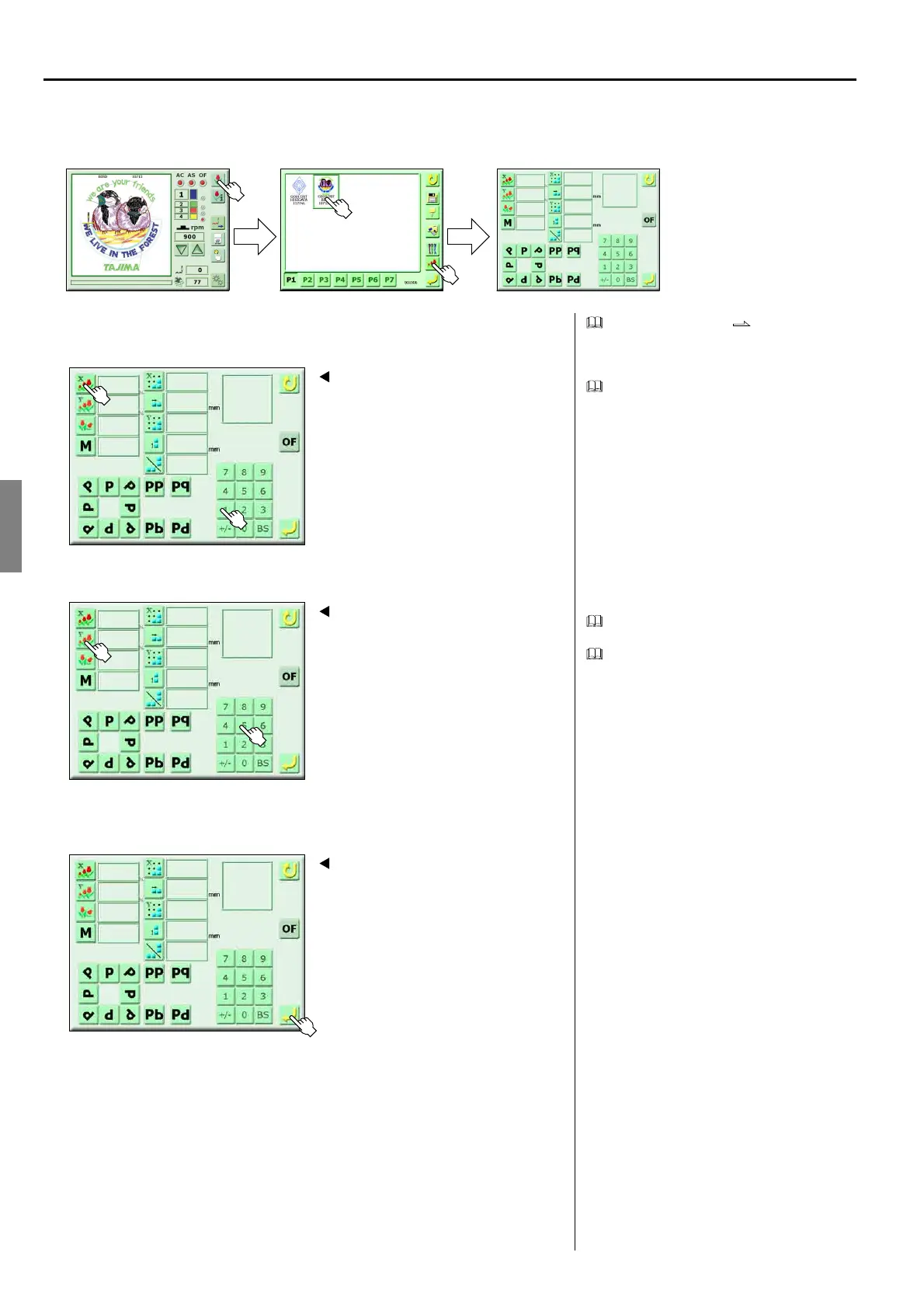
9. DESIGN SCALE UP/DOWN
<How to call the screen>
Design scale up/down p.96
1. Change of scale ratio in X direction
Setting value: 50 to 200%
2. Change of scale ratio in Y direction
Setting value: 50 to 200%
Pressing scale ratio of the Y direction will
become the same value as the scale ratio of
the X direction. It is possible to change the
scale ratio by inputting a value as it is.
3. Register
(GC02)
100
100
0
1
1
X
0.0
0.0
Select the design to be set
pp
p
1
2
Screen 6000
150
100
0
1
1
X
0.0
0.0
pp
p
4
3
150
150
0
1
1
X
0.0
0.0
pp
p
Screen 6000
5
150
75
0
1
1
X
0.0
0.0
pp
p
Screen 6000



 To Next Page