CHAPTER 8 PARAMETER SETTING
80
EXPLANATION ON THE SCREEN
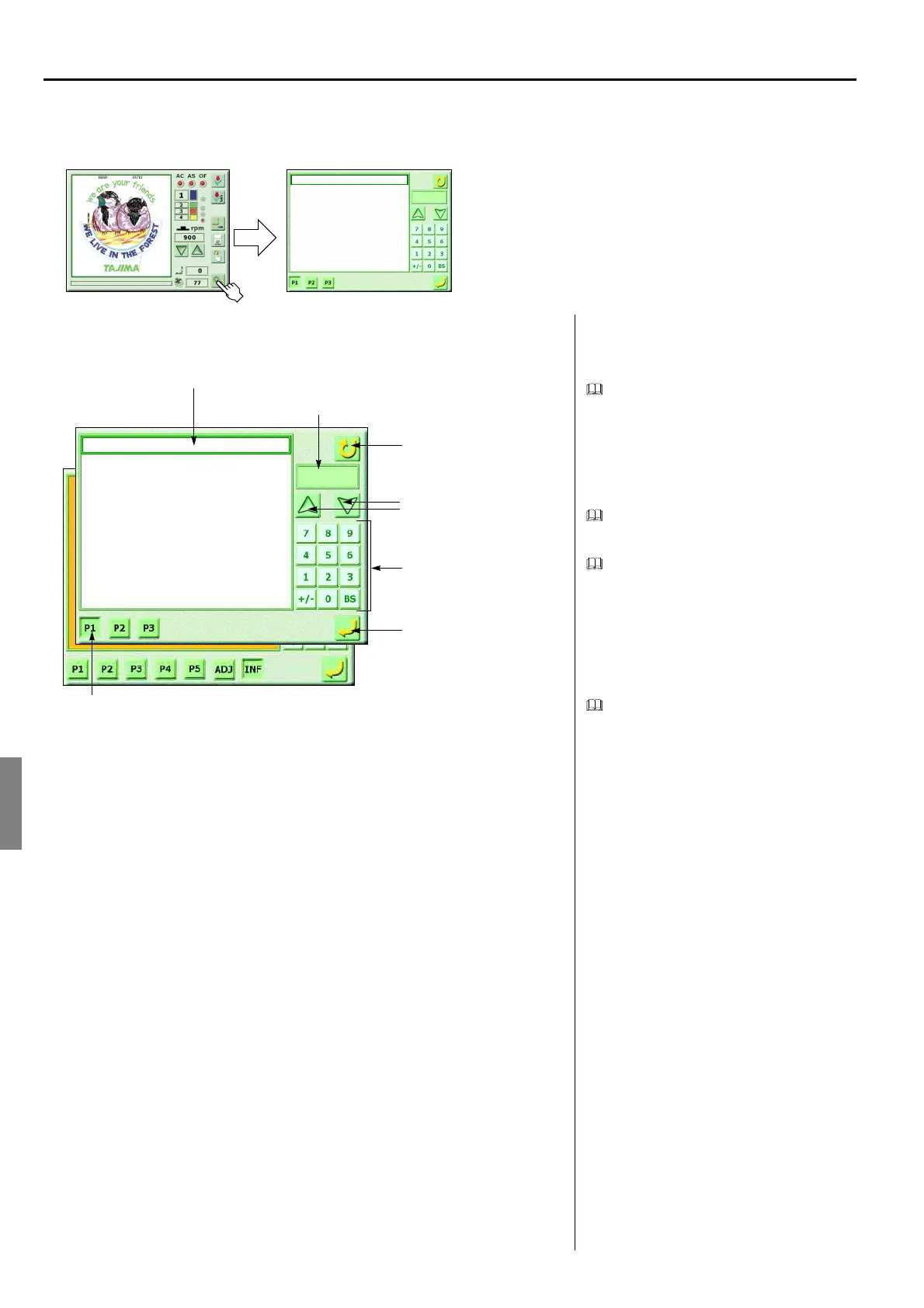
<How to call the screen>
Parameter setting screen
Setting items of parameter may not be dis-
played depending on machine specification.
Setting items of parameter may be different
from this manual due to research and devel-
opment.
It is possible to input all setting values by
using the scroll key.
Input of setting value by numerical key
In case of inputting value only, it is also pos-
sible to perform input by numerical key.
Perform input after deleting value by “BS
key”.
It is not possible to register values outside
the setting range.
Page switching
Pressing “P3” twice will display “P4, P5”.
Pressing “P5” twice will “ADJ”.
pressing “ADJ” twice will display “INF”.
1, Auto Color Change (AC)
2. Auto Start (AS)
3. Auto Start in the Same Color
4. A.S. after Auto Data Set
5. Main Shaft Inching
6. M.Shaft Inching after ATH
7. Auto Jump [mm]
8. Jump Convert
------
------
( No, Yes, )
( No, Yes, )
( No, Yes, )
( No, Yes, )
( 0, 1, 2, 3, 4, 5, 6, 7, 8, 9, )
( 2, 3, 4, 5, 6, 7, 8, 9, )
( No, 4.0 ~ 9.9, )
( No, 1, 2, 3, 4, 5, 6, 7, 8, 9, )
Yes
Yes
No
No
0
4
No
3
Yes
(GC02)
1, Auto Color Change (AC)
2. Auto Start (AS)
3. A.S. in the Same Color
4. A.S. after Auto Data Set
5. Main Shaft Inching
6. M.Shaft Inching after ATH
7. Auto Jump [mm]
8. Jump Convert
------
------
( No, Yes, )
( No, Yes, )
( No, Yes, )
( No, Yes, )
( 0, 1, 2, 3, 4, 5, 6, 7, 8, 9, )
( 2, 3, 4, 5, 6, 7, 8, 9, )
( No, 4.0 ~ 9.9, )
( No, 1, 2, 3, 4, 5, 6, 7, 8, 9, )
Yes
Yes
No
No
0
4
No
3
Yes
Previous state
Item to be selected
Contents to be set
Register
Scroll key
Yes/No, selection of setting
value
Page switching
Numerical key



 To Next Page