140
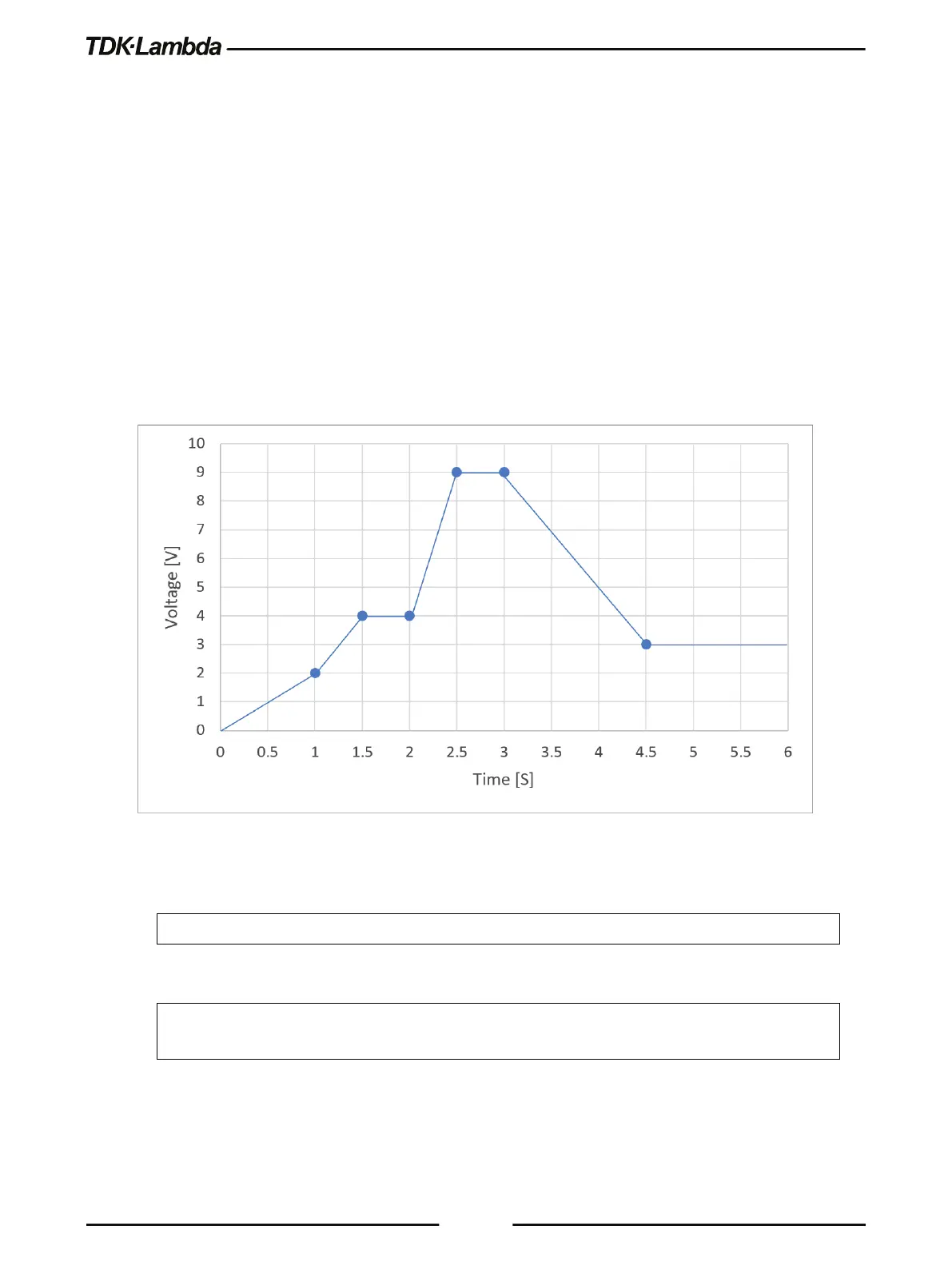
6.3.4 WAVE Mode Example
”WAVE” WAVE: VOLT 2,4,4,9,9,3,3
Set voltage values ”2,4,4,9,9,3,3” Volts
WAVE:TIME 1,0.5,0.5,0.5,0.5,1.5,1.5
Set time values ”1,0.5,0.5,0.5,0.5,1.5,1.5” Seconds
Set AUTO step execution mode ”AUTO”
Set wave execution iterations ”1”
Set AUTO step execution mode ”AUTO”
TRIG:SOUR BUS Select BUS trigger source via communication
Trigger system is enabled for a single trigger action
Figure 6–6: WAVE Mode Example
NOTE
Start condition: Assume power supply output is on; Initial voltage point is 0 Volts.
NOTE
Arbitrary waveforms can be easily created by using the Waveform Creator application provided on
the CD-ROM. Refer to Quick Start Guide documentation on the CD-ROM.











 To Next Page