78
C. LAN ➔ Advanced & LAN->Advanced->Modify Page
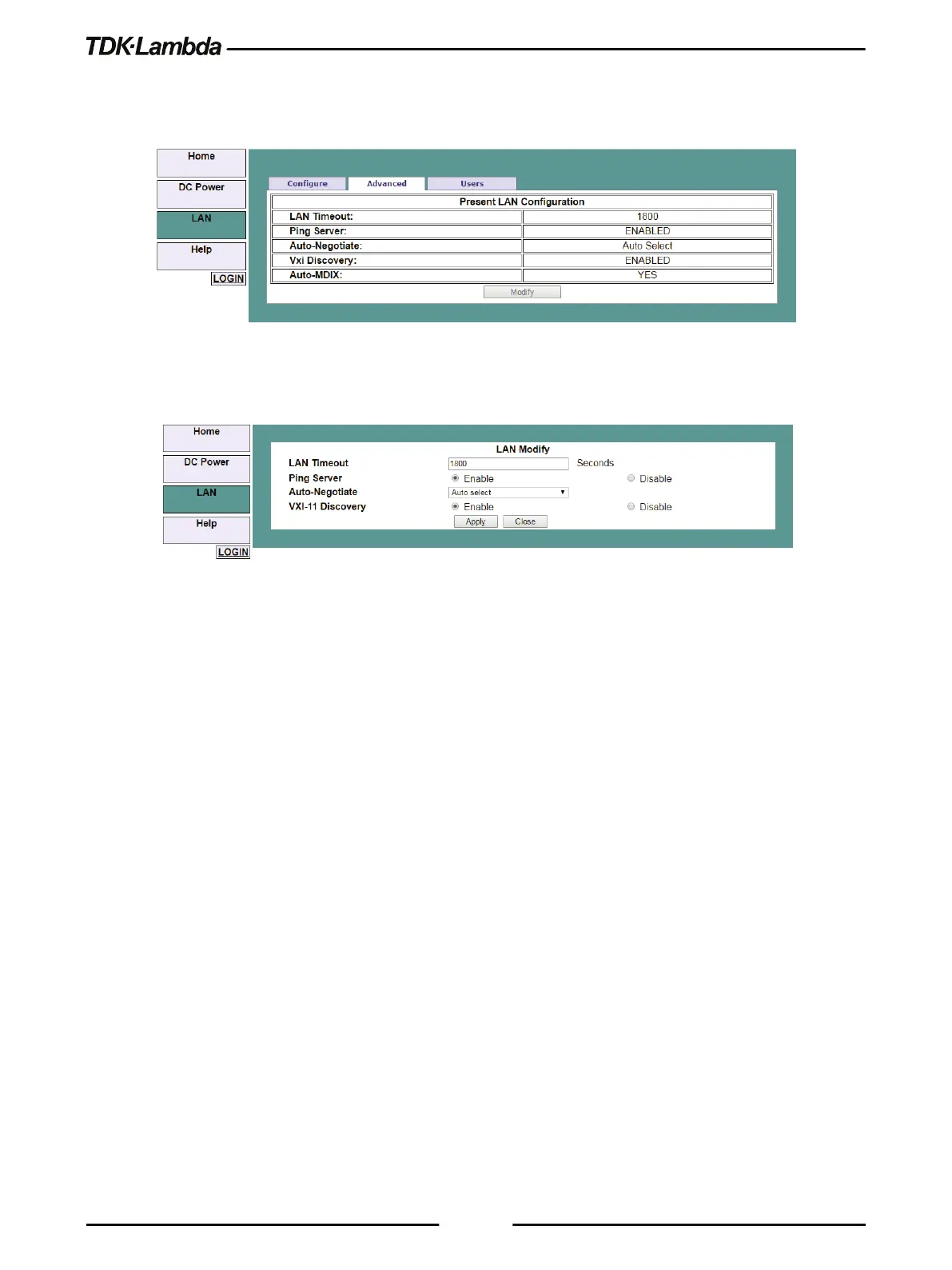
Click the LAN ➔ Advanced button to view advanced LAN settings:
Figure 5–17: LAN – Advanced Tab
These settings can be changed only by logging-in as 'admin'.
Figure 5–18: LAN – Changing Settings
•
LAN Timeout
If the user is logged in via the web page or by using VISA or TCP sockets, this is the time
duration (in seconds) in which the web pages may be inactive (idle) before the Power Supply
automatically logs out.
The default is 1800 seconds = 30 minutes.
•
Ping Server
Ping is a network utility that allows the computer to verify communication with the Power
Supply. This service can be disabled on the Modify panel for security reasons.
•
Auto-Negotiate
Shows the network speed at which the LAN card is allowed to operate. The choices are 100
Mbps, 10 Mbps (for slower networks) or Auto select.
•
VXI-11 Discovery
This is a protocol, which allows the network server to detect which instruments are connected
to the LAN. It may be disabled for security reasons.
•
Auto-MDIX
This service is always enabled in the Power Supply. The Power Supply LAN connection will
always detect a patch or cross-over cable automatically.











 To Next Page