6. LSServer, Scanner Shell and Download
2004-11 Operating Manual for the LS Series Scanner No. 30001798 Rev. No. 1.5 6-85
Edit SAF…
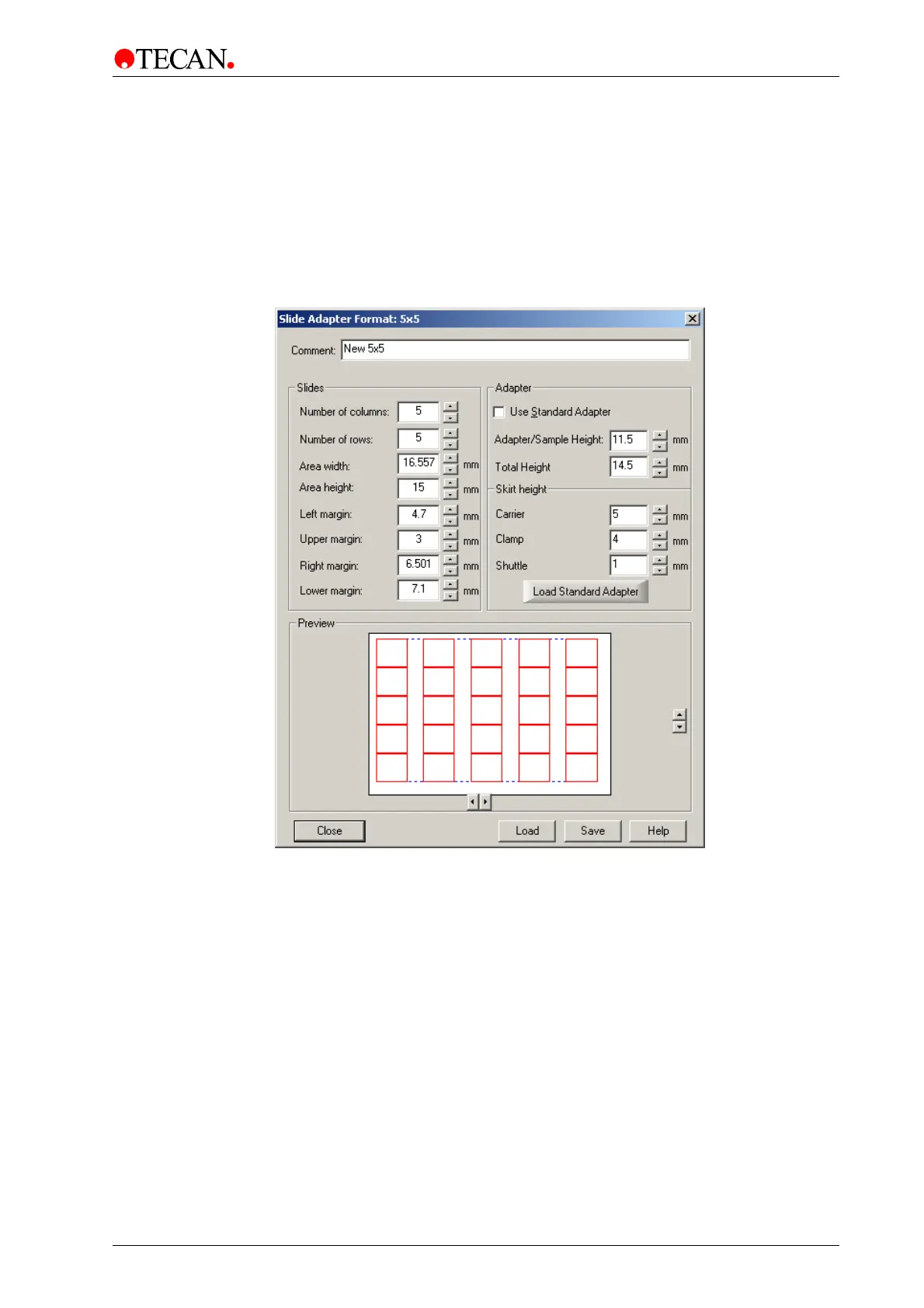
The Slide Adapter Format dialog box is used to edit or create Slide Adapter
Format files. Each file consists of data which represents a copy of a standard
slide adapter or microplate (MTP), for example: GREINER 96 well or NUNC 96
well. To enter and save adapter parameters the Slide Adapter Format dialog
box must be displayed.
In the Advanced menu, select
Edit SAF…and the Slide Adapter Format dialog
box appears:
In the Slide Adapter Format dialog box all parameters, defining a standard slide
adapter or a microplate, must be entered:
• Number of slides (columns and rows – max. 14 x 9).
• Geometry settings (width [min. 9 mm], height [min. 9 mm], margins):
For determining squares and distances keep in mind that the point of origin is
top left. Enter values of distances in mm (2 digits may be included) for the
specific parameters.



 To Next Page