6. LSServer, Scanner Shell and Download
2004-11 Operating Manual for the LS Series Scanner No. 30001798 Rev. No. 1.5 6-35
Autofocus
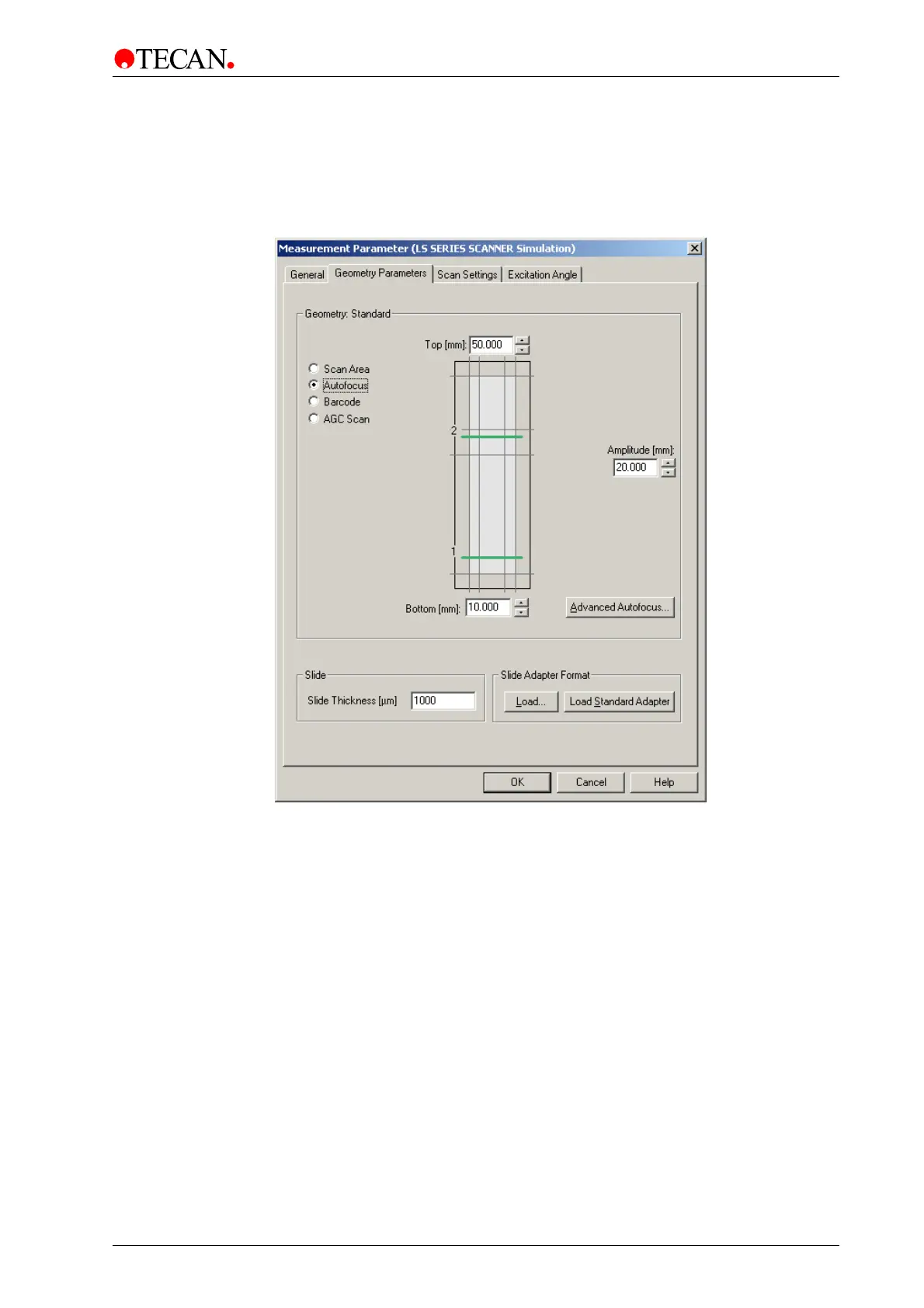
Select the Autofocus option button to define the autofocus position and to make
the Advanced Autofocus… button available.
The Geometry Parameters tab appears as follows:
The Autofocus contains the following elements:
Top spin
control
Use the Top spin control or type in a value to set the autofocus
scan line for Focus 2. The value is measured in mm from the
bottom line (0/0).
Bottom
spin control
Use the Bottom spin control or type in a value to set the autofocus
scan line for Focus 1. The value is measured in mm from the
bottom line (0/0).
Amplitude
spin control
Use the Amplitude spin control or type in a value to set the width of
autofocus scan line for both, Focus 1 and 2.
Advanced
Autofocus
button
Click Advanced Autofocus to select a different autofocus mode or
to change autofocus parameter.
For detailed information please refer to the Advanced Autofocus
description in this manual.
MTP
Autofocus
Autofocus entered in Well or HS-Mode.
Amplitude (width of Autofocus line) from 3mm to 22mm
Distance (between Autofocus lines): from 3mm to slide length



 To Next Page