Table 2-2: Pinning of black MQS connector
By the 100BASE-T1 port in this connector, you get access to the webserver by the
default IP-address (192.168.0.49 if not changed). To configure the default IP-address,
please see CHAPTER 4.3.2.
2.1.2 RJ45 Ethernet connectors
Figure 2-3: RJ45 Connectors
There are three RJ45 Standard Ethernet connectors for Gigabit Ethernet on the front
side (GB-A to GB-C). Here you can log and configure the device. And these ports are
for time synchronization between different CaptureModules from Technica. For details
please see CHAPTER 4.5.3.
2.1.3 White MQS Connector Backside (12 pins, 2 rows)
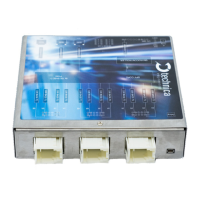
Figure 2-4: 3x White MQS Connectors backside
The user has to connect the (P) pin to the (P) pin of the periphery device.
The user has to connect the (M) pin to the (M) pin of the periphery device.
Note: If these two pins are swapped, the link LED may be lit on the slave side, but no
data transmission will be possible.


 To Next Page
 Loading...