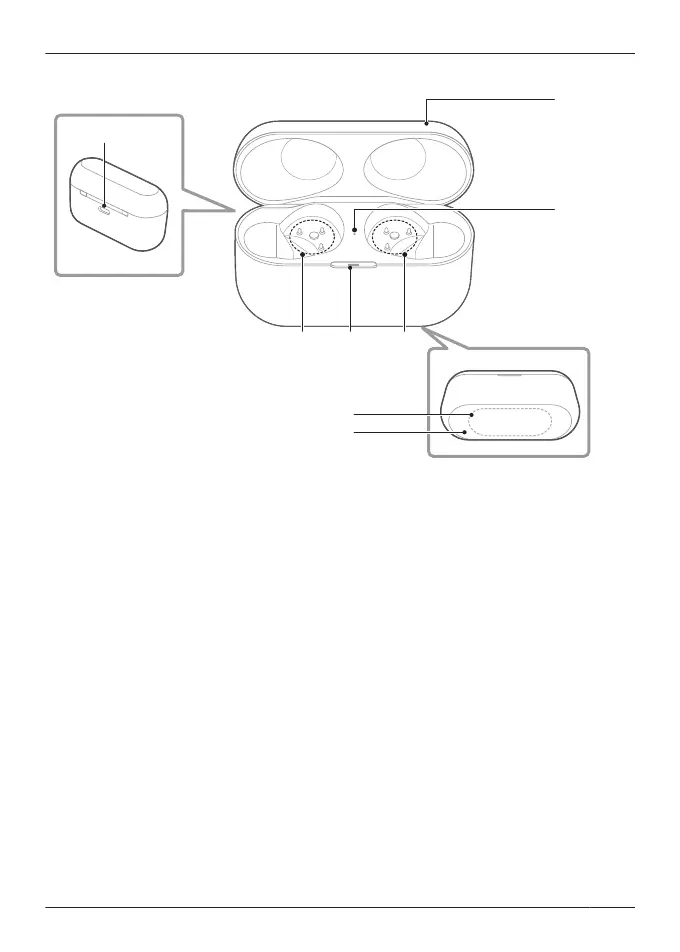
Charging cradle
1. Charging cradle lid
2. Rating
R Displays the model number.
3. Terminal section
4. Charging cradle status indicator LED
R Indicates the status of the charging cradle.
“Status Indicator LEDs”, Page 21
5. Earphone status indicator LED
R Indicates the status of the earphones when they are in the charging cradle.
(No LEDs on the earphones)
“Status Indicator LEDs”, Page 21
6. Charging terminal
R Use when charging with the USB charging cord.
7. Qi charging contact
R Use when charging with a separately sold Qi standard certified wireless charger.
19
Let’s Get Started



 To Next Page