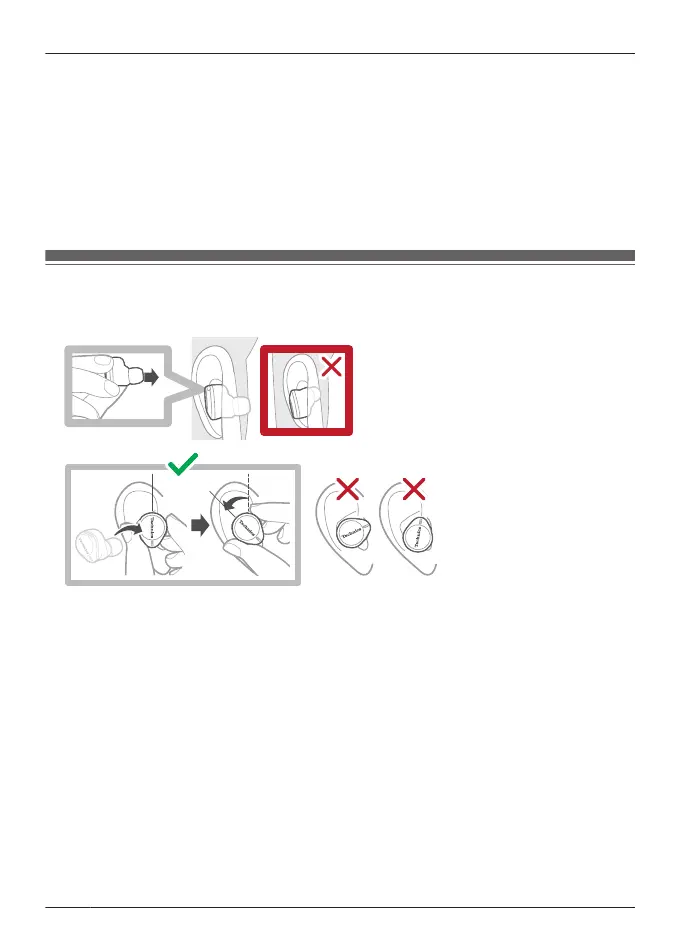
2 Wear them securely.
R With the Technics logo oriented diagonally, insert into your ears while twisting slightly
backwards, and adjust so that the earpieces fit well into your ear canals.
R Earphone (L) has a raised dot indicating the L side.
R After wearing them, check that they do not fall off from your ears.
R If the earphones fall off easily, replace them with earpieces of a different size (included).
“EAH-AZ100”, Page 31
R Select the earpieces that provide the best noise cancelling.
“Selecting the best earpiece for Active Noise Cancelling (EAH-AZ100/EAH-AZ80/EAH-
AZ60M2)”, Page 53
EAH-AZ80
Wear the earphones correctly to achieve good noise cancelling and acoustics.
1 Check the top and bottom orientation of the earphones and the L (left) and R (right) positions.
2 Wear them securely.
R With the Technics logo oriented vertically, insert into your ears while twisting slightly
backwards, and adjust so that the earpieces fit well into your ear canals.
R Earphone (L) has a raised dot indicating the L side.
R After wearing them, check that they do not fall off from your ears.
R If the earphones fall off easily, replace them with earpieces of a different size (included).
“EAH-AZ80/EAH-AZ60M2/EAH-AZ40M2”, Page 33
R Select the earpieces that provide the best noise cancelling.
“Selecting the best earpiece for Active Noise Cancelling (EAH-AZ100/EAH-AZ80/EAH-
AZ60M2)”, Page 53
30
Let’s Get Started



 To Next Page