“Use multi-point”, Page 56
R For information about using the Bluetooth
®
devices, please refer to the manuals of the
Bluetooth
®
devices.
R This feature may not work with some apps or software.
1 Confirm that the earphones are paired with the Bluetooth
®
devices.
2 Connect the first Bluetooth
®
device and earphones.
R From the Bluetooth
®
menu in the Bluetooth
®
device, select your headphones.
3 Connect the subsequent Bluetooth
®
device and earphones.
R From the Bluetooth
®
menu in the Bluetooth
®
device, select your headphones.
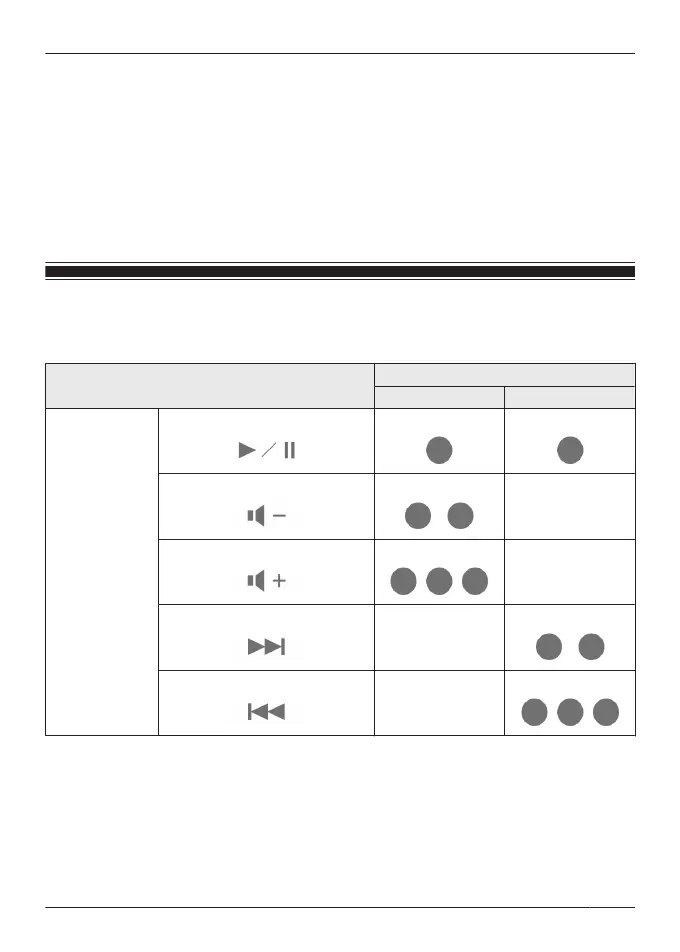
Use the touch sensors
You can use the touch sensors on the earphones to operate the earphones, or remote control
Bluetooth
®
devices connected to the earphones.
Function
Touch sensor gesture
L R
Music
Playback/Pause
Single tap Single tap
Decrease volume
Double tap
-
Increase volume
Triple tap
-
Next track
-
Double tap
Previous track
-
Triple tap
41
Convenient Function



 To Next Page