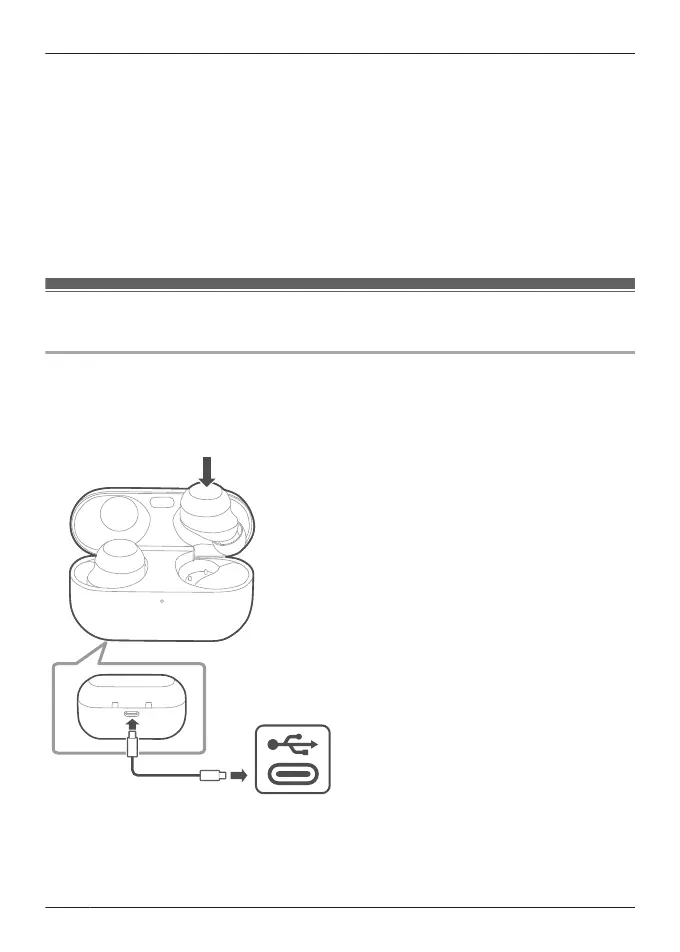
R The device cannot charge properly if there is dust or water droplets on the charging terminal,
earphones, or charging cradle terminal section. Remove dust and water droplets before
charging.
“Clean the charging terminals of the earphones”, Page 79
“Clean the charging cradle terminal section”, Page 79
R Hold the plug of the USB charging cord straight when plugging in or out.
(Plugging the USB charging cord at an angle to the charging terminal will deform the plug and
cause a malfunction.)
R Confirm (L) and (R) on the earphones, and align the terminal section of the charging cradle
with the charging terminals of the earphones. (Earphones will not charge if their charging
contact positions are incorrect.)
R We recommend charging at a room temperature between 10°C to 35°C.
Charge the earphones and charging cradle at the same
time
EAH-AZ100
1 Use the included USB charging cord to connect the charging cradle to a separately sold
USB PD supported AC adapter (USB Type-C).
R You can also charge from a USB Type-C port on a computer. Turn on your computer. It
may not charge if the computer is in standby or sleep mode.
2 Put the earphones into the charging cradle.
R The LED (light blue) of the charging cradle flashes once on each side before charging.
(Put the earphones into the charging cradle again if the LED (light blue) does not flash.)
24
Let’s Get Started



 To Next Page