3 Close the charging cradle lid.
R The LED (red, yellow, or green) lights up to indicate the battery level of the charging
cradle.
R The LED (red, yellow, or green) flashes slowly while the charging cradle is being charged.
R Charging for the charging cradle is complete when the LED turns off.
R Charging time (the time from empty to full charge)
Charging the earphones and
charging cradle at the same time
About 3.0 hours
EAH-AZ80/EAH-AZ60M2/EAH-AZ40M2
The illustrations use EAH-AZ60M2 as an example.
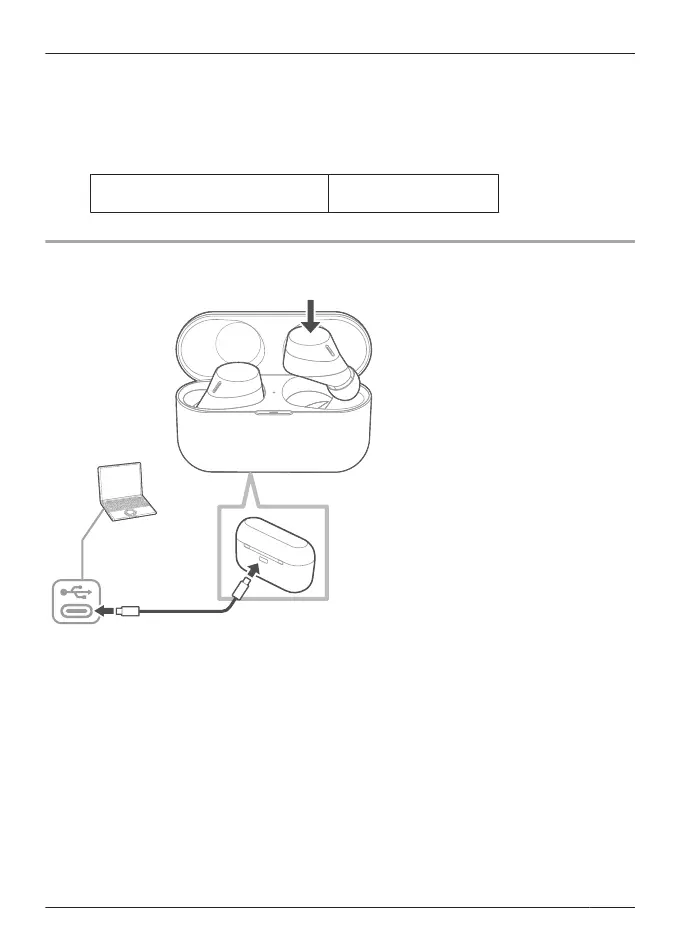
1 Use the included USB charging cord to connect the charging cradle to a separately sold
USB PD supported AC adapter (USB Type-C).
R You can also charge from a USB Type-C port on a computer. Turn on your computer. It
may not charge if the computer is in standby or sleep mode.
R The charging cradle status indicator LED flashes (red, yellow, or green), and charging
starts.
2 Put the earphones into the charging cradle.
R The earphone status indicator LED quickly flashes red (twice). (Put the earphones into
the charging cradle again if the LED does not flash.)
R The earphone status indicator LED lights up (red), and charging starts.
R Charging for the earphones is complete when the earphone status indicator LED turns off.
R Charging for the charging cradle is complete when the charging cradle status indicator
LED turns off.
R Charging time (the time from empty to full charge)
25
Let’s Get Started



 To Next Page