Important:
R Bringing a magnetic object close to the earphones during use may turn off the earphones. Do
not bring magnetic objects close to the earphones during use.
EAH-AZ80/EAH-AZ60M2/EAH-AZ40M2
Turn on
1 Take out the earphones from the charging cradle.
R A startup sound will play.
Turn off
1 Put the earphones into the charging cradle.
R When you put them in, the earphone status indicator LED quickly flashes red (twice).
(Put the earphones into the charging cradle again and charge the charging cradle if the
LED does not flash.)
Important:
R Bringing a magnetic object close to the earphones during use may turn off the earphones. Do
not bring magnetic objects close to the earphones during use.
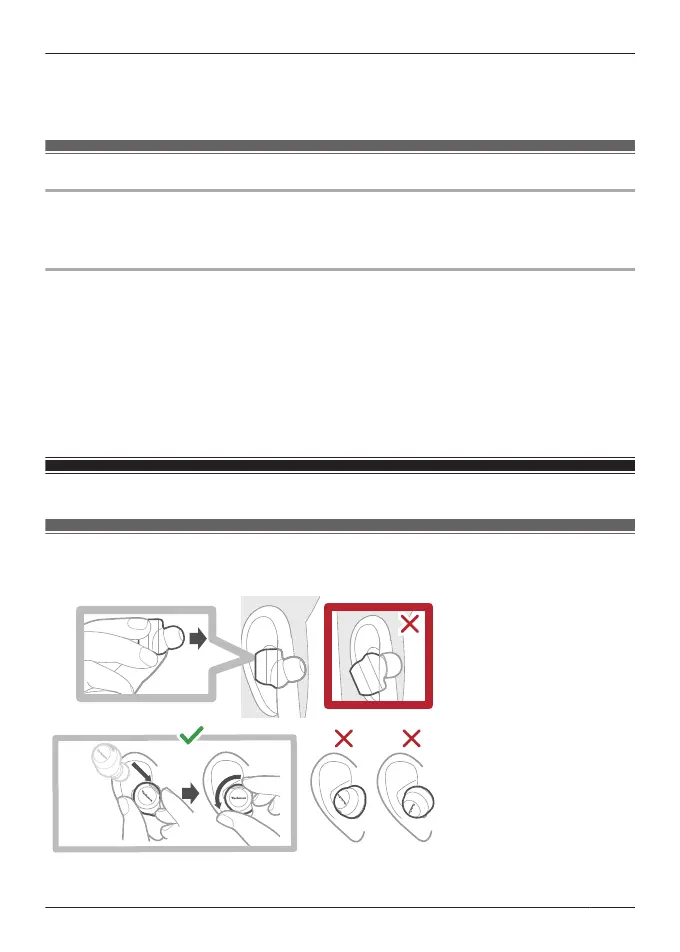
Wear the earphones
EAH-AZ100
Wear the earphones correctly to achieve good noise cancelling and acoustics.
1 Check the top and bottom orientation of the earphones and the L (left) and R (right) positions.
29
Let’s Get Started



 To Next Page