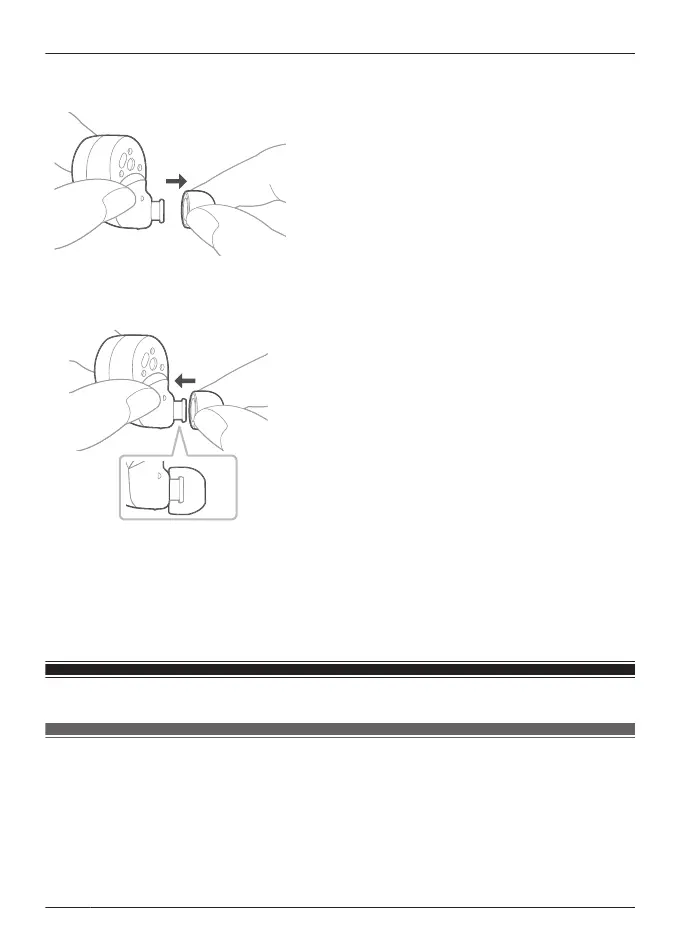
1 Remove the earpiece.
R Hold the earpiece and pull out while twisting slightly.
2 Attach the earpiece.
R Make sure that the earpiece is firmly attached and not slanted.
Note:
R The size of the earpieces that fit your ears may differ between the left and right.
R Select the earpieces that provide the best noise cancelling.
EAH-AZ80/EAH-AZ60M2: “Selecting the best earpiece for Active Noise Cancelling (EAH-
AZ100/EAH-AZ80/EAH-AZ60M2)”, Page 53
Pair for the first time
Use the app to pair with a Bluetooth
®
device
Important:
R Depending on the connected Bluetooth
®
device, a loud sound may be output during playback.
Check the volume setting of the Bluetooth
®
device before starting playback.
1 Download the [Technics Audio Connect] app.
{{"Google Play"|tolink("https://play.google.com/store/apps/details?
id=com.panasonic.technicsaudioconnect")}}
34
Let’s Get Started



 To Next Page