EasyManua.ls Logo

Technics EAH-AZ100 - Page 42

Technics EAH-AZ100
92 pages
Print Icon
To Next Page IconTo Next Page
To Previous Page IconTo Previous Page
Loading...
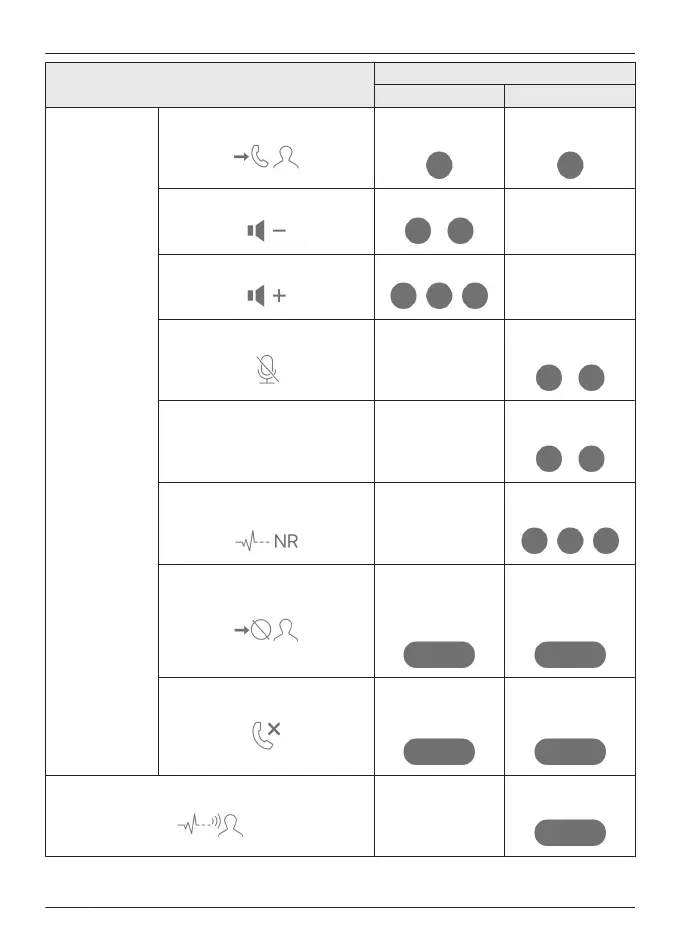
Function
Touch sensor gesture
L R
Calls
Answer call
Single tap during
incoming call
Single tap during
incoming call
Decrease volume
Double tap
-
Increase volume
Triple tap
-
Mute your voice
-
Double tap during
a call
Unmute -
Double tap during
mute
Switch the noise level from the
other party
*1
-
Triple tap during a
call
Reject call
Tap and hold for
about 2 seconds
during incoming
call
Tap and hold for
about 2 seconds
during incoming
call
End call
Tap and hold for
about 2 seconds
during a call
Tap and hold for
about 2 seconds
during a call
Switch external sound control
-
Tap and hold for
about 2 seconds
42
Convenient Function

Table of Contents

Related product manuals