EAH-AZ80/EAH-AZ60M2
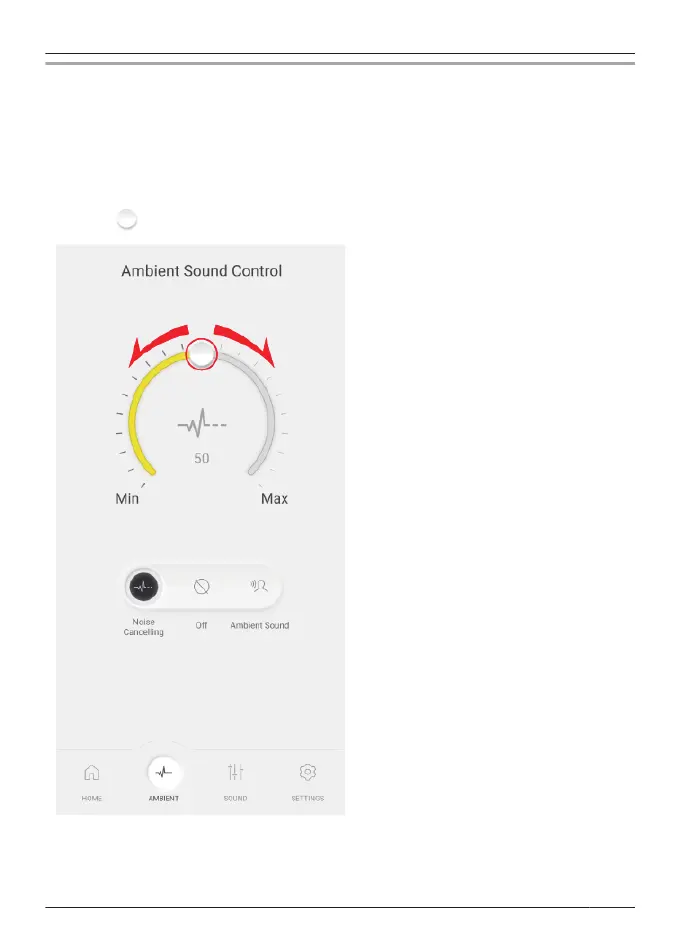
1 In the home screen of the [Technics Audio Connect] app, tap [AMBIENT].
R When setting external sound control for the first time, tap [Adjust] and pre-adjust noise
cancelling.
“Optimize noise cancelling (EAH-AZ100/EAH-AZ80/EAH-AZ60M2)”, Page 60
2 Select an external sound control mode.
R [Ambient Sound] has Transparent and Attention modes.
3 Move to adjust the level.
R Noise Cancelling: The closer to Max (100), the more noise is removed.
R Ambient Sound (Transparent): The closer to Max (100), the more external sound is
transmitted.
R If you select “Off” or “Ambient Sound” (Attention), you cannot adjust the level.
49
Convenient Function



 To Next Page