12
71504138-0-003
EN
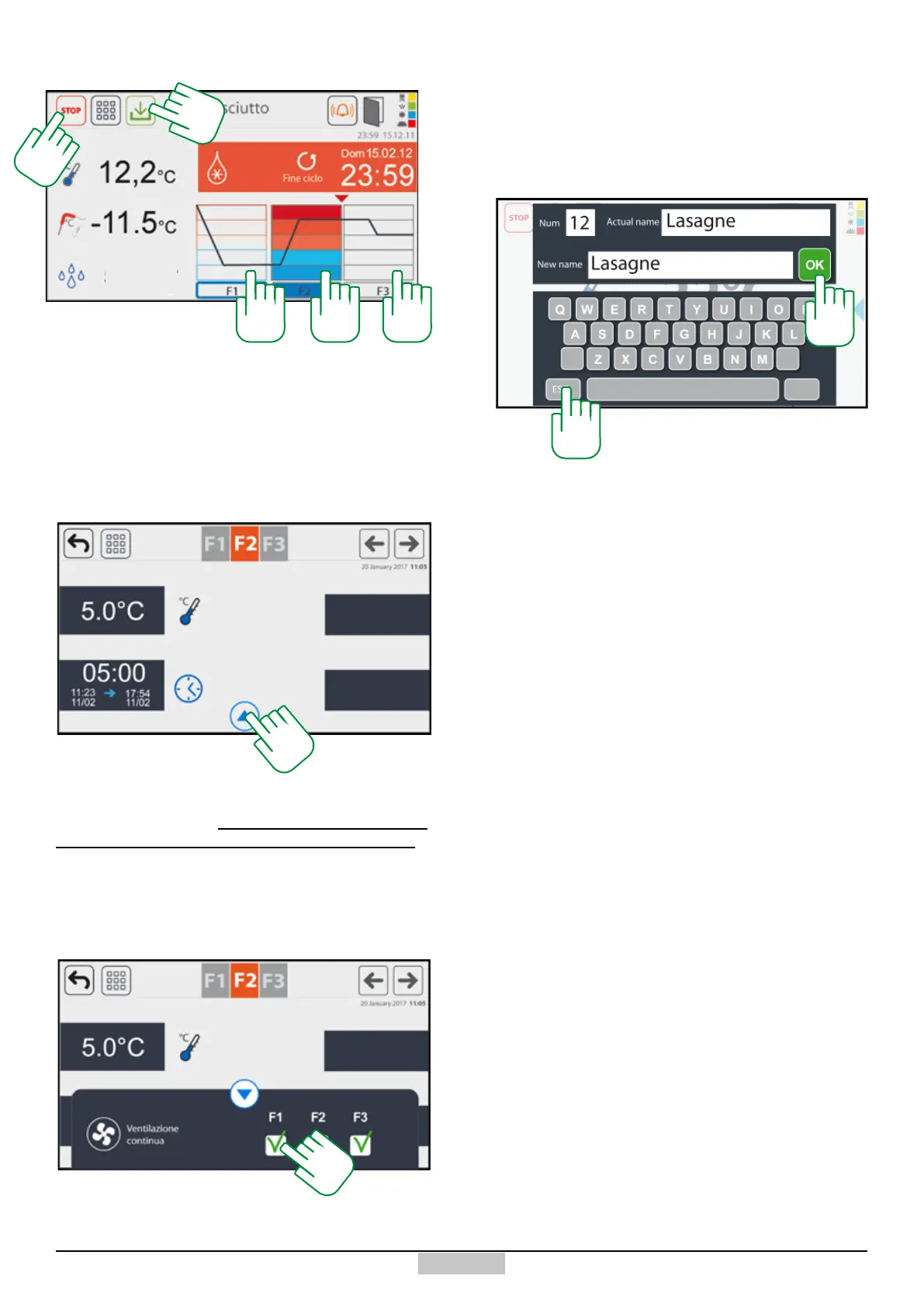
At any time, you can start the cycle by pressing the
If you want to save the set programme, press the key
[47], and the following window will open to name the
programme. If you conrm the name with the key [48],
the programme will be found in the programmes window.
If you want to exit without saving, just press the key [49].
48
49
START key [38], and the following screen will appear:
On the left, the read elements are represented: cell
temperature, needle temperature.
The screen represents a scheduled defrosting cycle, the
coloured phase (e.g. F2) will be the one in progress. You
can access the temperature settings, by pressing above
the area of the phase you want to change.
If instead, the lower arrow [45] is pressed, you can
access the setting, for every single phase, of the
continuous ventilation (this can be performed even
during the setting phase of the cycle programme).
In order to set the continuous ventilation, just press in
the white boxes provided for each phase [46] until the
green ag appears. In order to stop at any time the cycle,
just press the key [44].
43 4343
44
47
- - -
45
46







 To Next Page