15
71504138-0-003
EN
8 - PROGRAMME WRITING
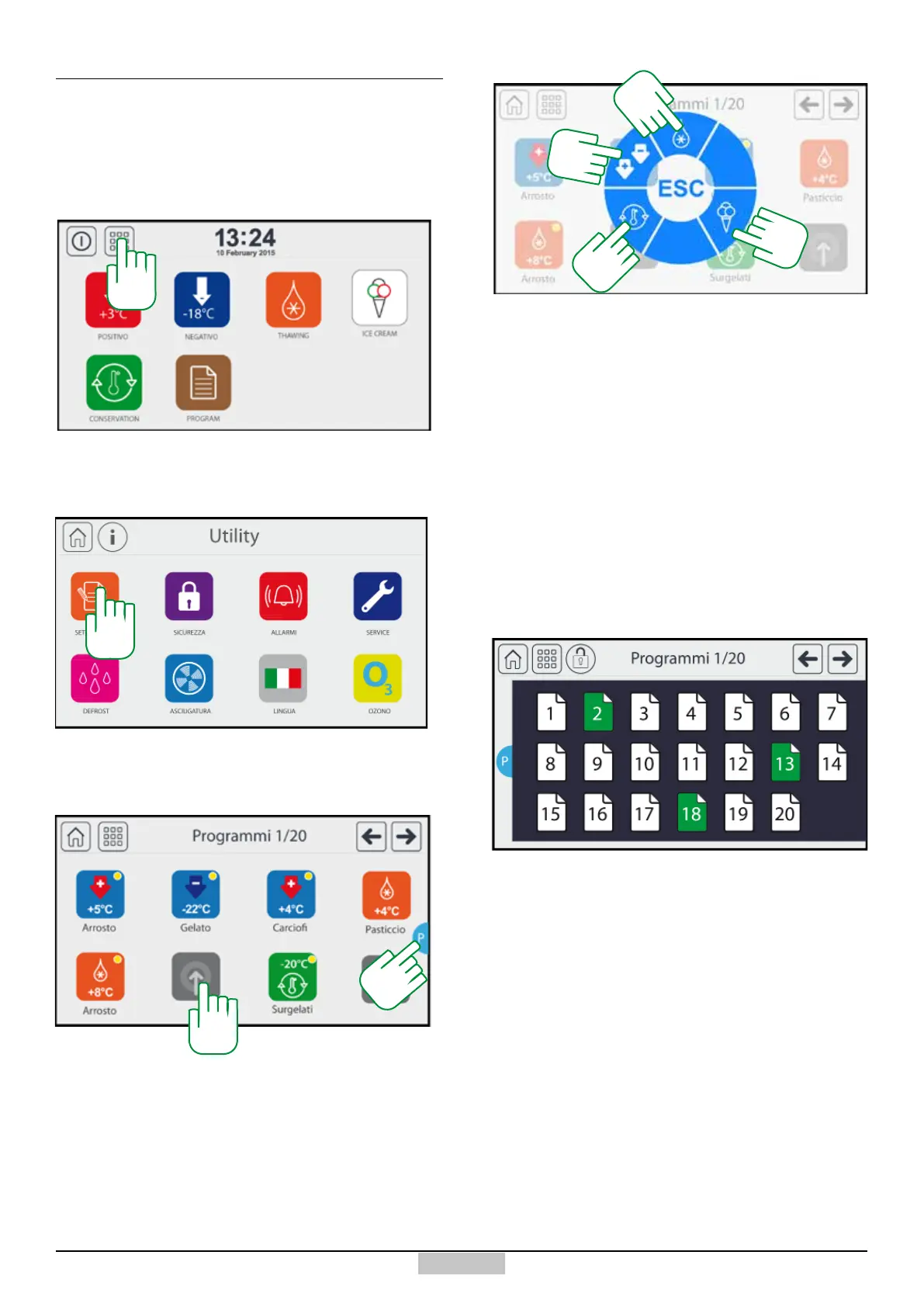
In addition to saving programmes from the selected
cycles, you can register a programme without starting
a cycle. In order to select a programme to store, press
the icon [125] from the main menu.
8.1 - Access to programme set-up
Which will allow accessing the following Utility window:
126
Now, by pressing the icon [126] you can access the
following library of created or to create programmes
To modify a programme already created, simply press
on the icon of the programme concerned. The icons of
the programmes created with the yellow circle at the top
right, are also visible in the User programme collection.
If instead you want to create a new programme, press
above the grey icon [132], afterwards, the following
circular menu will appear which allows selecting the type
of programme to create:
Upon pressing one of the represented symbols, a
specic programme setting will follow.
To exit, press ESC.
To scroll through the pages quickly, instead of using the
arrows in the top right, it is possible to recall the pages
by pressing the key [P].
The following screen will appear, in which the green
pages will be those that have at least one programme
set, the white ones will be the ones with no programme
set (wait a few seconds for the green pages to be
updated).
Pressing on a page will send to the screen containing
the programs of the selected page.
125
132
P
127
139
174
198







 To Next Page