23
71504138-0-003
EN
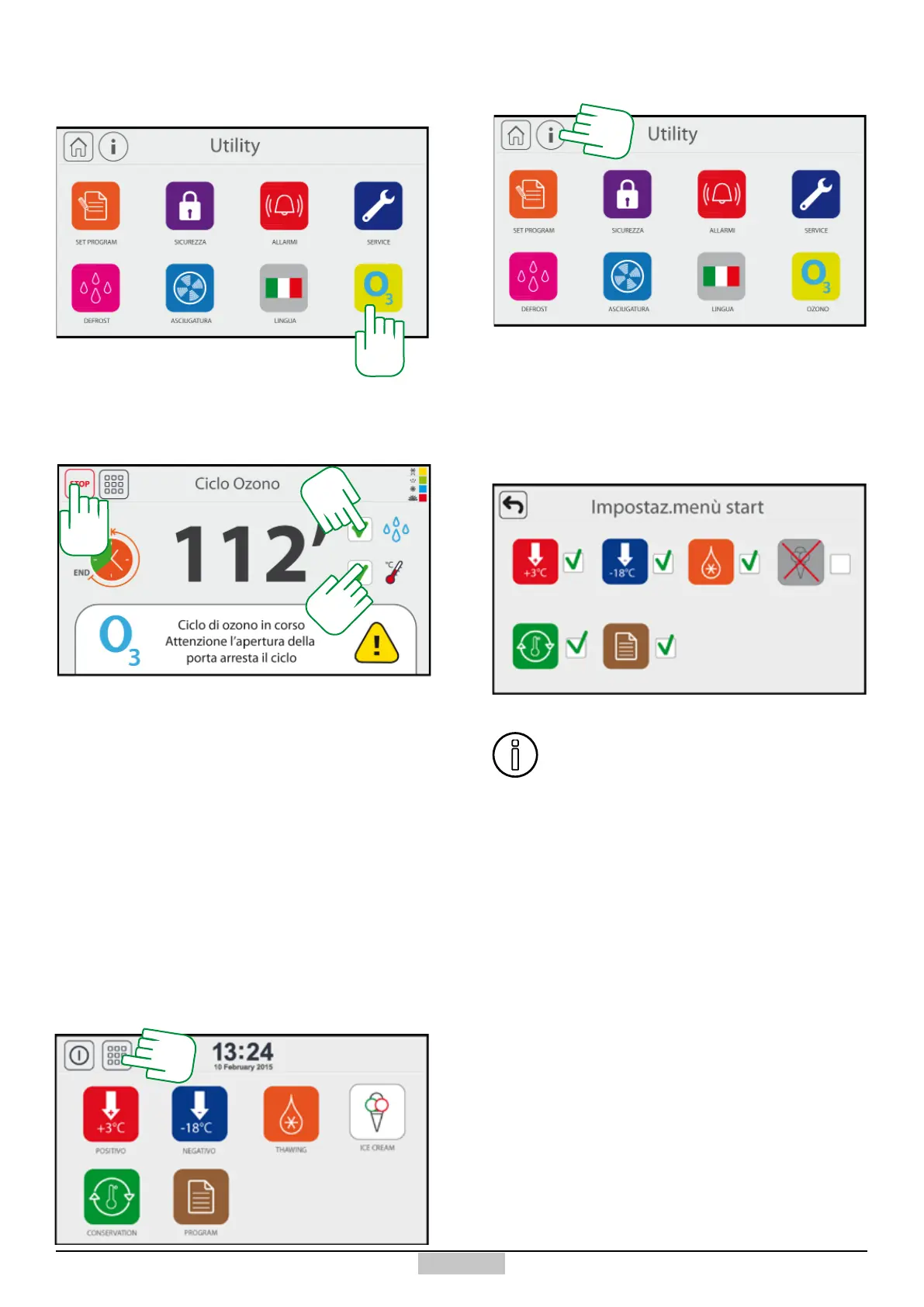
If you want to start an Ozone cycle, close the door of
the chiller and then press the icon [226]
226
The cycle will start and the following screen will appear,
with the countdown being displayed in the centre
(starting from 120 minutes).
If you want to join the action of the ozone with the one
of cooling down or of the humidity, check the ags [227]
and respectively [228].
At the end of the countdown you will exit the cycle that
will end. To end earlier press the STOP [229] key.
If you are using Temperature and humidity, it is
recommended to perform a drying cycle afterwards.
229
227
228
Upon start-up, the main menu has 8 icons represented in
the following window, if you want to change the number
of icons present, press the key [230]:
10.7 - Conguration of the main menu
You will access the Utility window, at this point press
the key [231].
231
The following window will appear and by checking the
green ags, the main menu icon will be shown or hidden.
The disabled icons will disappear from the main menu,
but you will be able to nd them in the second page of
the UTILITY menu.
If all icons are disabled by mistake, when
accessing the main menu, a warning will be
displayed which will send you back to the icon
setting page.
230







 To Next Page