20
71504138-0-003
EN
9 - STARTING UP STORED PROGRAMMES
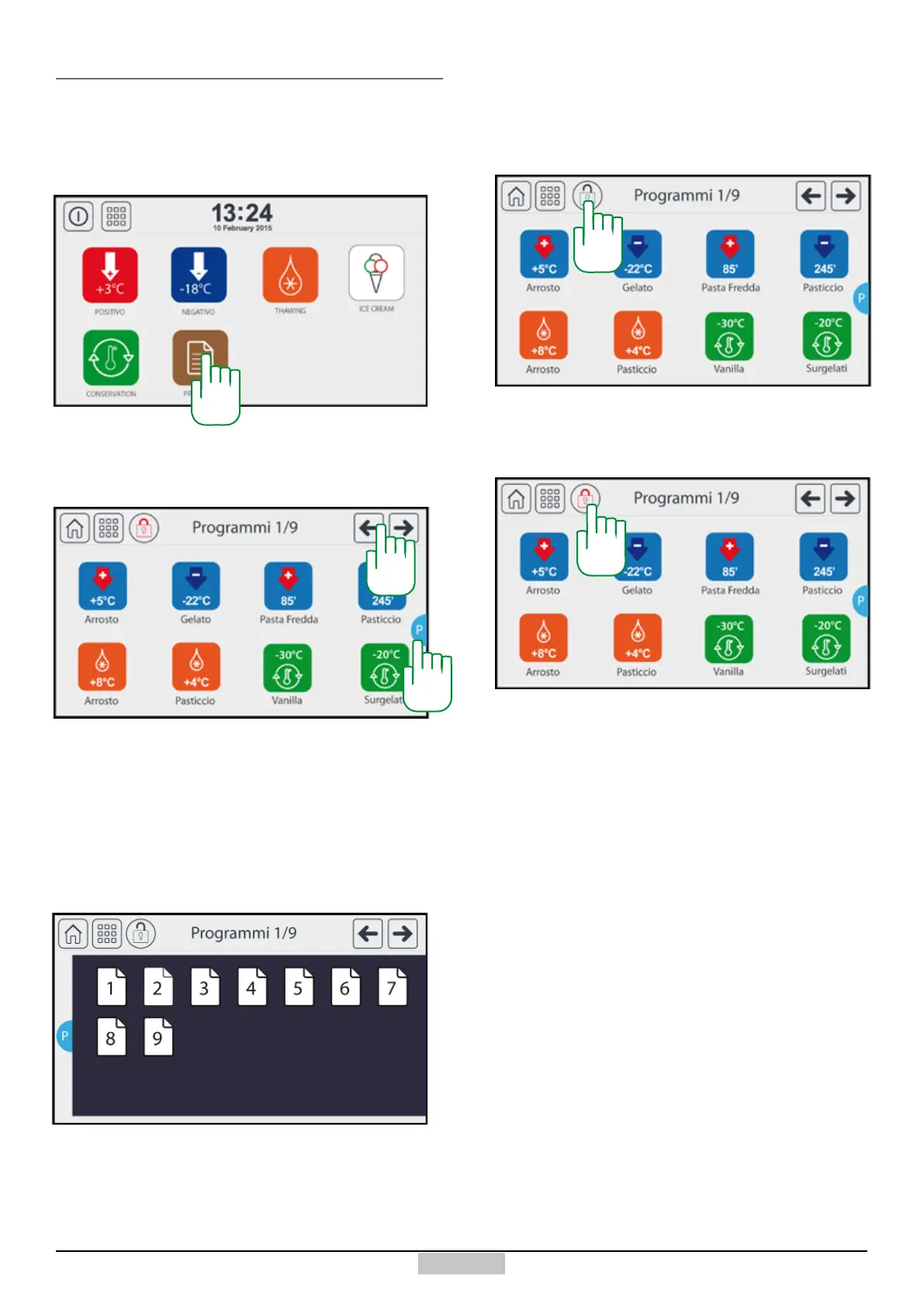
In order to access the archive of stored programmes
and visible to the user, press the icon [205] from the
main menu.
9.1 - Access to stored programmes
You will access the following window where you can start
the preselected cycle by pressing the relative icon and
browsing all available pages by pressing the icons [206]
If, upon the machine start-up, after pressing the stand-by
key [1] , you want to directly access the programmes
pages, you must enable the padlock function, pressing
above the icon [207].
9.2 - Starting up from stored programmes
Afterwards the icon will turn red, representing a closed
padlock as in the following screen.
In order to return to the previous condition, just press
again above the icon [208].
Please bear in mind that the modication, deletion,
creation of programmes can be made only by
accessing the set programmes icon [126].
Or to move between pages quickly, press [P]. The
following page summary will appear. Having pressed on
the relevant page, the screen will show the programmes
of that page.
The number of pages represented depends on the
number of programmes set and made visible. A
maximum of 20 pages may appear.
205
206
P
207
208







 To Next Page