11
71504138-0-003
EN
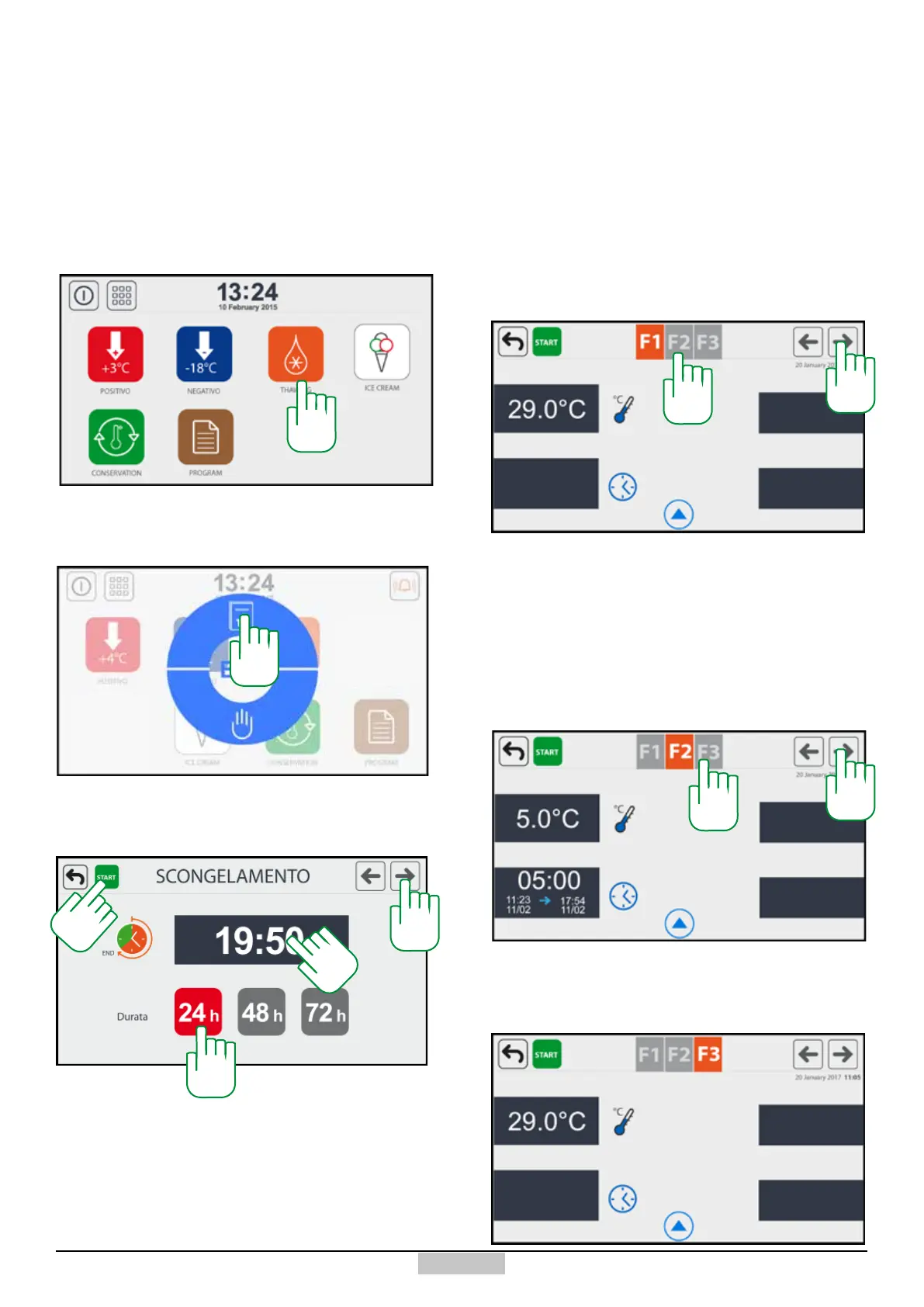
The programmed defrost cycle consists of three phases:
a rst preservation phase, a second phase of defrosting
with a dened time, and a nal post-defrosting indenite
time preservation phase. The purpose of the cycle is to
obtain defrosting within a particular date and time set
by the user, keeping the food in the blast chiller before
the defrosting process. To obtain this, the user must in
any case know the time necessary to defrost the product
In order to start the Programmed defrost cycle, press
the key [34], the following window will appear:
In order to execute a cycle on a date, press the top key
[35], once pressed, the following window will appear:
38
4.2 - Programmed THAWING
Now you have to set the nal time by pressing above
the values of the hours and minutes [36], and select the
duration in days of the programme [37].
Should the duration of the programmed defrost cycle
be higher than the defrosting phase, if the set time and
duration in days which determines a period of time is
37
36
lower than the duration provided for defrosting, the
programme cannot be executed and the top left START
key [38] will have a grey background, and it will not
execute any programme. In order to enable it and making
it green, just change either the cycle end time or the
duration days.
In this page, the cycle can be started by pressing the key
[38], or you can continue changing the default parameters
of the 3 phases which compose the programme starting
from phase F1 (pre-defrosting preservation) which is
accessed by pressing the top right arrow [40]. In order
to change the values, it is enough to press above and
access again the change window.
Naturally, the rst phase does not have a time to set for
the duration, such value being obtained for the dierence
between the total time which is missing at the end and
the provided defrosting duration.
Phase F2 (Defrost) allows the setting or modifying of
this duration, together with the other variables that can
be set. It can be accessed by pressing on F2 [39] or on
the right arrow [40].
The phase F3 (preservation) allows setting the
parameters of this phase of indenite duration. It can be
accessed, by pressing the keys [41] or [42].
40
34
35
39
40
41
42







 To Next Page