2
71504138-0-003
EN
1 - MACHINE START-UP AND SHUT DOWN
The Touch interface accepts only pressing
with the ngers, avoid using tools or other
mechanical devices which might damage
the interface
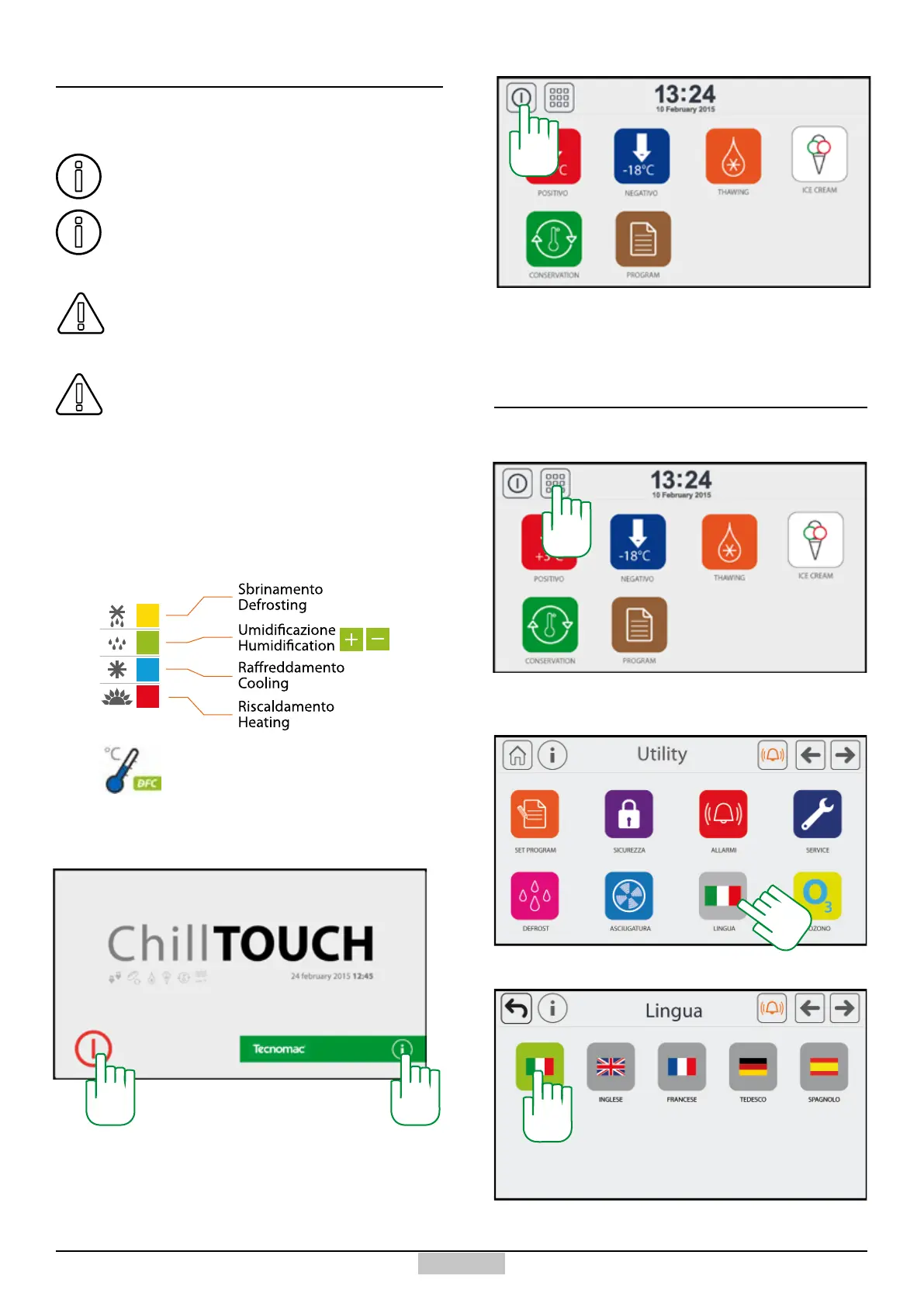
Upon the machine start-up, after a few seconds, the
screen represented above will appear.
In order to access the main screen, press the key
[1]. By pressing key [2], you can access the machine
information.
In order to return to the initial stand-by screen, just press
the key [3]
2 - INITIAL SETTINGS
2.1 - Language
In order to access the language setting from the main
menu, press the key [4]
Once the Utility window is accessed, press the key [5]
Select the preselected language by pressing the key
representing it with the ag [6]
5
6
Up to 40 programmes of various type can
be saved.
During all cycles, the humidification-
dehumidication will be used, it will be active
only if the cell temperature is higher than 3°C.
1.1 - General information
1.2 - Entry and exit from Stand-by
During the cooking cycles, the retarder proving
cycles and in general in all cases in which
high humidification values are used, it is
recommended removing the steel cap placed
on the internal back discharge.
Icons positioned in the top right
Identication of operation in progress
If the DFC logo appears, then the
Dynamic Frost Control algorithm is
active.
1
2
3
4







 To Next Page