22
71504138-0-003
EN
Once the window is opened, insert the USB ash drive
in the provided connecter (on the blast chiller air output),
select the period you want to download [217], nally
press the type Export key [219-220] and afterwards,
after the export completed message appears, you can
exit by pressing the ESC key [218].
The TXT le stores the statuses of the board inputs and
outputs at the beginning and the ending of the alarm.
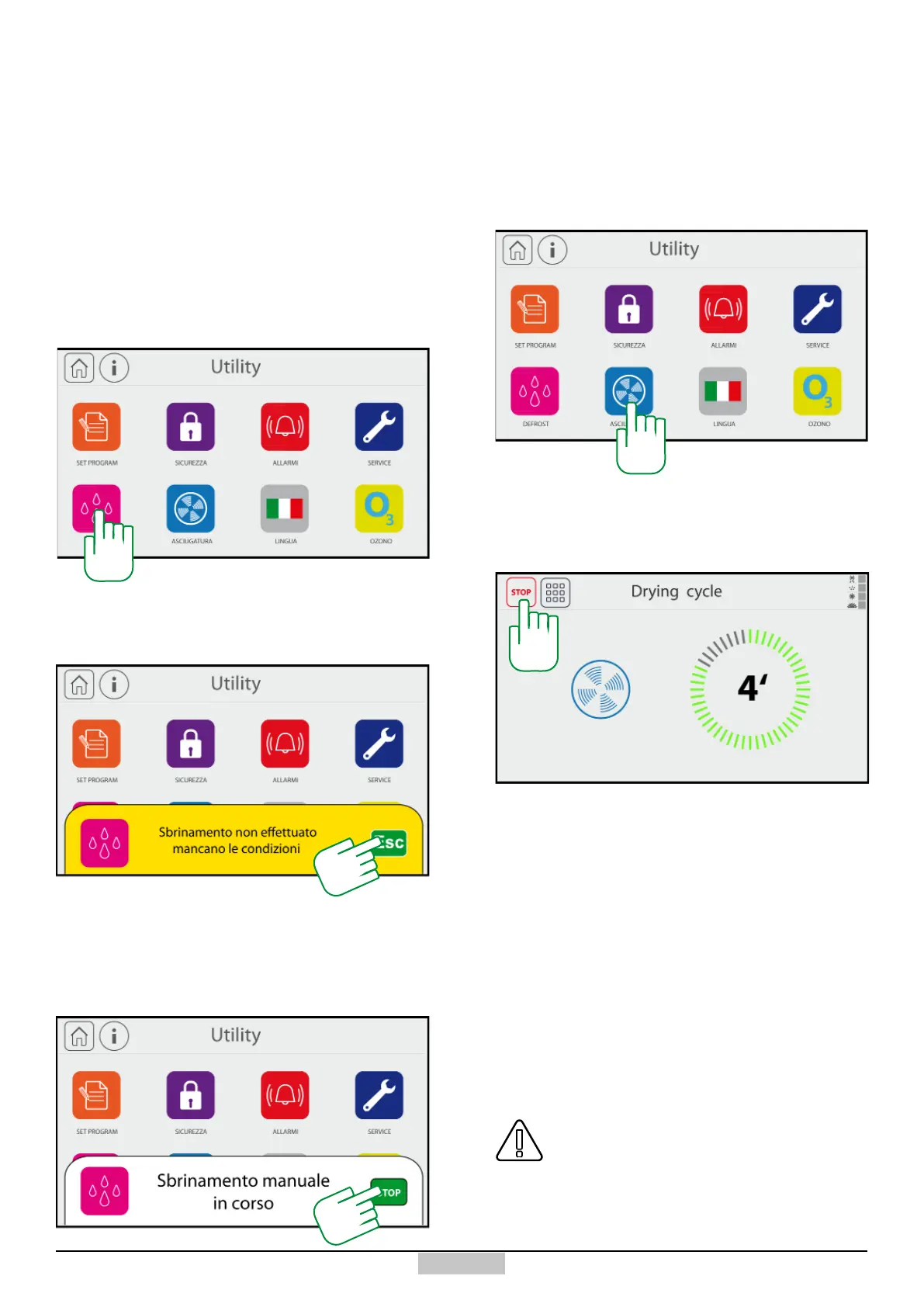
If you want to start a manual defrosting, press the icon
[221]
10.4 - Starting the manual defrosting
221
If there are no minimum temperature conditions, in
order to perform a defrosting, the following message
will appear:
In order to exit, just press the key ESC [222]. While if the
defrosting can be performed, the following message will
appear and the defrosting can be interrupted in advance
by pressing the key STOP [223].
222
223
The drying cycle is used either to remove the humidity
from the cell after cleaning or to perform a defrosting
using only the ambient air ventilation.
If you want to start a drying cycle, open the door of the
chiller and then press the icon [224]
A window will open with a timer that will start from
20 minutes and proceed with the countdown. At the
10.5 - Starting the Drying cycle
224
end of the time the cycle will end. If you want to end
earlier, just press the key STOP [225]. Please bear
in mind that during this cycle, the door switch will
not have any impact on the ventilation.
225
The Ozone cycle (if installed) involves a denite time
cycle during which ozone is inserted into the cell, to
achieve sanitisation, killing bacteria, mould, etc.
Such cycle must be started after performing a machine
cleaning using the recommended detergents.
10.6 - Starting the OZONO cycle (optional)
ATTENTION! : Ozone being an aggressive gas,
you must try not to come into contact with it,
however, immediately after opening the door
with a running cycle, the cycle will end, and
even if the door is closed back, it will not start
again.







 To Next Page