14
71504138-0-003
EN
7 - PRESERVATION CYCLE
The preservation cycle is a single phase cycle and of
indenite duration, during which the following elements
can be set: Cell temperature, relative humidity and fan
speed.
This cycle aims to perform the preservation of food
items under optimum air temperature, humidity and
ow conditions.
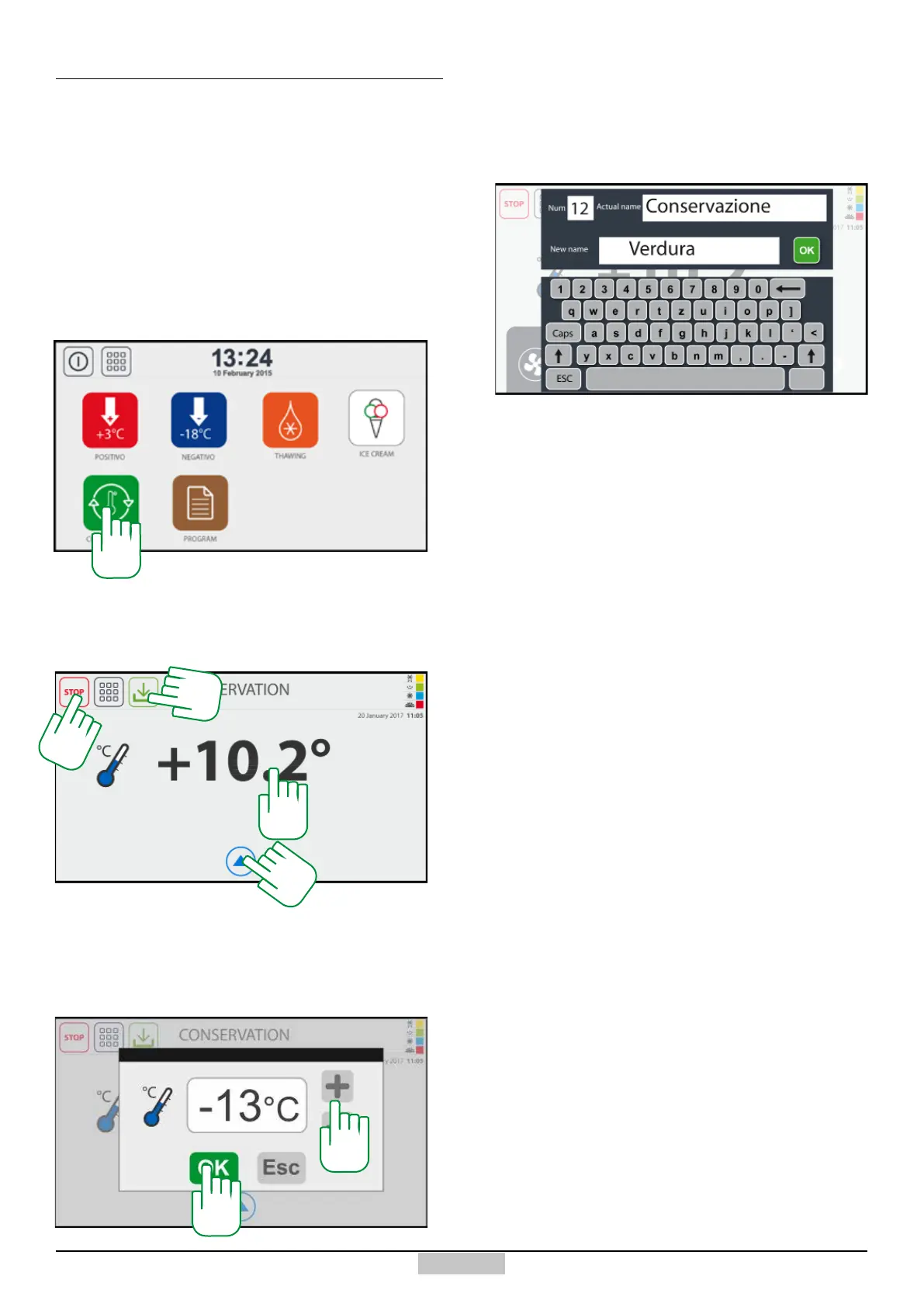
In order to access the preservation cycle, press the key
[116] from the main menu:
7.1 - MANUAL preservation cycle
The following window will appear, in which, upon start-
up, only the reading of the set temperature is represented
[117]. The appliance will start to cool down right away,
if the conditions exist.
117
In order to change the set temperature, just press above
the temperature value [117] and the following window
for changing the temperature will appear, in which, using
the keys +/- [118] you can change the value and using
the OK key OK [119] you can conrm it.
118
119
If you want to save the new configuration as a
programme with a name, press the key [123]. You will
access the window which allows typing the name of the
programme and save it.
120
You can end at any time the preservation cycle, by
pressing the STOP key [124].
116
123
124







 To Next Page