17
71504138-0-003
EN
If you select the icon of defrosting cycles [139] from the
wheel, you will access the following window:
8.3 - Creation of a thawing programme
140
141
142
142
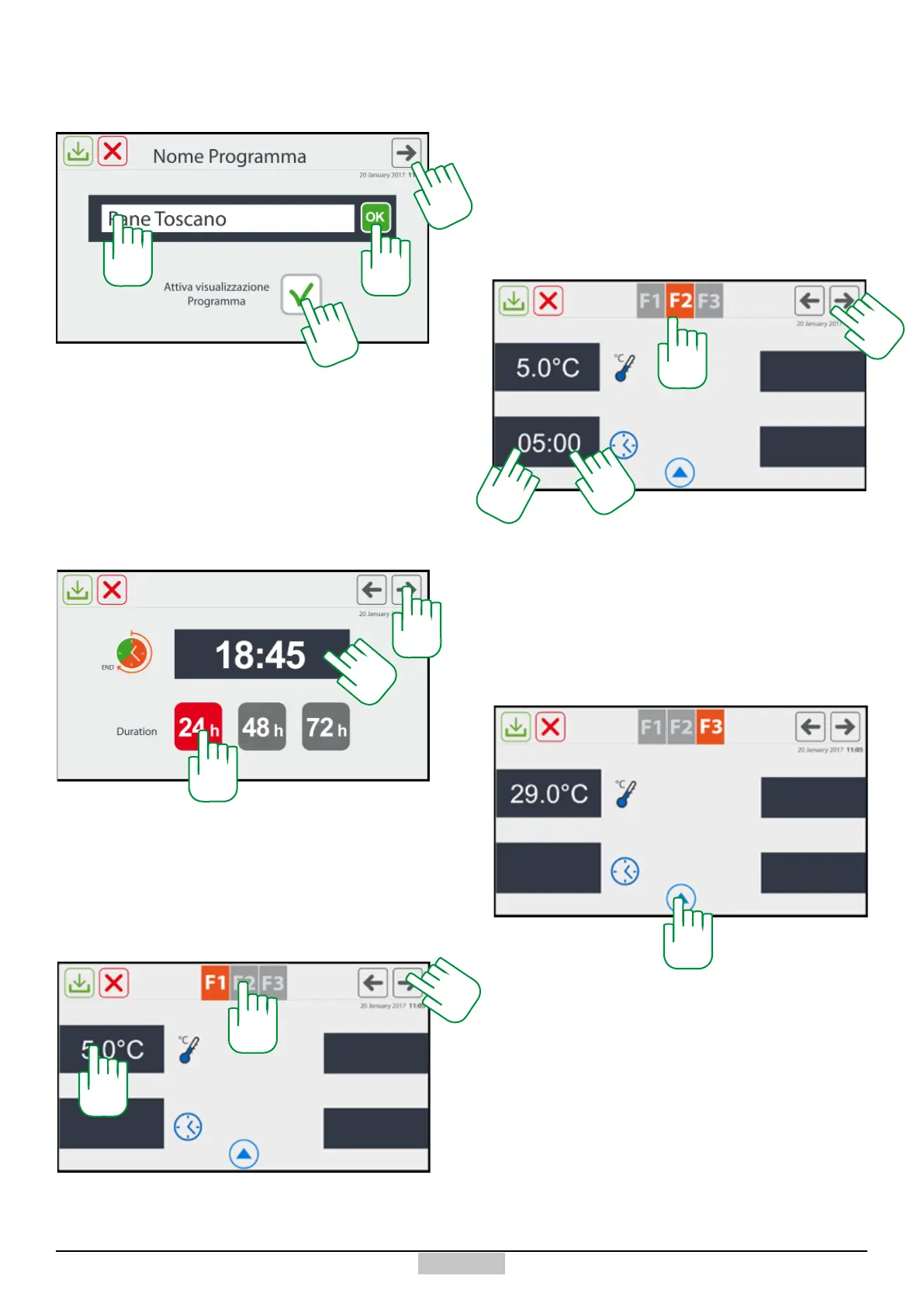
By pressing on the area of the programme name [140],
the usual keyboard will appear which will allow typing the
name of the desired programme. During this phase, you
can decide if you want that this programme be displayed
in the User programmes collection by pressing the ag
[141]. By pressing the OK key or the arrow [142], you
will go to the next setting window.
Now you have to set the nal time by pressing above the
values of the hours and minutes [143], and select the
duration in days (24-48 and 72h, see paragraph 2.4) of
the programme [144]. To continue in the settings, press
the arrow [145].
143
144
145
This is a phase the duration of which is obtained by
dierence and therefore, the time will not be set. You
can change the set temperatures [146]. Simply press
above the value you want to change, and the set point
changing window will open.
In order to perform the F2 phase setting, press one of
the icons [149] and the following window will appear:
In this case, besides the already mentioned elements
for the previous phase, it is possible to change and set
the duration of the F2 defrosting phase by pressing the
area [150a-b], the time changing and setting window
will appear (hours-minutes). Also in this case, to go to
phase F3, press one of the icons [151].
Also in phase F3, you can change the set points in the
same way as for phase F1. In any of the 3 phases,
you can access the EXPERT conguration which will
allow deciding if the ventilation in the phase should
be continuous or discontinuous. Just press the arrow
symbol [152] and the following pop-up window will
appear, you must enable or disable the continuous
ventilation using the ag for every single phase [155].
146
149
149
150a
151
151
150b
152







 To Next Page