16
71504138-0-003
EN
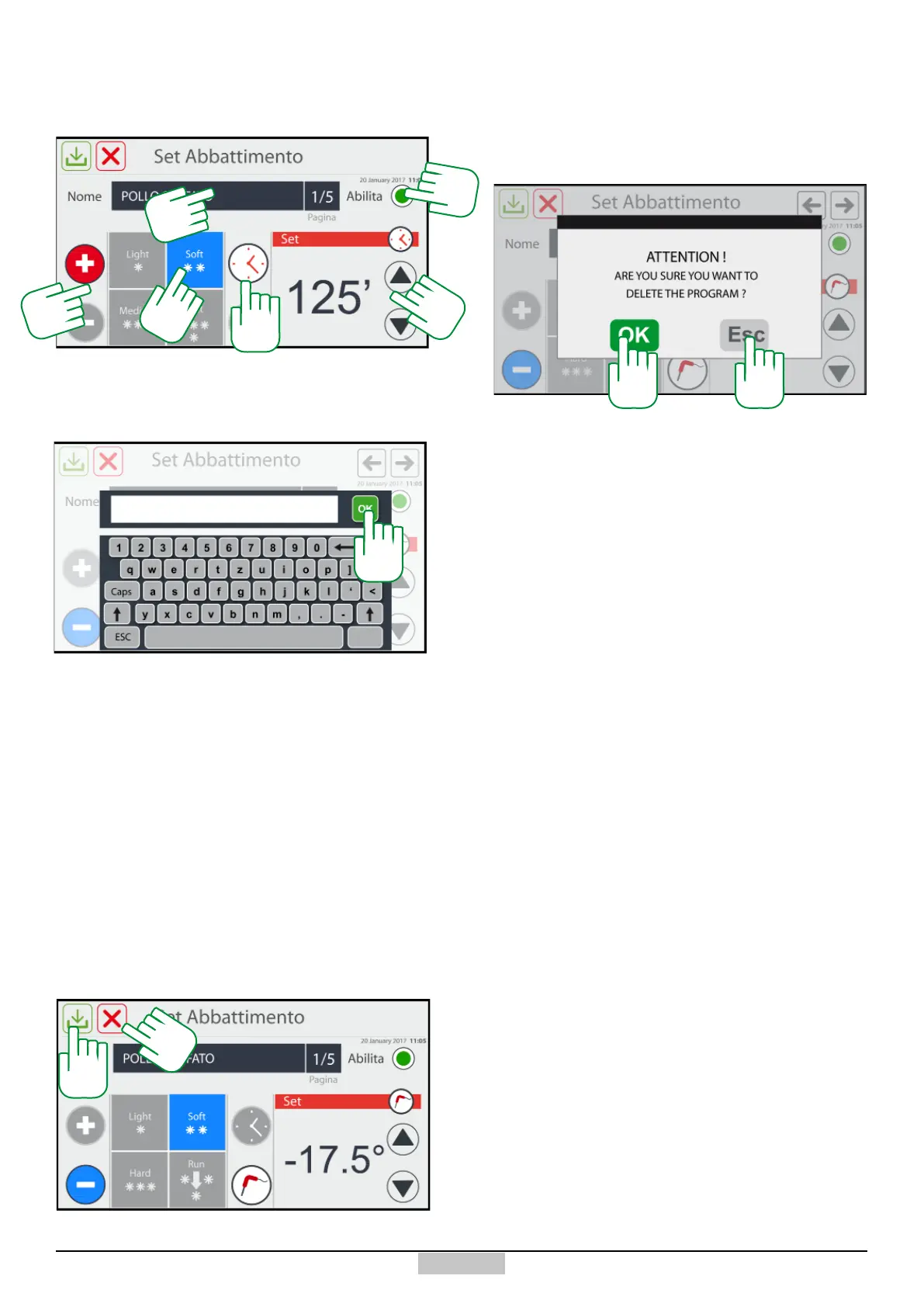
Hereinafter, there is an example of selection with
TEMPERATURE chilling.
135
136
Now, if you want to save the set programme, press the
key [135], while if you want to delete or if you do not
want to save the new programme, press the key [136],
a message to conrm appears [137] or otherwise [138]
to delete.
137 138
134
If you select the icon of chilling cycles [127] from the
wheel, you will access the following window:
8.2 - Creation of a Chilling Programme
128
As a rst action, press in the programme name area
[128] and the following keyboard will appear for typing
the name of the programme to conrm using the OK
key [129]:
129
After saving the name and returning to the setting
window, dene the type of blast chilling by pressing
above one of the Chilling/Freezing symbols [130],
afterwards select one of the 4 modes [131], nally
select the mode, TIME or TEMPERATURE [132], and
afterwards change the value [133].
Up until this moment, the programme remains
visible during the collection of USER programmes.
In order to make it visible, ONLY in the CREATED
programmes window, you must disable the view by
pressing the ag [134].
130
131
132
133







 To Next Page