!+")+'( ! !,-,
!+/% ! (.&
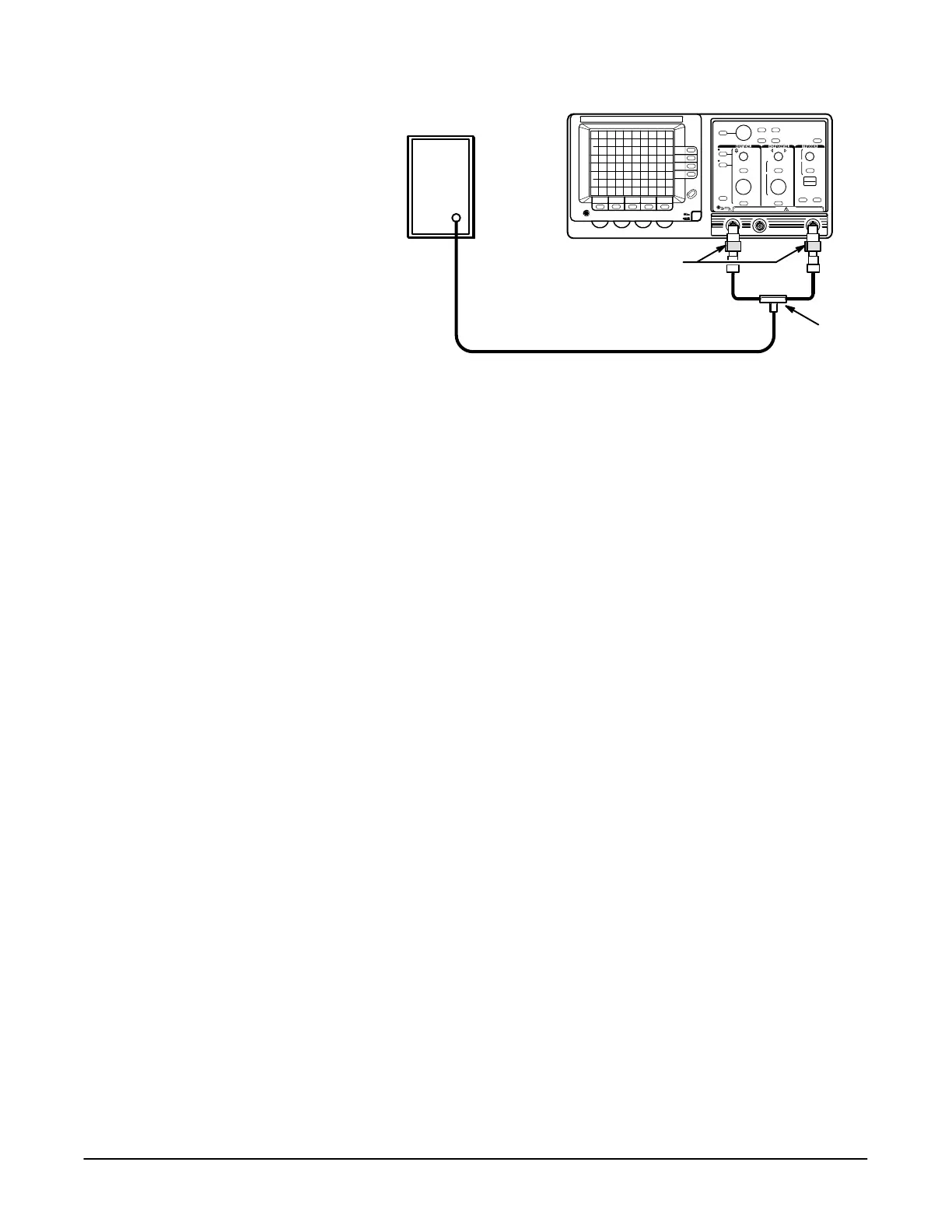
4Ć25
Sine Wave Generator
Precision Cable
50 W Terminations
DualĆinput
Coupler
%#.+! 21+%##!+ !(,%-%/%-0 !,- !-.* (!
3. Set the frequency of the sine wave generator to 25 MHz.
4. Press the button.
5. Set the volts/div scale to 50 mV.
6. Set the sec/div scale to 100 ns.
7. Press the button and set to
8. Press the button and make the following selections
from the main trigger menu:
H Set to .-)
H Set to $
H Set to
H Set to %,%(#
9. Press the button and make the following selecĆ
tions from the delay trigger menu:
H Set to .(, "-!+
H Set to $
H Set to
H Set to %,%(#
10. Set the delayed sec/div scale to 50 ns.
11. Press the button and select .
12. Set the delay time to 15 ns using the General Purpose Knob.
13. Set to "".
14. Adjust the sine wave generator amplitude for a three division display.
15. Add a 10X attenuator to the test setup as shown in Figure 4Ć13.


 To Next Page
 Loading...