TSA-200 / TSA-200XT / TSA-240 / TSA-240XT
© 2010 – 2014 Telefire Fire & Gas Detectors Ltd Revision 1.06 July 2014
Page 34 of 79
• The name and telephone number of the installing company and of the service
reresesntative should be clearly marked on the panel itself or on an attached
document
See a sample document at the end of this manual.
10.7 Connecting a TDM-500i Dialer
10.7.1 Dialer Configuration
Verify that dialer software version is revision 2.01.08 or higher (see label on TDM-500i).
Press Prog – the display shall show "_." enter the password (default 2222). The display
shall show P.
Press 1. The display shall show d.
Press Display Configuration Range Default
6 – Selection of A and B input polarity:
11 – A positive, B positive
(This option exists only from software
revision 2.05.01)
00 – 11 01
Configure the dialer for positive activation of both input A and input B (11).
10.7.2 Dialer Connection
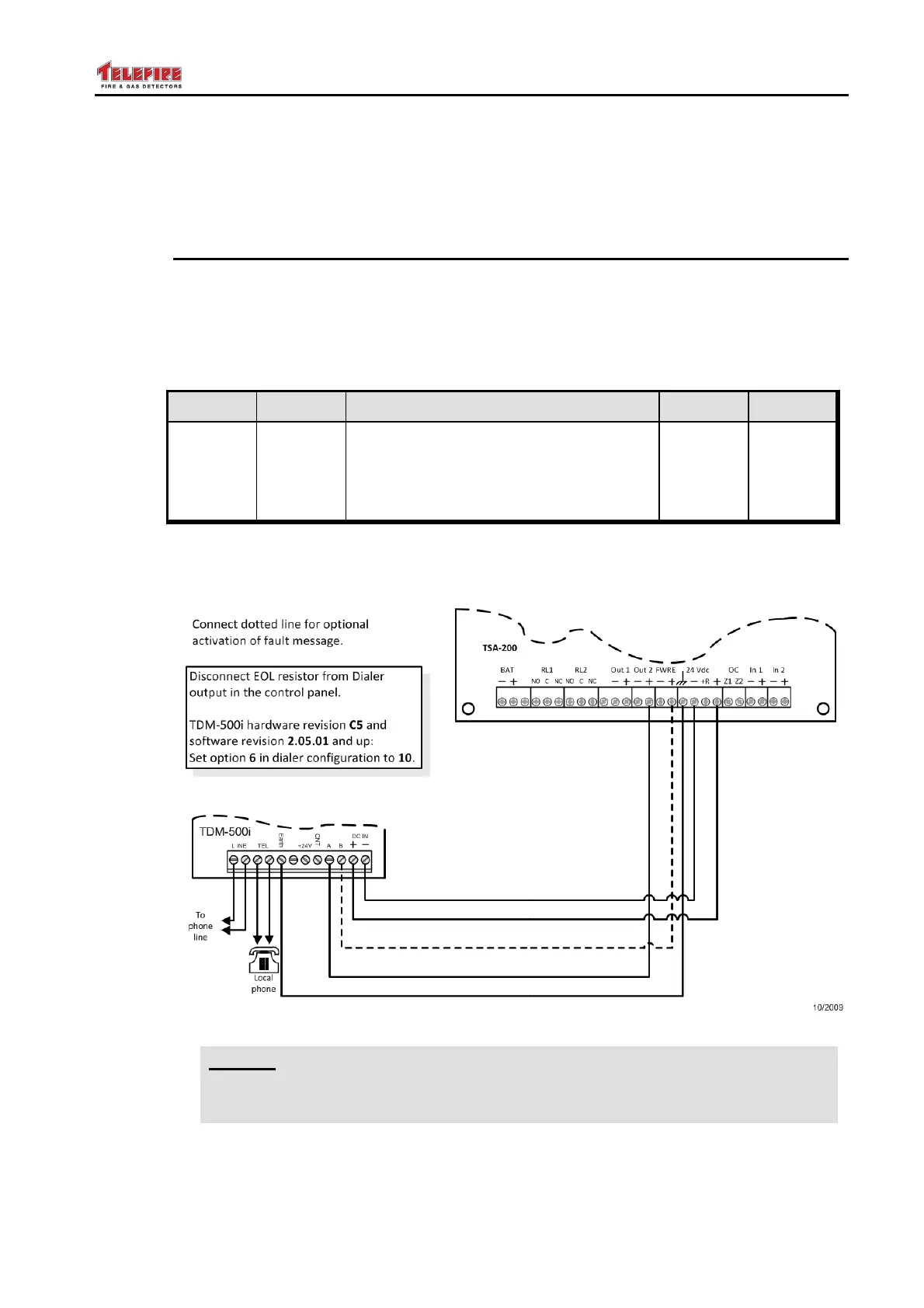
Figure 9 Connecting a TDM-500i Dialer (H/W rev C5, S/W rev 2.05.01 or higher)
i
Note
The dotted lines in Figure 9 are required only for error message notifications.
Configure the dialer (option 6) to 11.



 To Next Page