48
Tempest900 2-Channel Operating Manual
Controls
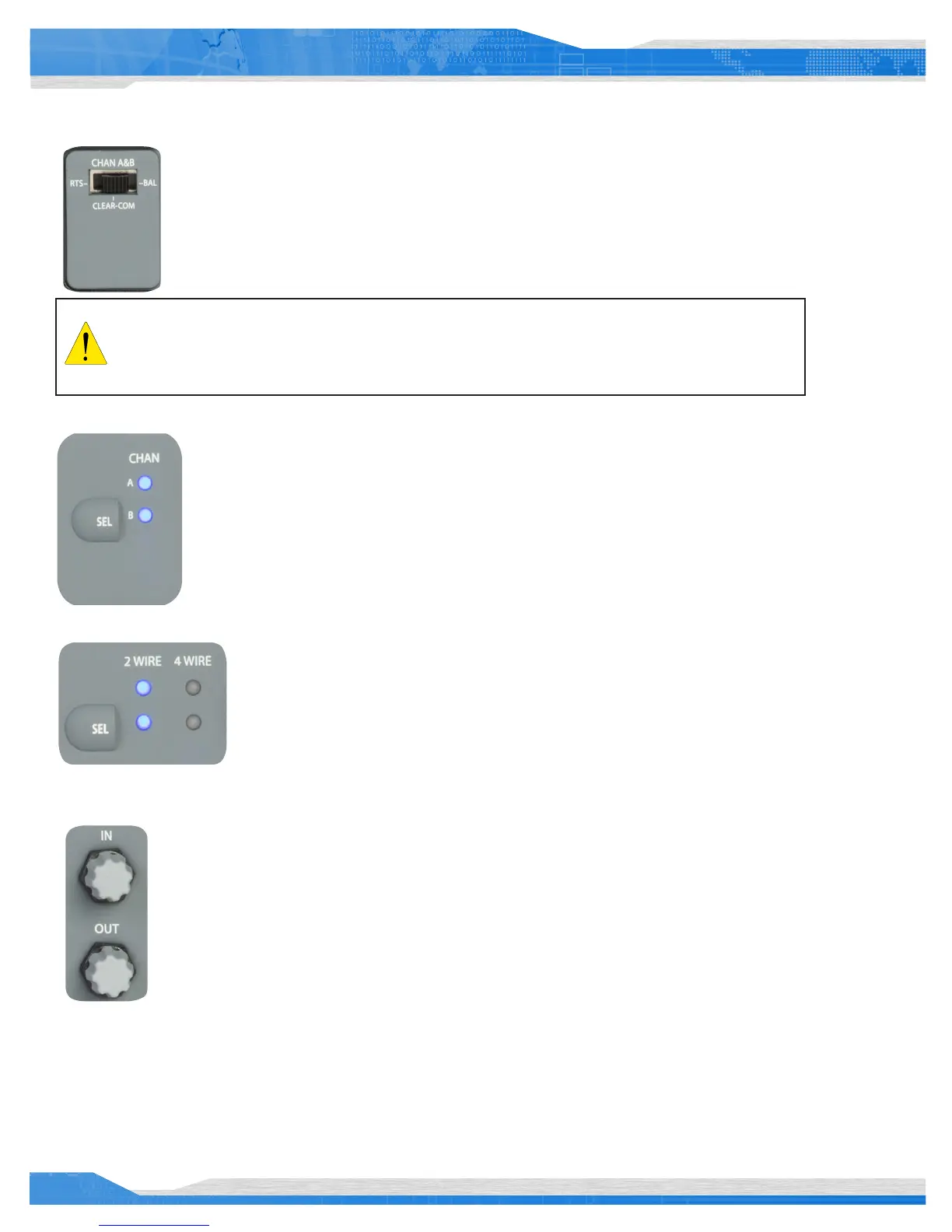
The 2-Wire Intercom Type Select Switch determines the type of 2-Wire intercom that may be connected to the
corresponding 2-Wire connectors on the rear panel of the BaseStation. Clear-Com, RTS, or BAL (AudioCom) can be
selected. These switches only affect 2-Wire operation and do not control 4-Wire operation. The CHAN A&B switch
selects the 2-Wire system type for both the A and the B intercom channels.
The Intercom Channel Select (SEL) button selects one of the two intercom channels to allow selection of
2-Wire or 4-Wire functionality and to allow the intercom audio IN and OUT levels to be adjusted.
Pressing the Intercom Channel Select button once selects Menu Mode on the BaseStation and displays the
Intercom Levels screen on the LCD display. A second press selects channel A. The intercom channel selected
is indicated by one of the two CHAN LEDs located to the right of the CHAN SEL button and on the LCD
screen. Additional presses of the CHAN SEL button advances through the remaining intercom channels. The
next press of the CHAN SEL button will exit Menu Mode and will cause all of the LEDs to be illuminated.
The 2-Wire/4-Wire Select (SEL) button selects the connection mode for operation of each of the two
intercom channels. Pressing the 2-Wire/4-Wire Select (SEL) button changes the selected intercom mode
between 2-Wire, 4-Wire or no wired connection. In Operational Mode, the four 2-Wire/4-Wire LEDs
indicate the currently selected hard wired intercom connection mode for each of the intercom channels:
2-Wire, 4-Wire, or no wired intercom connection.
The IN and OUT controls adjust the intercom volume level coming in to the Tempest BaseStation from the
hard wired intercom system or out to the hard wired intercom from the BaseStation. In addition, these
knobs adjust Aux IN/OUT levels.
To adjust the levels, press the CHAN SEL button to enter Menu mode, CHAN SEL again to advance to
the desired channel and rotate the IN or OUT controls. Note that the LCD display indicates the currently
selected levels.
Intercom Channel volume levels are expressed in Decibels (dB):
• 2-Wire IN: -13.5 to +10.5 2-Wire OUT: -10.5 to +7.5
• 4-Wire IN: -18 to +4 4-Wire OUT: -6 to +12
Always set the 2-Wire Intercom Type Select Switches prior to connecting the 2-Wire intercom to the back
of the Tempest BaseStation. Never change the switch setting while connected to a wired intercom system.
Failure to follow this procedure could damage the Tempest BaseStation or the 2-Wire hard wired system.



 To Next Page