Sub-setting values represent the number of consecutive zeros in the lower bits of IP-3
Dot decimal notation
Subnet mask
255. 0. 0. 0
255. 255. 0. 0
255. 255. 255. 0
255. 255. 255. 240
High order digits
Second digits
Low order digits
Sub setting
values
1111 1111
1111 1111
1111 1111
1111 1111
0000 0000
1111 1111
1111 1111
1111 1111
0000 0000
0000 0000
1111 1111
1111 1111
0000 0000
0000 0000
0000 0000
1111 0000
24
16
8
4
Third digits
For the subnet mask, specify a number
from 0 to 32 when "Sub" is displayed in the
voltage indicator.
In the figure on the left, "Sub" indicates
"16", for which the set value is
"255.255.0.0".
For details about other set values for the
subnet mask, see the table in the figure on
the left.
A
V
W
W
CC:R
CV:G
OUTPUT
V(W) A(W)
MENU PROTECT CHECK
ESC/ KEY LOCK ENTER/ MEM
1 2 3
DIGIT
PRESET/ SEQUENCE
* LOCK/RMT
STEP STOP PAUSE START
PDS-A series
4-1
4-2
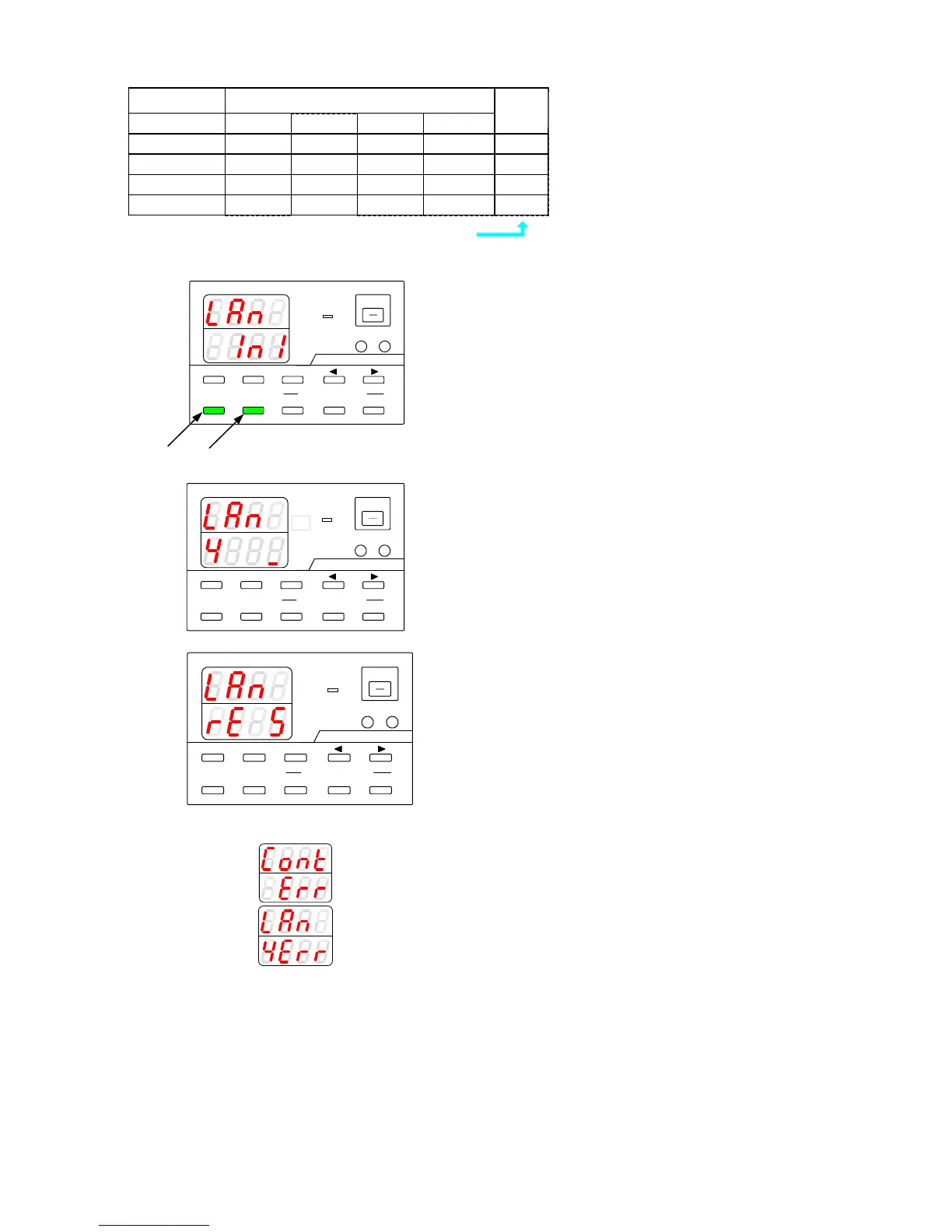
After you finish configuring the IP address,
the left window appears, asking whether
you want to perform initialization.
Press the ESC key to cancel initialization.
The power cycling message is displayed.
Press the MEMORY key to perform
initialization.
A
V
W
W
CC:R
CV:G
OUTPUT
V(W) A(W)
MENU PROTECT CHECK
ESC/ KEY LOCK ENTER/ MEM
1 2 3
DIGIT
PRESET/ SEQUENCE
* LOCK/RMT
STEP STOP PAUSE START
PDS-A series
The initialization process consists of the
following steps: (3) full initialization of Xport,
(4) IP address initialization, (5) IO default
settings, (6) save initialization data. The steps
are displayed in order of execution in the
current indicator display: "3", "4", "5", and
then "6".
A
V
W
W
CC:R
CV:G
OUTPUT
V(W) A(W)
MENU PROTECT CHECK
ESC/ KEY LOCK ENTER/ MEM
1 2 3
DIGIT
PRESET/ SEQUENCE
* LOCK/ RMT
STEP STOP PAUSE START
PDS-A series
When initialization is complete, a message
which instructs the user to perform power
cycling is displayed.
"rE StArt"
※Error message displayed during initialization
If the initialization request fails, the message
"Cont Err" is displayed, as shown in the left.
If the attempt to perform initialization is
unsuccessful, the number (No.) of the step at
which initialization failed is displayed together
with the word "Err". In the figure on the left,
initialization failed during step (4), when all
the settings were being initialized.



 To Next Page