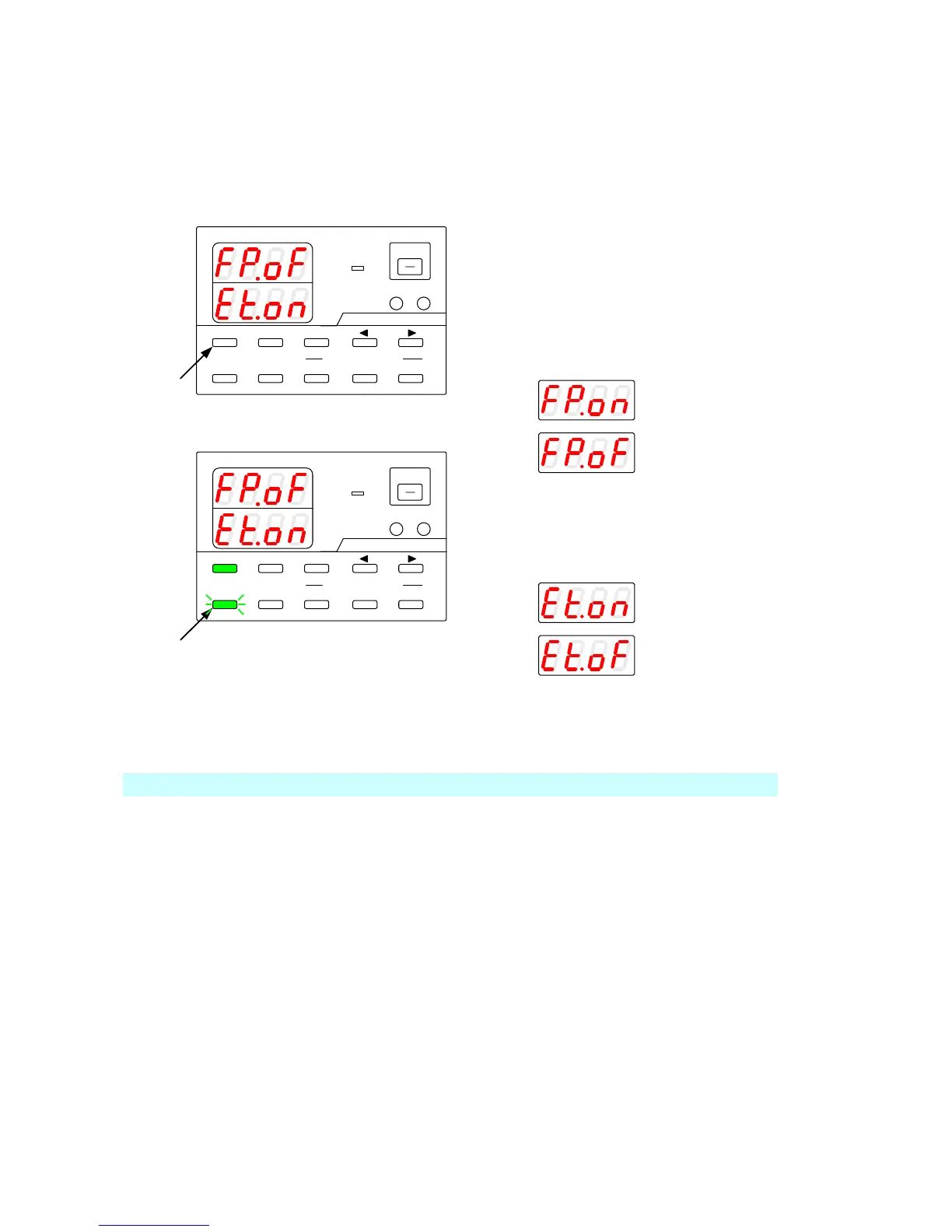
9-2-6. Checking the status when the output is off
If the analog IF board has been installed in the unit and the output of the unit is off, the following items can be checked:
Press the MENU key while the output is off.
The following messages are displayed:
Voltage indicator: "FP.oF"
Current indicator: "Et.xx"
The MENU key then is lit in green, and the
ESC/KEY LOCK key starts blinking green.
9-2-7. Main relay ON/OFF operation
When the power of multiple PDS-A units is turned on at one time, a large rush of current flows into the primary side.
This may generate current distortion in the AC line, affecting the devices connected to the AC line to which the PDS-A
units are connected.
Specify "off" as the Main relay setting for all the PDS-A units, and then turn on the power switch. Next specify "on" as
the Main relay setting for each unit, one unit at a time. This disperses the rush current on the primary side and
diminishes current distortion in the AC line.
If the analog IF board has been installed and the Main relay is off, "P-oF" is displayed in both the voltage indicator and
current indicator when the power switch is turned on. At this time, only the internal power supply source is running.
If the Main relay is set to "on" when external contacts of the analog IF board are closed or short-circuited, "P-on" is
displayed in both the voltage indicator and current indicator. The power can then be turned on or off.
For details about how to turn Main relays on or off, see “9-1-2. Wiring an analog signal to the standard board”.



 To Next Page