© TIMYO B.V. TIMYO USER MANUAL EN SKO52021V2 PAGE 32
5.3.9 Settings
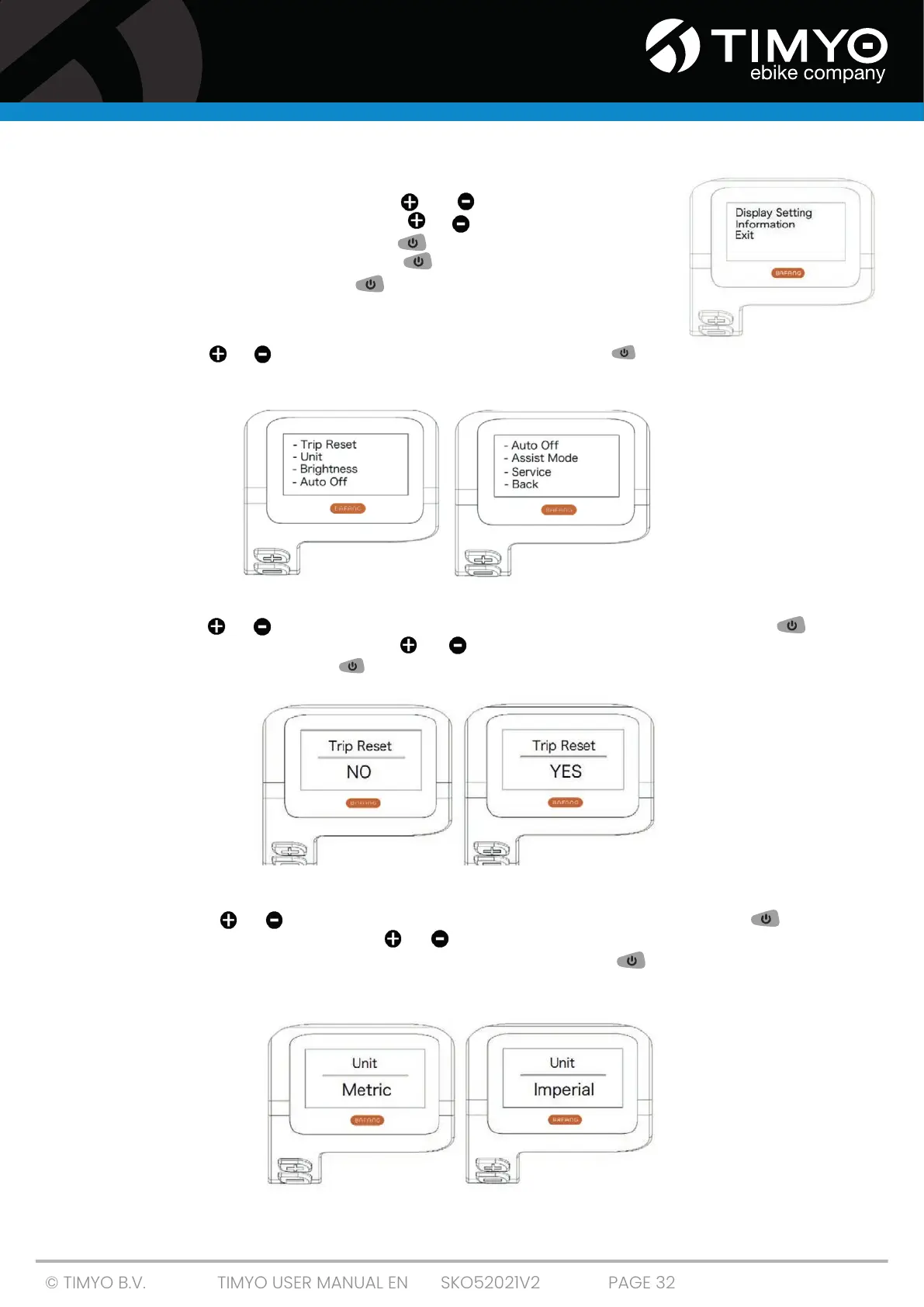
After the display is switched on, press and hold simultaneously to
access the SETTING menu. Short-press or to select 'Display Setting',
'Information' or 'Exit'. Then short-press to confirm your selection. You
can also select 'EXIT' and short-press to return to the main menu
or select 'BACK' and short-press to return to the settings interface.
5.3.10 'Display Setting' Display settings
Short-press or and select 'Display Setting'. Then short-press to
access the following settings.
5.3.11 'TRIP Reset' Mileage reset
Short-press or to select 'Trip Reset' in the 'Display Setting' menu, then short-press
to confirm your selection. Then use or to select 'YES' or 'NO'. Once you have chosen your
preferred setting, short-press to save your choice and return to the Display Setting menu.
5.3.12 'Unit' Setting the unit to km/miles
Short-press or to select 'Unit' in the 'Display Setting' menu, then short-press
to confirm your selection. Then use or to choose between 'Metric' (kilometres) or 'Imperial'
(miles). Once you have chosen your preferred setting, short-press to confirm your choice
save your choice and return to the Display Setting menu.



 To Next Page