Phoenix Pro User Manual
6
at your desk, or hang it on automotive parts
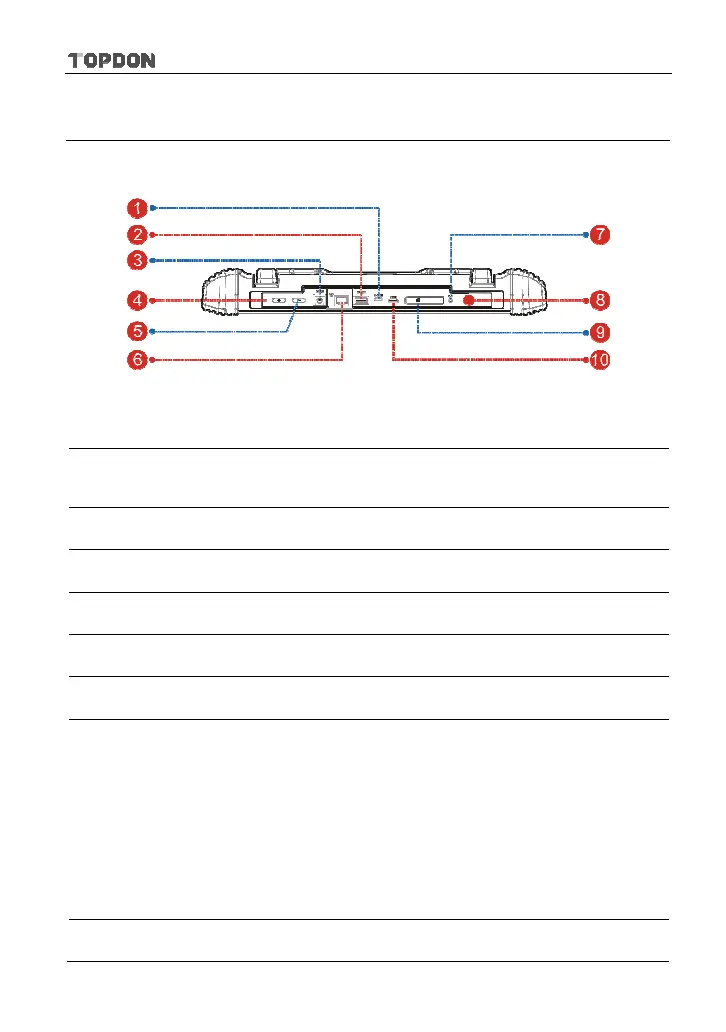
2.1.2 Top View
Fig. 2-4 Top View
1
Charging Slot
Only reserved for Micro USB cable.
2
USB2 Port
To connect VCI, USB devices or add-on modules
(Scopebox, Sensorbox or Batterybox).
3
DC-IN Interface
To connect the included power adaptor.
4
Reset Switch
5
VOLUME +/- Key
To adjust the volume.
6
Ethernet port
To connect the Crossover cable for wired network.
7
Earphone Jack
8
POWER/Screen
Lock Key
In Off mode, press it for 3 seconds to turn the
handset on.
In On mode:
Press it to activate the LCD if the LCD is off.
Press it to turn off the LCD if the LCD lights up.
Press it for 3 seconds to turn it off.
Press it for 8 seconds to perform forced shutdown.
9
Memory Card
To insert a memory card for memory extension.












 To Next Page