Phoenix Pro User Manual
24
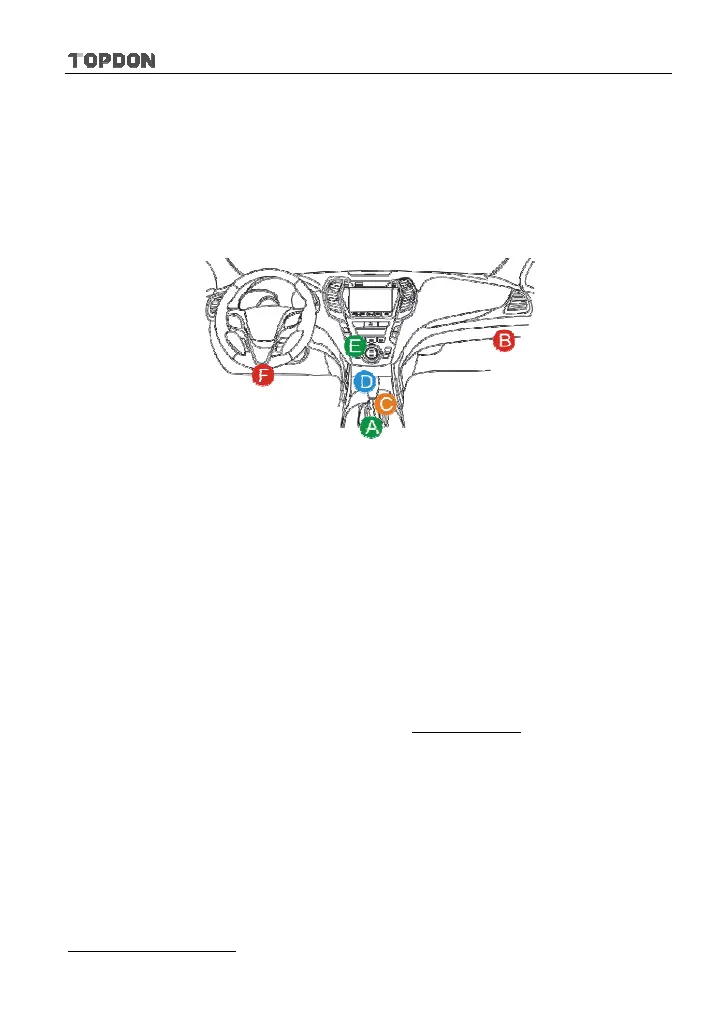
DLC is usually located 12 inches from the center of the instrument panel (dash),
under or around the driver’s side for most vehicles. If Data Link Connector is not
located under dashboard, a label should be there telling location. For some
Asian and European vehicles, the DLC is located behind the ashtray and the
ashtray must be removed to access the connector. If the DLC cannot be found,
refer to the vehicle’s service manual for the location.
Fig. 4-11
4.4.3 Vehicle connection
The method used to connect the diagnostic connector to a vehicle’s DLC
depends on the vehicle’s configuration as follows:
y
A vehicle equipped with an OBD II management system supplies both
communication and 12V power through a standardized DLC.
y
A vehicle not equipped with an OBD II management system supplies
communication through a DLC connection, and in some cases supplies 12V
power through the cigarette lighter receptacle or a connection to the vehicle
battery.
Follow the steps mentioned below to connect OBD II vehicle:
1. Locate vehicle’s DLC socket.
2. Plug the VCI connector into the vehicle’s DLC socket (It is suggested to use
the OBD II extension cable to connect the VCI connector and DLC socket.).
3. Choose one of the two ways to obtain power from:
A. Power adaptor: Connect one end of the included power adaptor to DC IN
port of Phoenix Pro tablet, and the other end to AC outlet.
B. Internal battery pack
For non-OBDII vehicle, proceed as follows:












 To Next Page