© Copyright 2013 TRENDnet. All Rights Reserved.
TRENDnet User’s Guide
TEG-448WS
60
1. Log into your switch management page (see “Access your switch management page”
on page 7).
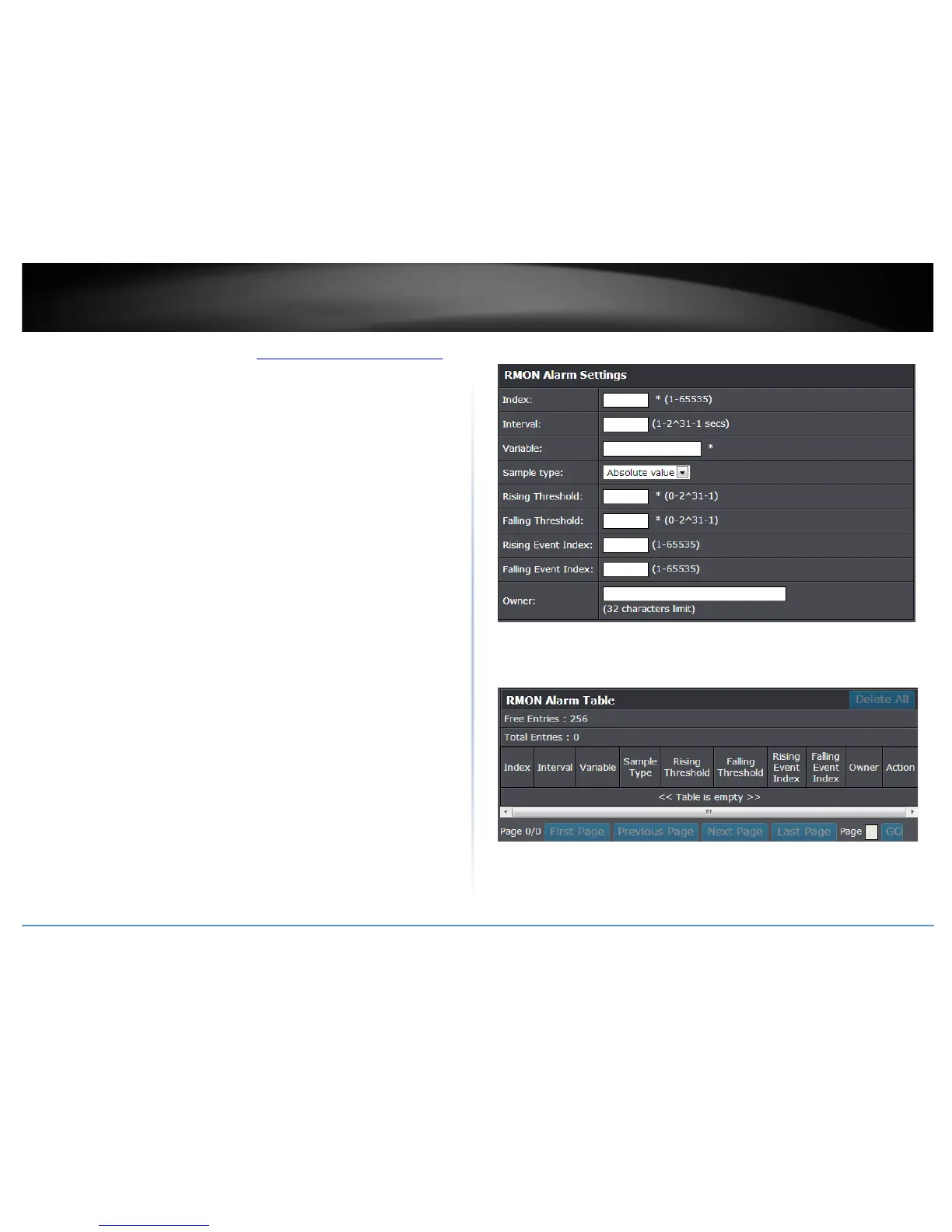
2. Click on RMON and click on Alarm.
3. Review the settings.
• Index: This parameter specifies the ID number of the new group. The range is 1
to 65535.
• Interval: This parameter specifies the time (in seconds) over which the data is
sampled. Its range is 1 to 2147483647 seconds.
• Variable: This parameter specifies the RMON MIB object that the event is
monitoring.
• Sample type: This parameter defines the type of change that has to occur to
trigger the alarm on the monitored statistic. There are two choices from the
pull-down menu - Delta value and Absolute value. Delta value- setting
compares a threshold against the difference between the current and previous
values of the statistic. Absolute value- setting compares a threshold against the
current value of the statistic.
• Rising Threshold: This parameter specifies a specific value or threshold level of
the monitored statistic. When the value of the monitored statistic becomes
greater than this threshold level, an alarm event is triggered. The parameter’s
range is 1 to 2147483647.
• Falling Threshold: This parameter specifies a specific value or threshold level of
the monitored statistic. When the value of the monitored statistic becomes less
than this threshold level, an alarm event is triggered. The parameter’s range is
1 to 2147483647.
• Rising Event Index: This parameter specifies the event index for the rising
threshold. Its range is 1 to 65535. This field is mandatory and must match an
Event Index that you previously entered in “Events”.
• Falling Event Index: This parameter specifies the event index for the falling
threshold. Its range is 1 to 65535. This field is mandatory and must match an
Event Index that you previously entered in “Events”.
• Owner: This parameter is used to identify the person who created an entry. It is
primarily intended for switches that are managed by morethan one person,
and is an optional field.
Click Add to add the entry to the table.
In the list, you can click Modify to modify an entry or click Delete or delete the entry.
You can also click Delete All to delete all of the entries in the table. If the entries span
multiple pages, you can navigate page number in the Page field and click Go or you can
click First, Previous, Next, and Last Page to navigate the pages.
4. Click Save Settings to Flash (menu).
5. Click Save Settings to Flash (button), then click OK.
Note: This step saves all configuration changes to the NV-RAM to ensure that if the
switch is rebooted or power cycled, the configuration changes will still be applied.










 To Next Page