© Copyright 2013 TRENDnet. All Rights Reserved.
TRENDnet User’s Guide
TEG-448WS
3
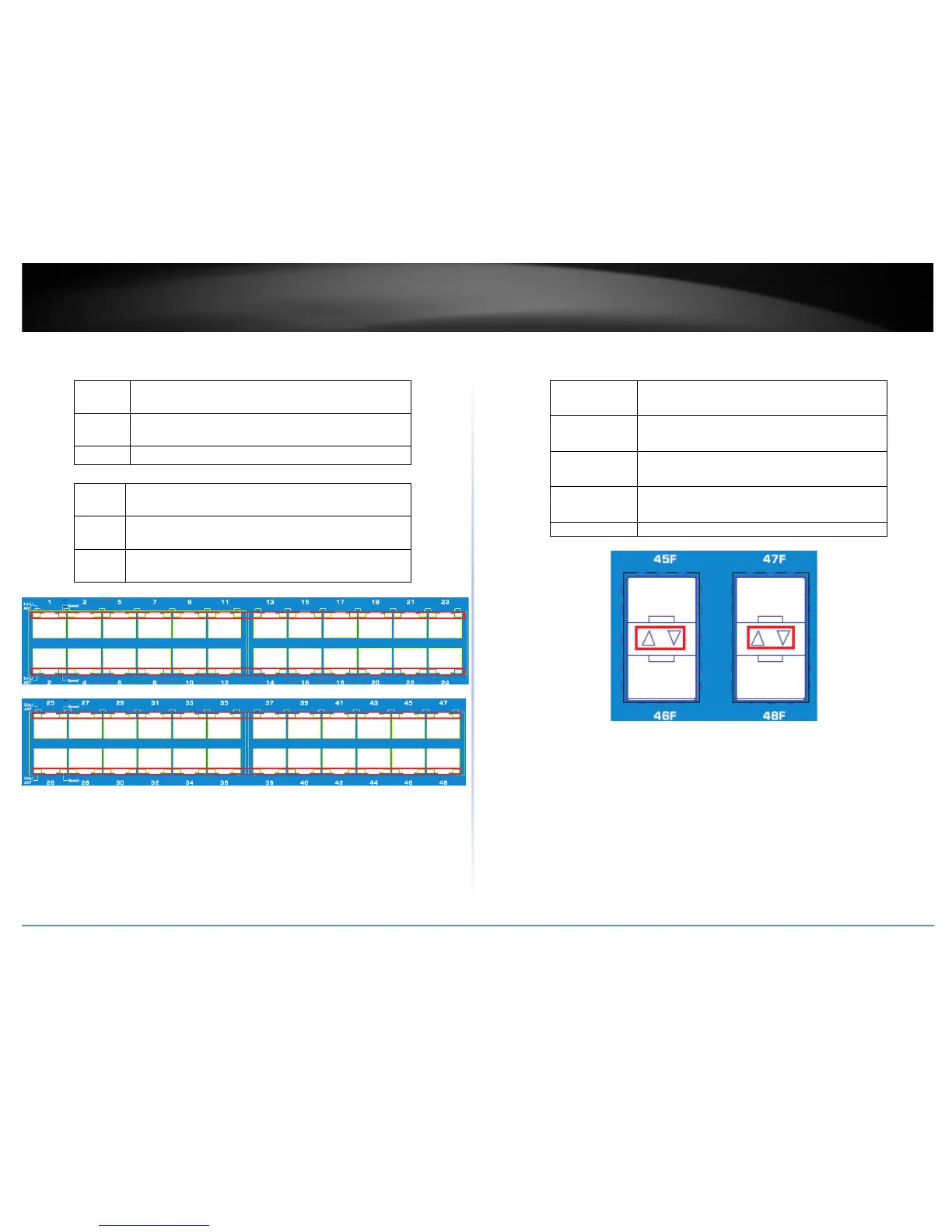
• Gigabit Ethernet Port LEDs (1-48)
• Link/Activity (per port)
When the Link/ACT LED lights on, the respective port is
successfully connected to an Ethernet network.
Blinking :
When the Link/ACT LED is blinking, the port is
transmitting or receiving data on the Ethernet network.
Off : No link.
• Speed (per port)
Green
on
:
When the Green
LED lights on, the respective port is
connected to a 1000Mbps Gigabit Ethernet network.
Amber
on
:
When the Green
LED lights on, the respective port is
connected to a 100Mbps Ethernet network.
Off
When the Green
LED lights on, the respective port is
connected to a 10Mbps Ethernet network.
• SFP Slots Shared (45F-48F)
• SFP
When the mini-GBIC Green LED lights on, the
respective port is inserted mini-
When the mini-GBIC Green LED is blinking, the
port is transmitting or receiving data on the
Gigabit network.
When the mini-GBIC Amber LED lights on, the
respective port is inserted mini-
When the mini-GBIC Amber LED is blinking, the
port is transmitting or receiving data on the
Ethernet network.










 To Next Page