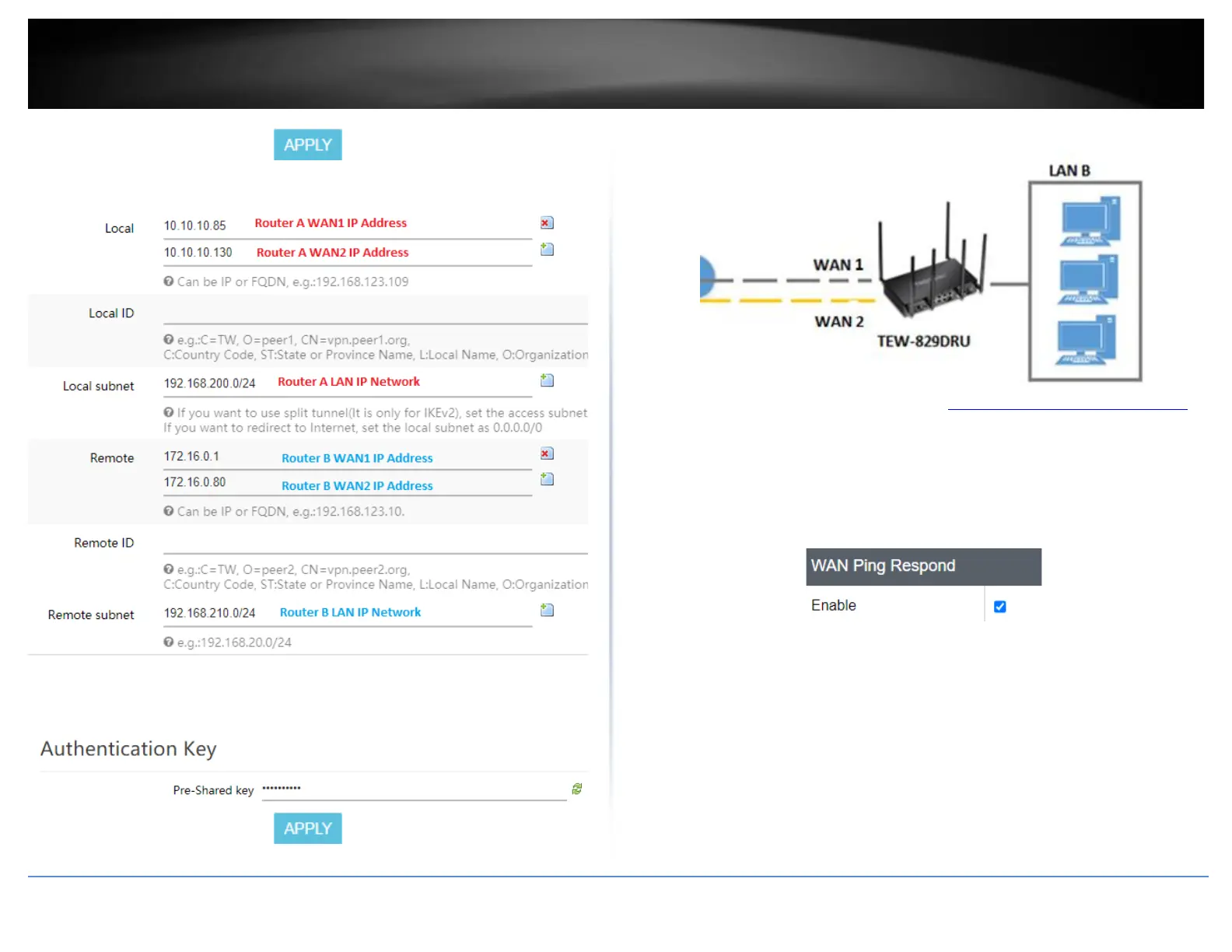
Based on the example, the network settings will be the following:
17. Under Authentication Key, enter the Pre-Shared Key (PSK) for the IPsec VPN tunnel
and click Apply. (e.g. 1234567890)
VPN Router B Configuration
1. Log into your router management page (see “Access your router management page”
on page 6).
2. Click on Security, click Firewall, and click the General Settings tab.
3. Check the Enable under WAN Ping Respond and click Apply to save and commit the
configuration changes.
4. Click on Multi-WAN/QoS and click on Multi WAN.
5. Under the Link Tracking section, check Enable Tracking on both WAN1 and WAN2,
and enter an IP address or IP addresses on the Internet to check for connectivity and
quickly determine if the WAN interface is up or down (e.g. 8.8.8.8). Set the Ping Interval
to 3 seconds, and Fail Count to 1 for both WAN1 and WAN2 and click Apply to save and
commit the configuration changes.














 To Next Page