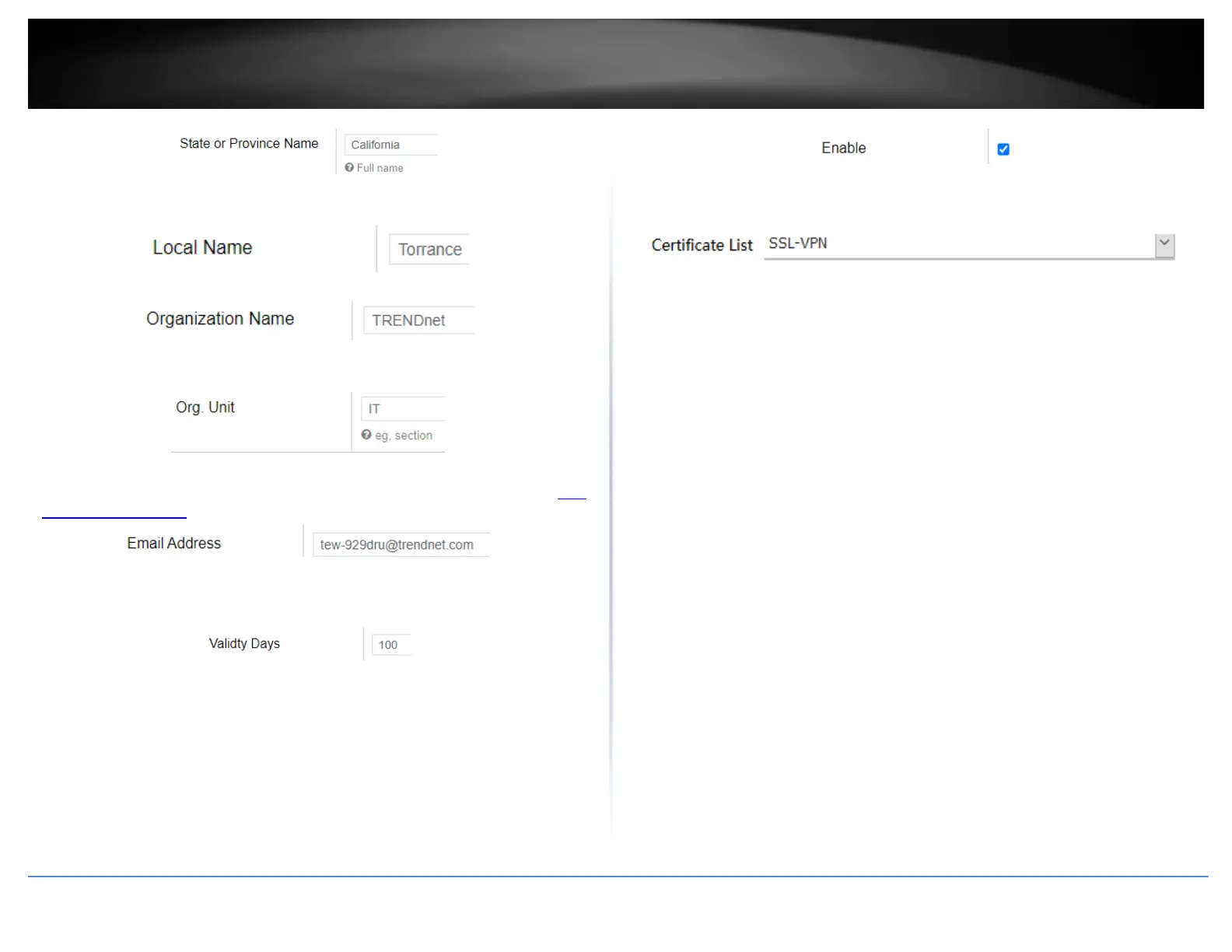
7. In the Local Name field, enter the city name. (e.g. Torrance)
8. In the Organization Name field, enter your company name (e.g. TRENDnet)
9. In the Org. Unit field, enter the section, group, or department. (e.g. IT)
10. In the Email Address field, enter the email address used for the certificate. (e.g. tew-
929dru@trendnet.com)
11. In the Validity Days field, enter the number of days the certificate will be valid and
click Apply to save and commit the changes.. (e.g. 100)
12. Click on Security, click VPN, and click the OpenVPN Server tab.
13. Check the Enable option to enable the SSL VPN server.
Note: You may receive a notification if Dynamic DNS is not configured on your router. If
you are using VPN, it is not required however, strongly recommended to setup the
Dynamic DNS feature on your router to prevent any issues with VPN connectivity if
your public (WAN) Internet IP address dynamically changes.
14. In the Certificate List drop-down list, select the name of the OpenVPN certificate
you created and click Apply to save and commit the changes. (e.g. SSL-VPN)
15. Next to Client configuration file, click Export to download the configuration files for
the VPN client computer.
Note: Please do not change the filename for Windows installation. If installing in Linux,
the .ovpn extension must be changed to .conf.
Folder paths for SSL VPN client configuration files:
Windows: C:\Program Files\OpenVPN\config
Linux: /etc/openvpn
Below is a reference of the additional SSL VPN settings if you choose to make other
configuration changes to these sections.
Note: Changing any settings will require you to export a new client configuration file.
• Port – Used to change the default SSL VPN server port.
• Server – Used to change the default IP address subnet and IP address range to
distribute to SSL VPN clients.
• Proto – Used to change the default protocol. UDP or TCP.
• Connect Type – Changing this setting will change the access level of your SSL
VPN clients.
o LAN Access – This setting will allow your SSL VPN clients access to your
LAN network and the Internet.
o Internet Redirect – This setting will allow your SSL VPN clients access
only the Internet only via full tunneling but no access to your LAN
network
• Cipher – Select the cipher/encryption algorithm used for SSL VPN client
connections. AES-256-CBC offers the highest degree security.
• Auth – The authentication/hash algorithm used for SSL VPN client connections.
SHA256 offers highest degree of security.














 To Next Page